
dsh-usage-panel
Run the following command in DeepSeek Harness:
dsh plugin install AlfredChaos/dsh-usage-panel
Paste the following prompt into your AI chat to install this plugin:
To install this plugin in DeepSeek Harness, run the command "dsh plugin install AlfredChaos/dsh-usage-panel"; the source code is at https://github.com/AlfredChaos/dsh-usage-panel.
About this plugin
The dsh-usage-panel plugin addresses the challenge of tracking token consumption for DeepSeek Harness users. During AI model inference, token usage directly impacts cost and performance optimization, yet default systems lack intuitive visualization. By aggregating session logs, this plugin automatically generates a dashboard that lets users monitor cumulative token counts, cache efficiency, and usage patterns without manual data analysis. Its core capabilities include multidimensional displays: from overview metrics like billed tokens and session counts to detailed breakdowns such as daily stacked bars, heatmaps, and model distributions. Data is computed read-only from historical records, ensuring reliability without affecting production environments. Whether you're a developer debugging applications, a manager controlling budgets, or a researcher analyzing behavior, this plugin offers efficient and transparent insights.
Screenshots
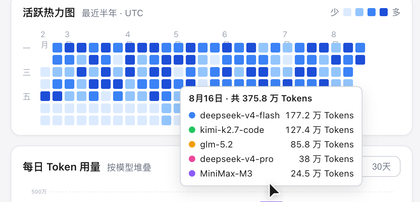
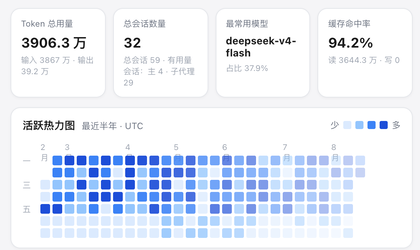
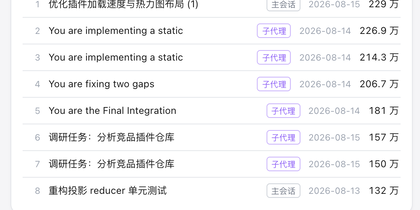
Use Cases
- Track daily token consumption to optimize API costs
- Analyze session usage patterns to identify high-frequency model calls
- Export data to generate reports, supporting team collaborative decisions
Best For
- AI application developers monitoring inference performance
- Cloud service administrators managing token budgets and quotas
- Data analysts studying usage trends and model efficiency
Related Plugins
A unified suite combining hot runtime injection, task-aware thinking-mode routing, and a graded session protocol with red-team gates to sustain model diligence across long-horizon inference.

ModLens is a vision plugin for DeepSeek Harness that gives text-only models sight by reading images pasted directly into chat, with zero-config setup and multiple vision engines.

On-demand vision for text-only DeepSeek Harness agents: built-in free keyless vision chain and 14 vision tools, routing image turns as tool calls to vision models with pixel fidelity, no Python needed, one-command install.

Give text-only models in DeepSeek Harness eyes, enabling image Q&A, long-screenshot OCR, UI restoration, and GUI visual tasks.