dsh-plugin-session-export
Run the following command in DeepSeek Harness:
dsh plugin install zhaoxuejie/dsh-plugin-session-export
Paste the following prompt into your AI chat to install this plugin:
Run dsh plugin install zhaoxuejie/dsh-plugin-session-export in your terminal to install the plugin; source code is at https://github.com/zhaoxuejie/dsh-plugin-session-export
About this plugin
Debugging a DeepSeek Harness agent is rarely about the model giving one wrong answer — it is about not being able to reconstruct why the run went off the rails. User prompts, tool call chains, intermediate errors, and per-turn latency all live in volatile memory and vanish the moment the terminal closes. dsh-plugin-session-export listens passively on the session event bus, silently recording every user input, model reply, tool invocation, and error without interfering with the agent, and even back-fills events that occurred before the plugin was loaded so no history is lost.
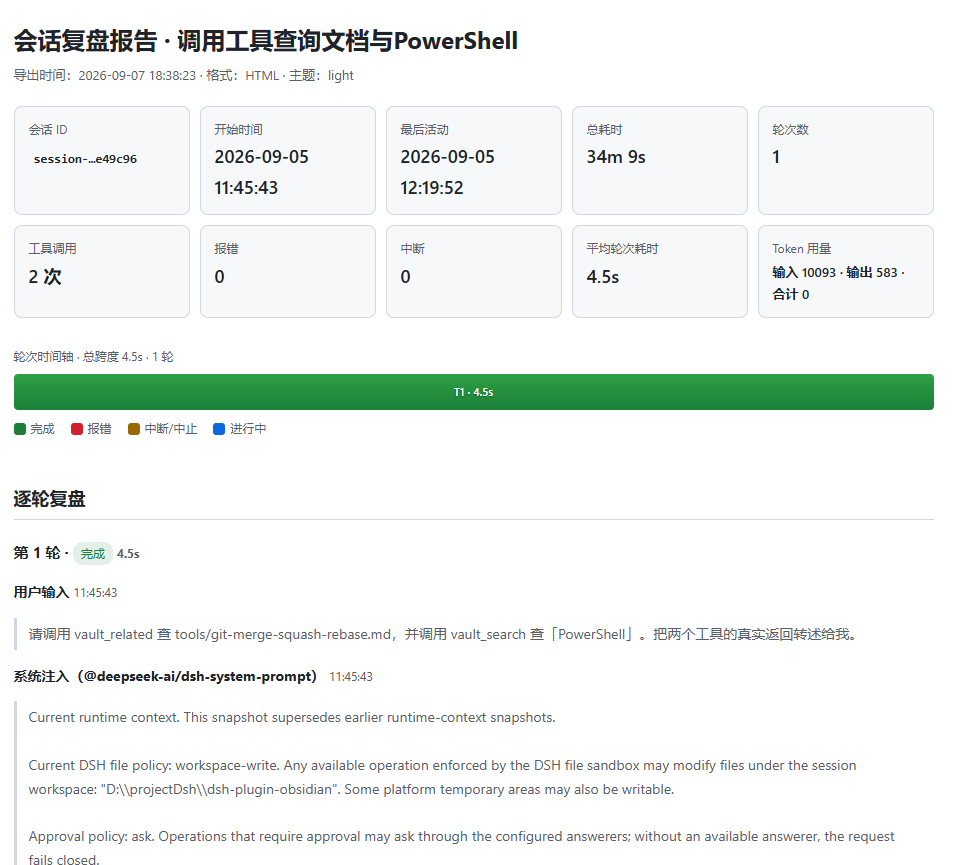
When you are ready to review, the plugin weaves the raw event stream into a structured report in your choice of Markdown (drop it into a doc or ticket) or a self-contained HTML file with inline light/dark themes, collapsible tool calls, syntax-highlighted code, and a visual per-turn timeline. Built-in statistics cover turn count, tool-call distribution, total and average latency, slowest-tools Top 3, error and interruption counts, and token usage. Sensitive fields such as api_key, token, password, secret, authorization, and cookie are masked at collection time, so the exported artifact is safe to share. A navigation-bar Web panel shows live stat cards, a per-tool bar chart, and one-click export/clear buttons, while every setting hot-reloads without a restart.
It is built for DSH agent developers troubleshooting pipelines, engineering teammates who need to replay a task chain, and anyone who wants to archive a complex multi-tool workflow as a readable, portable post-mortem. In short: it turns the agent's black-box run into a shareable, fileable review asset.
Screenshots
Use Cases
- Export the full event chain to diagnose tool-call failures in your agent pipeline
- Share a self-contained HTML post-mortem of a complex multi-turn workflow with your team
- Track agent performance and token usage trends via periodic session exports
Best For
- Developers debugging and troubleshooting DeepSeek Harness agent pipelines
- Engineering teams that need to archive multi-tool workflows into shareable docs
- Ops staff tracking agent performance metrics and token costs
Related Plugins

Memory layer for coding agents that indexes local session history and auto-recalls relevant context before edits, commands, and failures, with no manual search needed.

Traceable, searchable cross-session memory for AI agents that turns conversation knowledge into a typed knowledge graph and recalls relevant subgraphs instead of replaying full history, natively integrated with DeepSeek Harness.
Gives DSH AI cross-session long-term memory, to-do and skill management, plus multi-session orchestration, external AI delegation, and an infinite canvas that grows with you.

dsh-mnemon is a three-tier, pluggable, Agent-driven memory system for DeepSeek Harness, combining Runtime memory, Project Documents, and replaceable Memory Spaces with nine long-term providers.