dsh-instruction-memory
Run the following command in DeepSeek Harness:
dsh plugin install HERO476/dsh-instruction-memory
Paste the following prompt into your AI chat to install this plugin:
Run dsh plugin install HERO476/dsh-instruction-memory in the DeepSeek Harness terminal to install the plugin, source code is available at https://github.com/HERO476/dsh-instruction-memory .
About this plugin
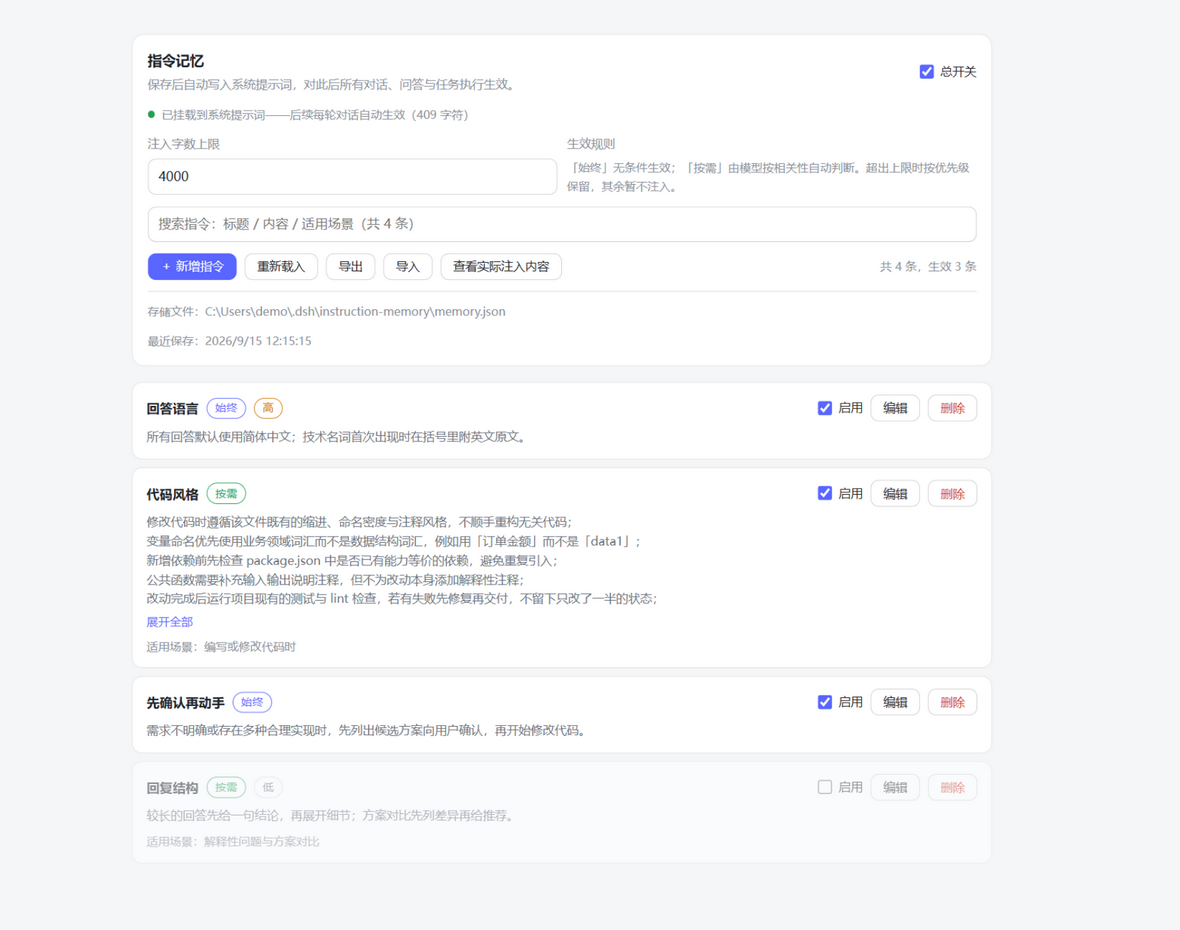
Tired of retelling your preferences, conventions, and project context every time you start a fresh conversation? dsh-instruction-memory stores your standing instructions locally and auto-injects them into the system prompt of every subsequent round, so you say it once and move on.
Every entry is fully under your control. The plugin deliberately registers no model-facing tools, giving the model zero ability to add, edit, or delete entries on its own. You choose whether each entry is always active or applied on-demand by relevance, assign a high, normal, or low priority that governs injection order, and the plugin respects a character budget, keeping the highest-priority items and noting how many were trimmed at the end. The settings page supports export to a documented JSON file and import with merge semantics that add new entries but never overwrite or clear existing ones. Data lives under your DSH home directory, can be hand-edited with a reload button, and is persisted via atomic write with a .bak fallback so a mid-save crash leaves nothing corrupted.
Built for developers who want their coding standards, project conventions, and personal preferences baked into every prompt without relying on cloud services or letting the AI decide what to remember. One rule governs everything here: you are the sole author of these instructions.
Screenshots
Use Cases
- Persist coding standards and project conventions across every session
- Combine always-active role settings with context-triggered conditional instructions
- Export and import memory JSON to sync personal preferences across machines
Best For
- Developers who hate restating preferences in every new session
- Teams that demand full control over AI memory and block model-side writes
- Privacy-conscious users who prefer local tooling over cloud-hosted instruction stores
Related Plugins

Memory layer for coding agents that indexes local session history and auto-recalls relevant context before edits, commands, and failures, with no manual search needed.

Traceable, searchable cross-session memory for AI agents that turns conversation knowledge into a typed knowledge graph and recalls relevant subgraphs instead of replaying full history, natively integrated with DeepSeek Harness.
Gives DSH AI cross-session long-term memory, to-do and skill management, plus multi-session orchestration, external AI delegation, and an infinite canvas that grows with you.

dsh-mnemon is a three-tier, pluggable, Agent-driven memory system for DeepSeek Harness, combining Runtime memory, Project Documents, and replaceable Memory Spaces with nine long-term providers.