prompt-for-me
Run the following command in DeepSeek Harness:
dsh plugin install ChuanTianML/prompt-for-me
Paste the following prompt into your AI chat to install this plugin:
To install this plugin in DeepSeek Harness, run the command dsh plugin install ChuanTianML/prompt-for-me, or visit https://github.com/ChuanTianML/prompt-for-me for the source code.
About this plugin
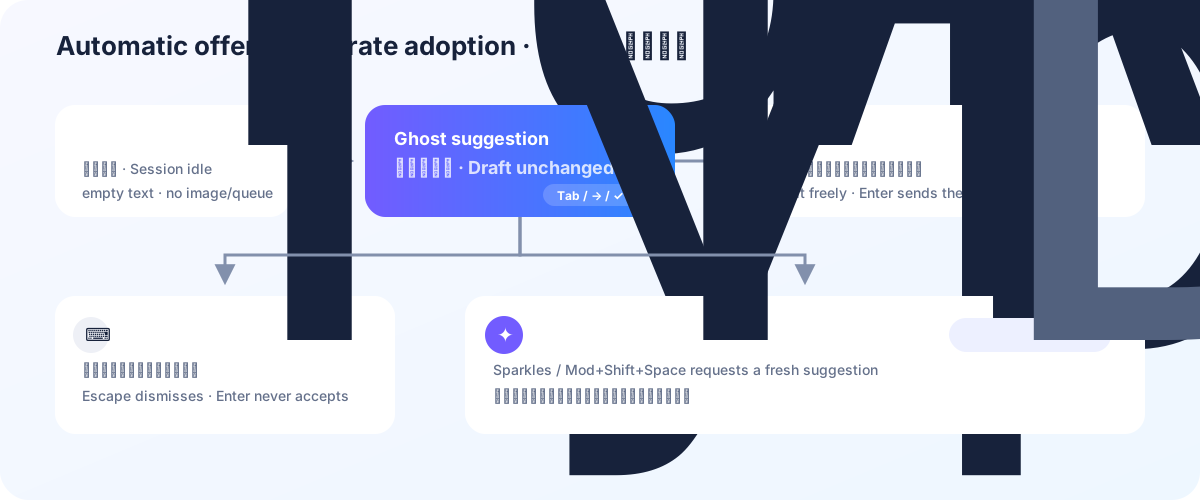
In AI conversations, users often spend time crafting the next message, and the Prompt for Me plugin addresses this efficiency gap. After DeepSeek Harness completes an agent turn, the plugin automatically generates a message suggestion and displays it as ghost text outside the input composer. Users can easily accept the suggestion with Tab, Right Arrow, or a check control to make it an editable draft; if not needed, they can dismiss it with Escape or start typing, causing the ghost to hide. This design offers instant inspiration while respecting user control—the plugin never auto-submits messages, ensuring conversations remain user-driven.
Screenshots
Use Cases
- Quickly get reply suggestions in long conversations
- Providing inspiration when users hesitate
- Assisting content creation and code writing
Best For
- Active DeepSeek Harness users
- Developers seeking to boost conversation efficiency
- Content creators and writers
Related Plugins
A unified suite combining hot runtime injection, task-aware thinking-mode routing, and a graded session protocol with red-team gates to sustain model diligence across long-horizon inference.

ModLens is a vision plugin for DeepSeek Harness that gives text-only models sight by reading images pasted directly into chat, with zero-config setup and multiple vision engines.

On-demand vision for text-only DeepSeek Harness agents: built-in free keyless vision chain and 14 vision tools, routing image turns as tool calls to vision models with pixel fidelity, no Python needed, one-command install.

Give text-only models in DeepSeek Harness eyes, enabling image Q&A, long-screenshot OCR, UI restoration, and GUI visual tasks.