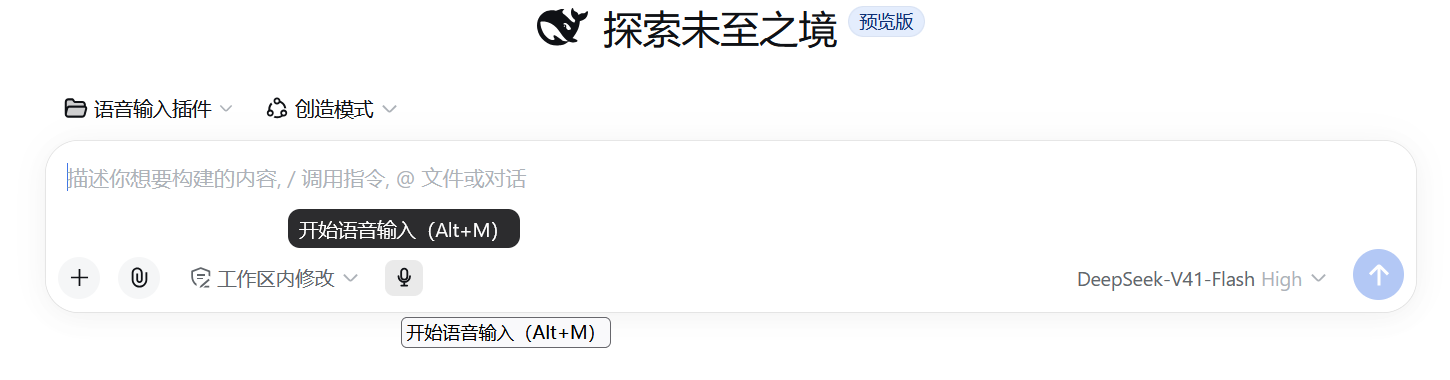
dsh-voice-input
Run the following command in DeepSeek Harness:
dsh plugin install QDchuan/dsh-voice-input
Paste the following prompt into your AI chat to install this plugin:
Run dsh plugin install QDchuan/dsh-voice-input in the DeepSeek Harness terminal to install the voice input plugin. The source repository is available at https://github.com/QDchuan/dsh-voice-input .
About this plugin
Typing is slow, and bouncing between a speech-to-text app and the editor to copy-paste results is a small but constant source of friction when working with DeepSeek Harness. dsh-voice-input collapses that into one gesture: a microphone button sits to the left of the input box, and whatever you say lands as text directly in the field. A live status bar floats above the input during recording, showing waveform level, a timer, real-time partial transcript, and Done or Cancel buttons, so you never leave the page.\n\nTwo engine paths are available. The zero-setup path uses the browser built-in SpeechRecognition API, ideal for quick dictation in Chrome or Edge. The higher-quality path speaks to any service that implements the OpenAI /audio/transcriptions contract: SiliconFlow, Groq, a local whisper.cpp server, or faster-whisper-server all work with a single preset click. The settings page includes a one-click local-backend panel that installs Whisper, starts Ollama, and pulls models through bundled PowerShell scripts, streaming logs back into the UI without ever opening a terminal. API keys are read on demand from the DSH credential store; nothing plaintext ever touches the config file, and rotating a key takes effect on the very next recording.\n\nThe plugin is honest about what does not work. After you select Ollama it inspects every local model for audio capability and, if none can listen, shows a red verdict with a one-click switch back to local Whisper. A registered voice_input_status tool lets you ask the model directly why voice input is not responding, and it reads the live configuration and points to the specific field to fix. This plugin is for people who frequently type long passages into DeepSeek Harness, users who want a fully offline speech-to-text pipeline, and anyone who would rather speak than type.
Screenshots
Use Cases
- Dictate long passages instead of typing word by word
- Run fully offline speech-to-text with local Whisper
- Quickly transcribe a sentence with the browser engine in Chrome
Best For
- Harness users who type long passages frequently
- Developers who need a fully offline speech-to-text setup
- Users who prefer speaking over typing
Related Plugins
A unified suite combining hot runtime injection, task-aware thinking-mode routing, and a graded session protocol with red-team gates to sustain model diligence across long-horizon inference.

ModLens is a vision plugin for DeepSeek Harness that gives text-only models sight by reading images pasted directly into chat, with zero-config setup and multiple vision engines.

On-demand vision for text-only DeepSeek Harness agents: built-in free keyless vision chain and 14 vision tools, routing image turns as tool calls to vision models with pixel fidelity, no Python needed, one-command install.

Give text-only models in DeepSeek Harness eyes, enabling image Q&A, long-screenshot OCR, UI restoration, and GUI visual tasks.