DSH-Prompt-Optimization
Run the following command in DeepSeek Harness:
dsh plugin install du-u-uck/DSH-Prompt-Optimization
Paste the following prompt into your AI chat to install this plugin:
Run dsh plugin install du-u-uck/DSH-Prompt-Optimization in DeepSeek Harness to install; full source at https://github.com/du-u-uck/DSH-Prompt-Optimization.
About this plugin
Crafting a good prompt in a Web chat is rarely a one-shot job. The phrasing could be sharper, the structure tighter, yet rewriting it word by word before you hit send kills your momentum and breaks focus. DSH-Prompt-Optimization was built to eliminate that last-mile friction: turn prompt polishing from a manual chore into a single click.
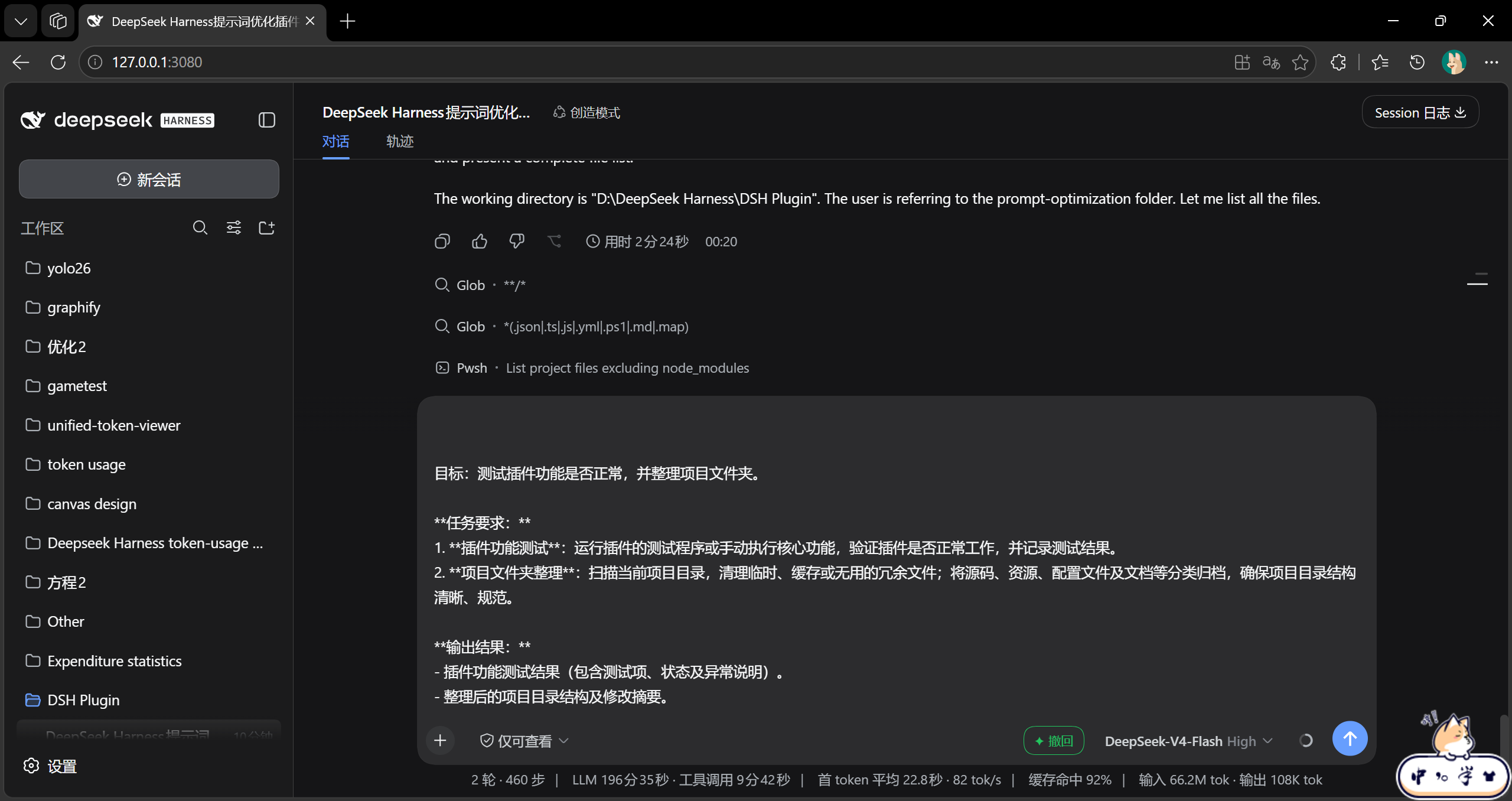
A dedicated "Optimize" button now sits right beside the text input. One click silently ships your draft to a model for refinement, and the polished result drops straight back into the input box, keeping your workflow seamless. Change your mind? The button flips to "Undo" and one more tap restores the original draft, tracked independently per conversation. You can also pin a dedicated optimizer model under Settings → Prompt Optimization; out of the box it simply follows whichever model your active session is using, so no extra setup is required.
Built for developers and technical writers who lean on AI coding assistants daily and find themselves iterating on prompt phrasing in rapid bursts. If you live in the Web chat and want faster, less disruptive prompt refinement without leaving the input field, this plugin slots right in.
Screenshots
Use Cases
- One-click prompt refinement inside the Web chat input
- Instant undo to restore the original draft after optimization
- Pin a dedicated model for prompt optimization separate from the session
Best For
- Developers iterating on prompts heavily with AI coding assistants
- Technical writers refining phrasing quickly in a Web chat
- Power users who want a frictionless, in-place prompt workflow
Related Plugins
A unified suite combining hot runtime injection, task-aware thinking-mode routing, and a graded session protocol with red-team gates to sustain model diligence across long-horizon inference.

ModLens is a vision plugin for DeepSeek Harness that gives text-only models sight by reading images pasted directly into chat, with zero-config setup and multiple vision engines.

On-demand vision for text-only DeepSeek Harness agents: built-in free keyless vision chain and 14 vision tools, routing image turns as tool calls to vision models with pixel fidelity, no Python needed, one-command install.

Give text-only models in DeepSeek Harness eyes, enabling image Q&A, long-screenshot OCR, UI restoration, and GUI visual tasks.