
dsh-session-steward
Run the following command in DeepSeek Harness:
dsh plugin install drscrewdriver/dsh-session-steward
Paste the following prompt into your AI chat to install this plugin:
Run dsh plugin install drscrewdriver/dsh-session-steward in DeepSeek Harness to install; source: https://github.com/drscrewdriver/dsh-session-steward
About this plugin
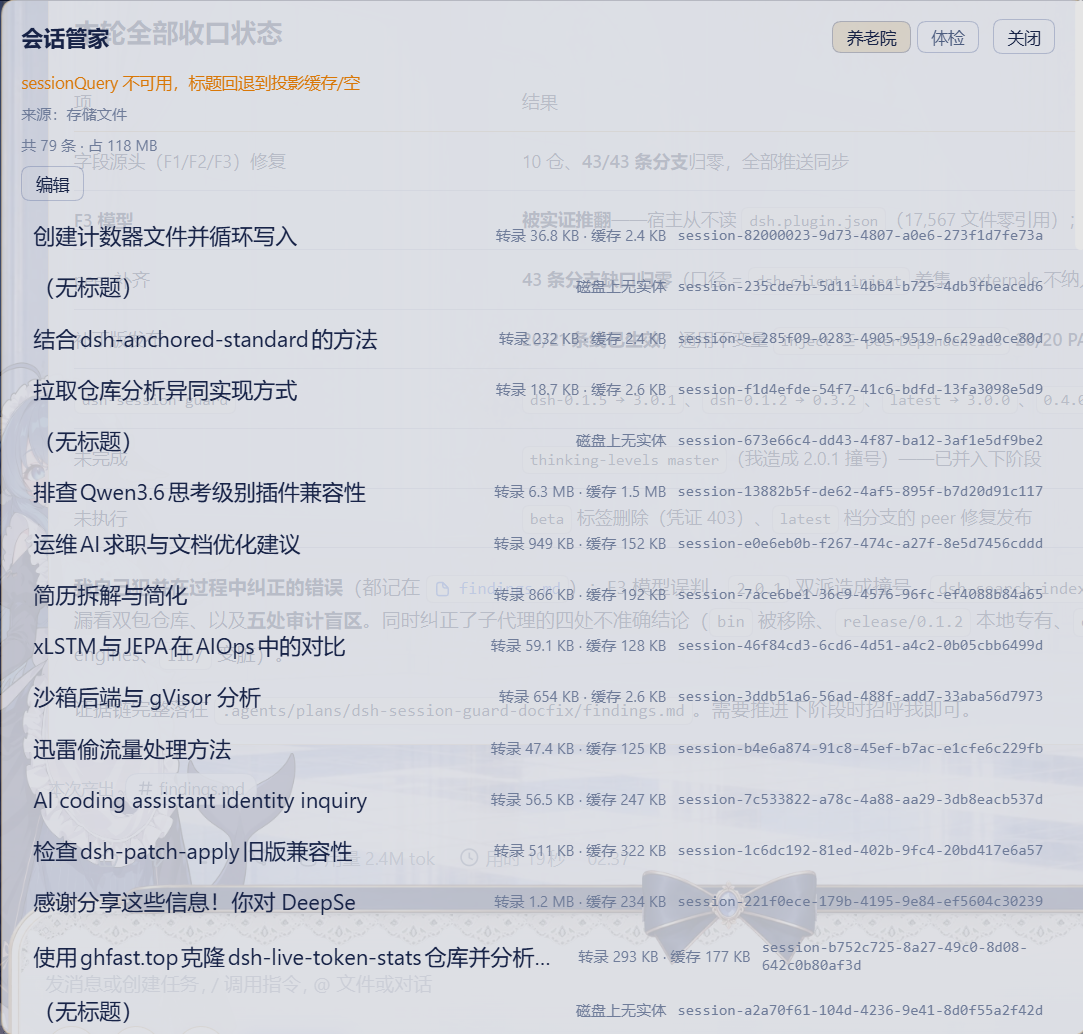
After months of use, DSH quietly accumulates a pile of archived session files on disk. You may want to clean them out but hesitate for fear of irreversible damage, or want to restore an archive but cannot find the right entry point. This plugin adds a Session Steward panel to the sidebar so you can inspect the archived collection, its per-entry size, and the on-disk entity state before taking any action.
Two capabilities are kept deliberately separate and non-interchangeable. For session history files, unarchiving (prune) only edits the stored array and is fully reversible; purging (purge) deletes real disk entities including transcript directories, projection caches, and two workspace-membership entries, making it permanent and auto-unarchiving first to avoid leaving zombie ids that vanish from the sidebar. For session health, a four-gate check covers log integrity, projection-cache lag, lossless-JSON validity, and cold-read closure; the resulting prescription is strictly reversible: isolate corrupted projection-cache records, wait for the host to settle open steps, and emit an actionable command list with a before/after diff. The plugin never rewrites session logs or silently drops fields.
Best suited for long-term DSH users who have accumulated a large archive, occasionally hit empty-session or data-corruption issues, and want a safe diagnostic pass before any cleanup. Each sub-domain has its own feature gate so you can enable or disable them independently without affecting the other.
Screenshots

Use Cases
- Clean up accumulated archived session files on disk to free storage space
- Restore an accidentally archived session back to the sidebar workspace
- Diagnose empty-session or projection-cache corruption and apply safe reversible fixes
Best For
- DSH users who have accumulated a large archive of session files over time
- Users who occasionally hit empty-session or projection-cache corruption and need to find the root cause
- Developers who want a safe diagnostic pass before cleanup to avoid irreversible mistakes
Related Plugins

Memory layer for coding agents that indexes local session history and auto-recalls relevant context before edits, commands, and failures, with no manual search needed.

Traceable, searchable cross-session memory for AI agents that turns conversation knowledge into a typed knowledge graph and recalls relevant subgraphs instead of replaying full history, natively integrated with DeepSeek Harness.
Gives DSH AI cross-session long-term memory, to-do and skill management, plus multi-session orchestration, external AI delegation, and an infinite canvas that grows with you.

dsh-mnemon is a three-tier, pluggable, Agent-driven memory system for DeepSeek Harness, combining Runtime memory, Project Documents, and replaceable Memory Spaces with nine long-term providers.