dsh-model-info-hint
Run the following command in DeepSeek Harness:
dsh plugin install jackie2455/dsh-model-info-hint
Paste the following prompt into your AI chat to install this plugin:
Run dsh plugin install jackie2455/dsh-model-info-hint to install this plugin in DeepSeek Harness; the source is hosted at https://github.com/jackie2455/dsh-model-info-hint
About this plugin
Juggling a dozen-plus models across multiple providers in DSH comes with a small, recurring annoyance: the model picker shows you a name, and to confirm what input modalities it accepts, how large its context window is, what the max output tokens are, which API endpoint it talks to, or which environment variable carries the auth key, you end up switching to a terminal, grepping through YAML, and switching back. That back-and-forth breaks your flow, especially when you are comparing two or three models side by side.
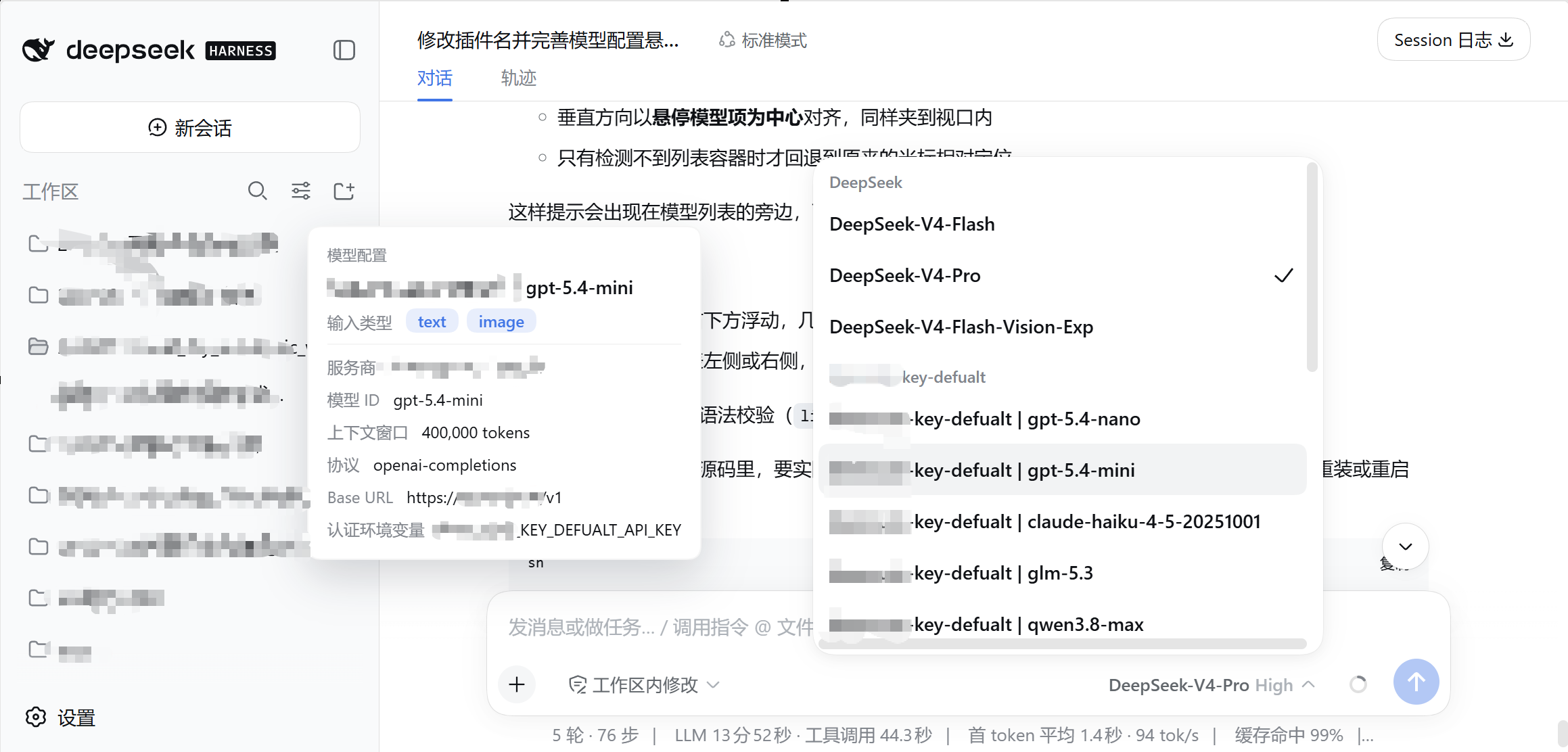
dsh-model-info-hint collapses that lookup into a single hover. Rest the cursor on any model entry in the selector—the model-button menu next to the input box, or the /model dialog—and a non-blocking tooltip appears right beside it: input types, context window, max output tokens, reasoning level, API protocol name, baseURL, and the authentication environment-variable name. The hint surfaces only fields that are explicitly declared in your settings document, so unconfigured entries are not padded in; apiKeyEnv shows the variable name, never the secret itself. The tooltip disappears the instant you move the cursor away, click, scroll, press any key, or after six seconds, whichever comes first, and pointer events pass through cleanly, so it never blocks your next action. Data is read through the built-in settings service of DSH, supporting both .yaml and .json formats, with $DSH_HOME overrides and hot-reload working out of the box.
This is aimed at DSH users who frequently switch between models for comparison or debugging and would prefer a glanceable configuration summary over yet another tab full of YAML. As long as your model routes live in a settings document (any registered namespace, not limited to llm-pi-ai), the plugin picks them up automatically with no extra configuration needed.
Screenshots
Use Cases
- Hover over the model selector to instantly confirm input types, context window, and max output tokens
- Compare reasoning level and API protocol between two models side by side without reopening YAML
- Check a model's baseURL and auth env-var name to quickly rule out connectivity or auth issues
Best For
- DSH users juggling dozens of models across multiple providers
- Developers who frequently switch and compare models and want key parameters at a glance
- Anyone tired of repeatedly switching to a terminal to grep settings.yaml for model details
Related Plugins
A unified suite combining hot runtime injection, task-aware thinking-mode routing, and a graded session protocol with red-team gates to sustain model diligence across long-horizon inference.

ModLens is a vision plugin for DeepSeek Harness that gives text-only models sight by reading images pasted directly into chat, with zero-config setup and multiple vision engines.

On-demand vision for text-only DeepSeek Harness agents: built-in free keyless vision chain and 14 vision tools, routing image turns as tool calls to vision models with pixel fidelity, no Python needed, one-command install.

Give text-only models in DeepSeek Harness eyes, enabling image Q&A, long-screenshot OCR, UI restoration, and GUI visual tasks.