dsh-claude-oauth
Run the following command in DeepSeek Harness:
dsh plugin install grloper/dsh-claude-oauth
Paste the following prompt into your AI chat to install this plugin:
Run dsh plugin install grloper/dsh-claude-oauth in the DeepSeek Harness terminal to install the Claude OAuth integration plugin from https://github.com/grloper/dsh-claude-oauth.
About this plugin
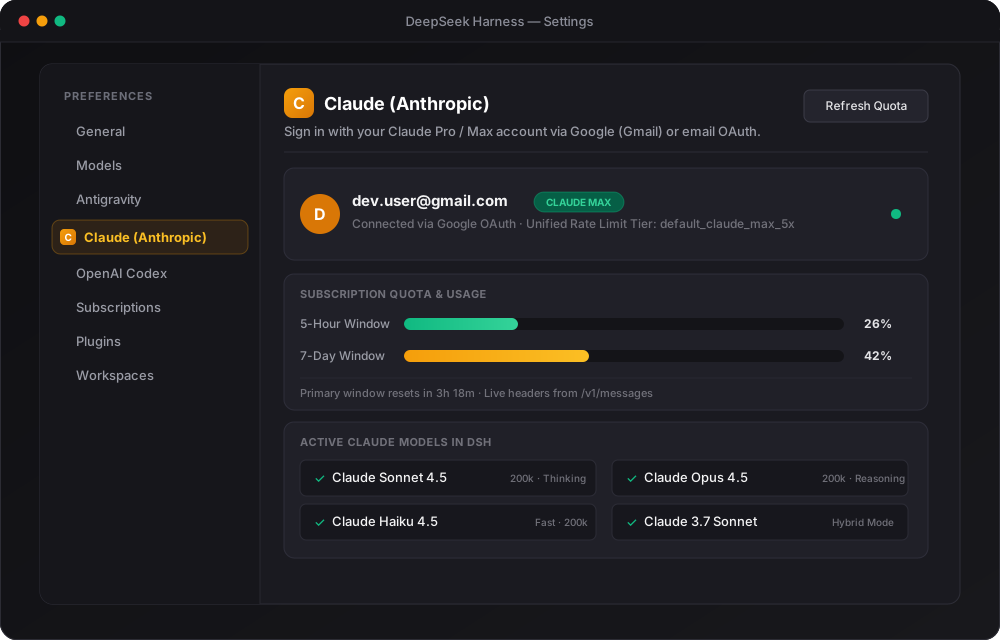
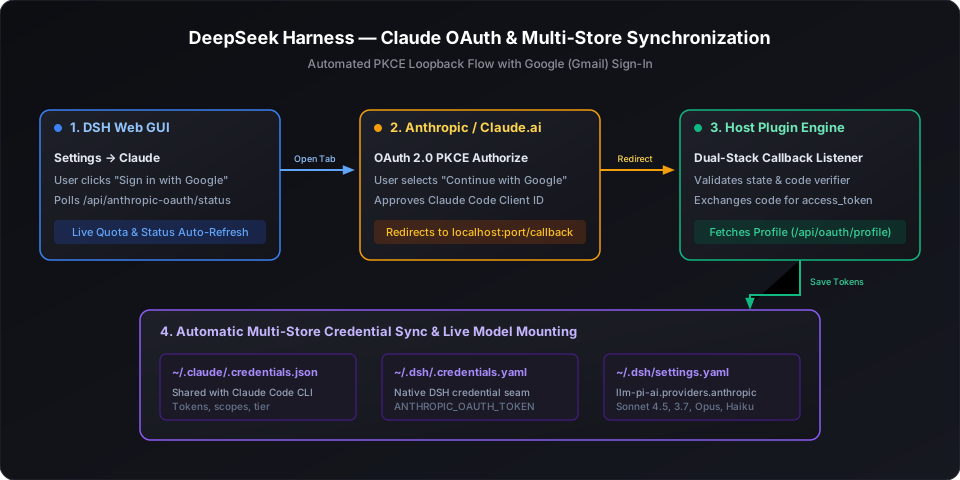
Integrating a Claude Pro or Max subscription into DeepSeek Harness used to mean running an OAuth flow in the terminal, copying a long token string, and hand-editing YAML config files with every expiry. dsh-claude-oauth collapses that entire chain into a single browser click: open DSH Settings, find the Claude section, click "Sign in with Google / Gmail", authorise in the popped-out tab, and return to see your account, subscription tier, and available models already active. Under the hood it runs a dual-stack PKCE OAuth engine that listens on both IPv4 (127.0.0.1) and IPv6 (::1) loopback, sidestepping the Windows localhost-resolution pitfalls that used to break the callback, while keeping the whole authentication transparent to the user.
Once authenticated, the plugin synchronises credentials to three locations automatically: it writes to ~/.claude/.credentials.json so the official Claude Code CLI shares the same authorisation, updates the OAuth token fields in ~/.dsh/.credentials.yaml, and mounts the active model list under the anthropic provider in ~/.dsh/settings.yaml. The model catalogue is fetched live from GET /v1/models, so every new Claude release from Sonnet 4.5 to Opus 4.5 and Haiku 4.5 appears without any manual list maintenance. Real-time quota progress bars for both the 5-hour and 7-day windows, along with reset countdowns, are displayed in Settings and beside the chat composer so you always know how much subscription credit remains.
This plugin is built for developers who already carry a Claude Pro or Max subscription and rely on DeepSeek Harness as their daily driver. You no longer need to re-run CLI token flows every time credentials expire, nor juggle multiple config files by hand—one browser authorisation and the plugin keeps everything in sync behind the scenes.
Screenshots
Use Cases
- Authorize a Claude Pro or Max account via Google in a single click from DSH Settings
- Let credentials auto-rotate after expiry without re-running CLI token flows or editing YAML files
- Watch real-time 5-hour and 7-day subscription quota bars with reset countdowns in Settings and the composer dock
Best For
- Developers who already hold a Claude Pro or Max subscription
- Day-to-day users who rely on DeepSeek Harness as their primary workbench
- Engineers who want to eliminate manual token pasting and multi-file config maintenance
Related Plugins
A unified suite combining hot runtime injection, task-aware thinking-mode routing, and a graded session protocol with red-team gates to sustain model diligence across long-horizon inference.

ModLens is a vision plugin for DeepSeek Harness that gives text-only models sight by reading images pasted directly into chat, with zero-config setup and multiple vision engines.

On-demand vision for text-only DeepSeek Harness agents: built-in free keyless vision chain and 14 vision tools, routing image turns as tool calls to vision models with pixel fidelity, no Python needed, one-command install.

Give text-only models in DeepSeek Harness eyes, enabling image Q&A, long-screenshot OCR, UI restoration, and GUI visual tasks.