dsh-model-context-catalog
Run the following command in DeepSeek Harness:
dsh plugin install HOWILLMAKEIT/dsh-model-context-catalog
Paste the following prompt into your AI chat to install this plugin:
Run dsh plugin install HOWILLMAKEIT/dsh-model-context-catalog in DeepSeek Harness to install the plugin from https://github.com/HOWILLMAKEIT/dsh-model-context-catalog.
About this plugin
When using a custom model route in DeepSeek Harness, a subtle trap lurks beneath the surface: if the route lacks an explicit context window, the engine falls back to a 262,144-token guess. Once a real request exceeds that estimate, the server may return a perfectly normal response yet the call is reclassified as a context overflow—tool calls survive but the final natural-language answer fails, and /compact compression is blocked entirely.
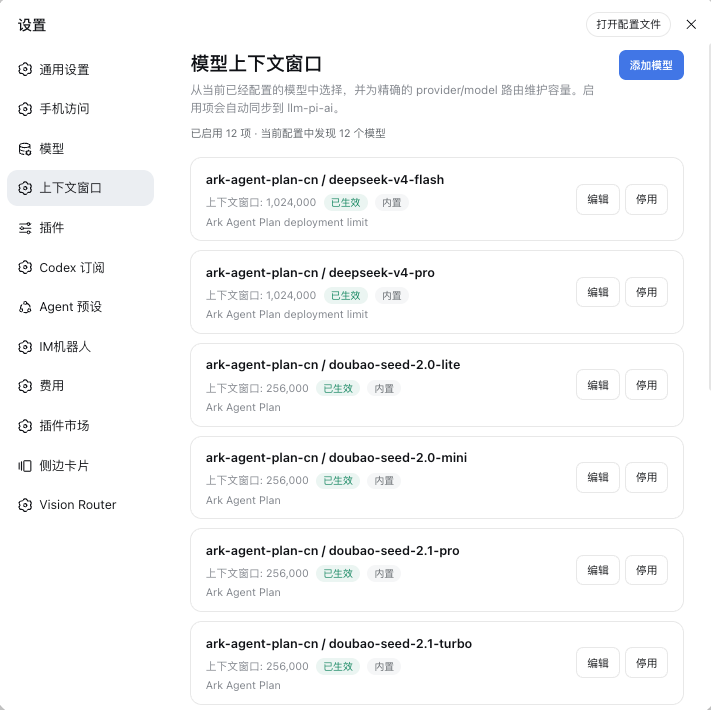
This plugin maintains exactly one field, contextWindow: it writes the true window size for a precise provider/model route and syncs it to llm-pi-ai through DSH\u2019s public Settings API. It does not patch internal code, does not touch credentials, does not fabricate missing routes, and never injects unverified maxTokens—its behavioural boundary is narrow and predictable.
If you run multiple custom model routes in DSH (different providers, different gateways, different plan suffixes) and keep hitting false overflow errors, this plugin was built for you: open Settings, pick the route, enter the window size, save, and it takes effect immediately.
Screenshots
Use Cases
- Custom routes trigger false context-overflow: tool calls succeed but the final answer fails
- /compact summary generation is misclassified as overflow and cannot be committed
- The same model deployed via different providers or gateways needs distinct context-window values
Best For
- Self-hosted DSH users running custom model routes
- Developers who keep hitting false overflow errors and need precise window control
- Teams managing multi-provider or multi-gateway deployments that require per-route window values
Related Plugins
A unified suite combining hot runtime injection, task-aware thinking-mode routing, and a graded session protocol with red-team gates to sustain model diligence across long-horizon inference.

ModLens is a vision plugin for DeepSeek Harness that gives text-only models sight by reading images pasted directly into chat, with zero-config setup and multiple vision engines.

On-demand vision for text-only DeepSeek Harness agents: built-in free keyless vision chain and 14 vision tools, routing image turns as tool calls to vision models with pixel fidelity, no Python needed, one-command install.

Give text-only models in DeepSeek Harness eyes, enabling image Q&A, long-screenshot OCR, UI restoration, and GUI visual tasks.