dsh-skill-trace
Run the following command in DeepSeek Harness:
dsh plugin install PolinniZhong/dsh-skill-trace
Paste the following prompt into your AI chat to install this plugin:
Run dsh plugin install PolinniZhong/dsh-skill-trace in the DeepSeek Harness terminal; the source lives at https://github.com/PolinniZhong/dsh-skill-trace, then restart Desktop to open Skill Trace in a session.
About this plugin
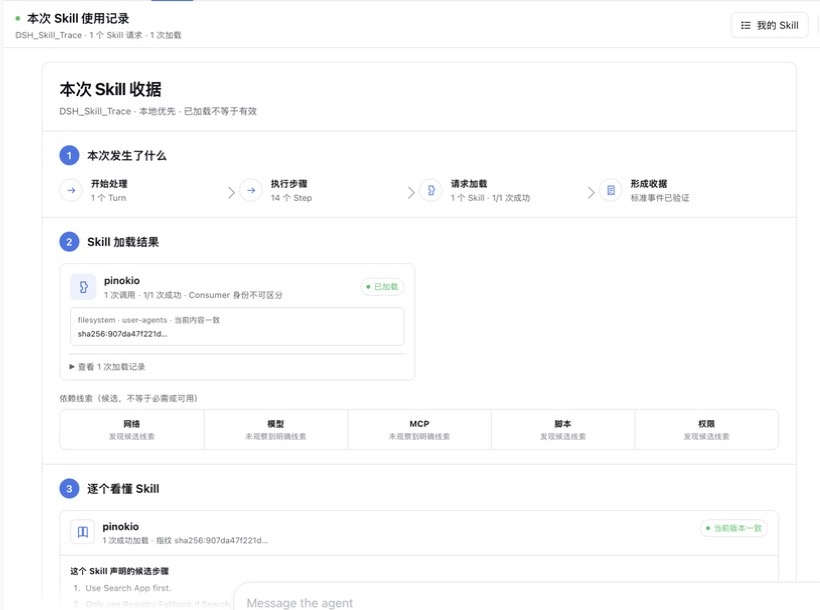
When an Agent silently selects a Skill and delivers output, what you actually see is only the result. You have no readable record of what it loaded, which steps it declared, what it depended on, or whether you could replicate the work yourself. dsh-skill-trace gathers every observable Skill-loading event in a session, the declared steps, and your own notes into a single local receipt, turning a fleeting side effect into something you can review, learn from, and manually extend.
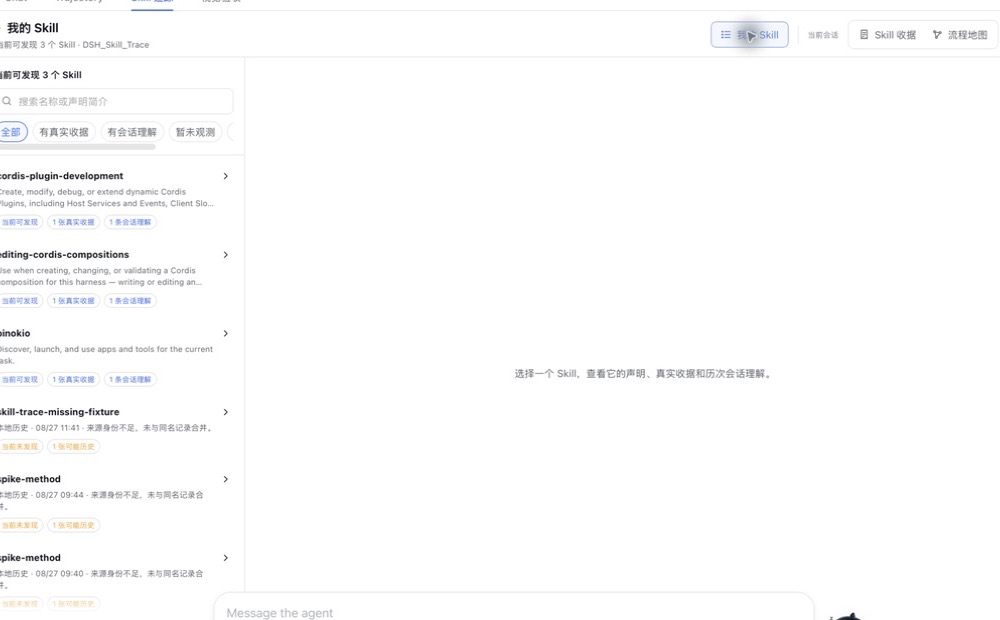
Three views anchor the experience. The Skill receipt lays out each turn, step, request, result, and empty state in chronological order, explicitly distinguishing "not observed" from "not used" and never filling gaps with sample data. The flow map reorganises the same fact set into nodes and dependency edges for users who think in system structure, reusing the same source of truth without inventing an extra layer of AI inference. The My Skill workspace is a read-only learning index: search discoverable Skills in the current scope, write down your understanding, improvement intent, and verification plan for each session, then log the outcome of a manual re-test and the next action. Everything stays on your machine. The plugin never stores full prompts, full Skill bodies, tokens, cookies, credentials, or project files; it does not discover, install, sync, route, rewrite, or publish any Skill, and it implements no telemetry or cloud sync.
A clear evidence line runs through every view: a successful skill(name) call only proves the tool was loaded; it does not prove the Agent followed every instruction, nor that the Skill caused the correct outcome. That boundary is stated explicitly in the receipt, the map, and the learning loop. If you work in DeepSeek Harness Desktop and want to move from "I saw it happen" to "I can do it next time," if you refuse to equate "loaded" with "effective," or if you need a reviewable record before touching a Skill, this local receipt puts the facts, the path, and your judgment in one place you can keep reopening.
Screenshots
Use Cases
- Review which Skills the Agent actually loaded and their declared steps after a session
- Write down personal understanding, improvement intent, and a verification plan against the receipt
- Record the outcome of a manual re-test with observed results and next actions locally
Best For
- DeepSeek Harness Desktop users who want visibility into Agent behaviour
- Developers who insist on separating "loaded" from "effective" and preserving evidence boundaries
- Teams that want to turn Skill understanding into a reviewable learning log rather than trust output blindly
Related Plugins

Memory layer for coding agents that indexes local session history and auto-recalls relevant context before edits, commands, and failures, with no manual search needed.

Traceable, searchable cross-session memory for AI agents that turns conversation knowledge into a typed knowledge graph and recalls relevant subgraphs instead of replaying full history, natively integrated with DeepSeek Harness.
Gives DSH AI cross-session long-term memory, to-do and skill management, plus multi-session orchestration, external AI delegation, and an infinite canvas that grows with you.

dsh-mnemon is a three-tier, pluggable, Agent-driven memory system for DeepSeek Harness, combining Runtime memory, Project Documents, and replaceable Memory Spaces with nine long-term providers.