dsh-plugins
Run the following command in DeepSeek Harness:
dsh plugin install PlusQi/dsh-plugins
Paste the following prompt into your AI chat to install this plugin:
Run dsh plugin install PlusQi/dsh-plugins in your terminal; the source repository is at https://github.com/PlusQi/dsh-plugins. After installation, restart the DSH web process and refresh the page to activate the bundle.
About this plugin
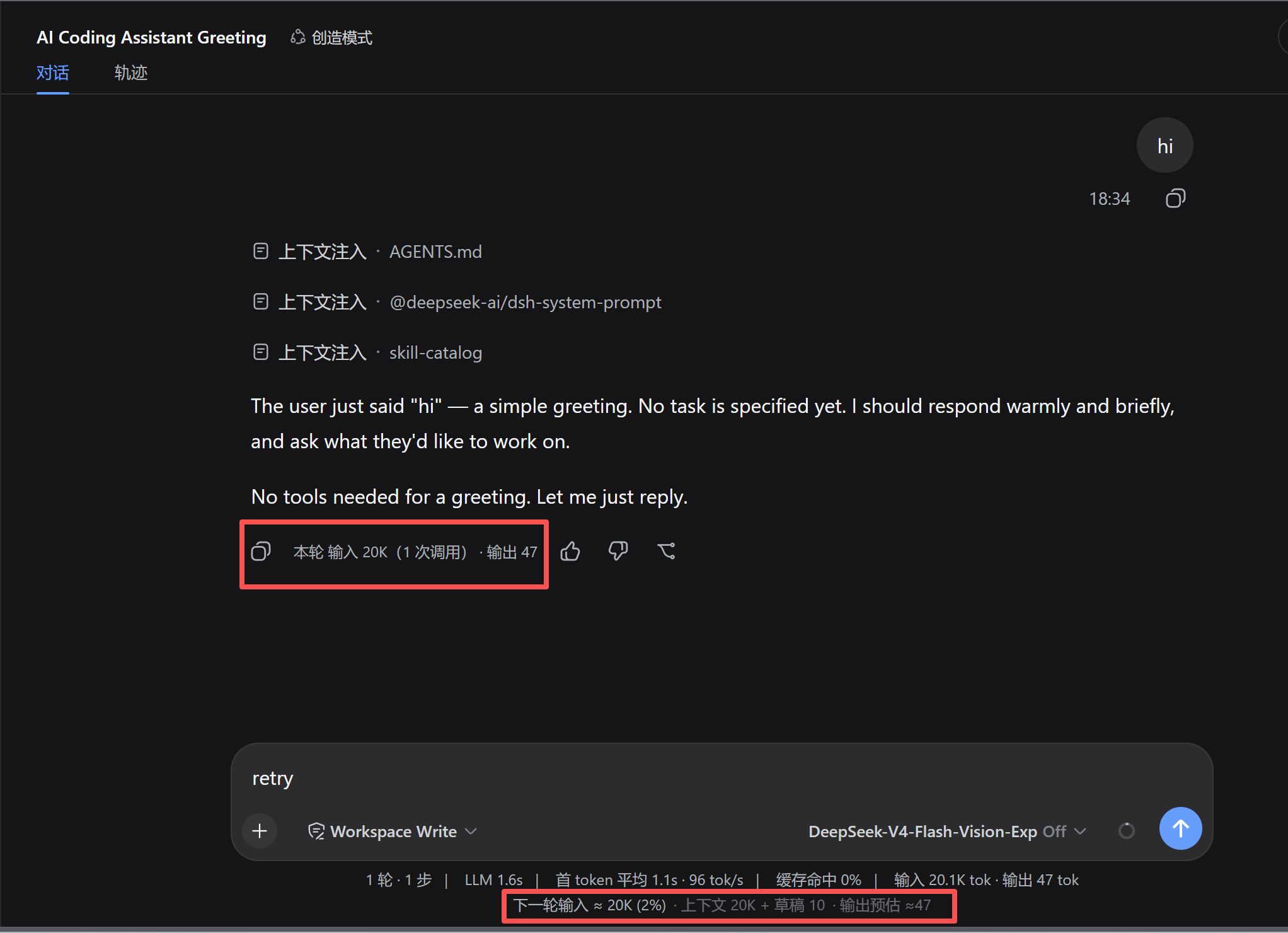
Long DeepSeek Harness sessions have a persistent blind spot: token spend. You hit send without knowing how much context this turn will consume, and tracing per-turn billing input afterward is a manual slog. dsh-plugins bundles three tightly scoped plugins into a single profile bundle, closing the loop right inside your Composer and sidebar so you never need an extra chat turn to ask the assistant how many tokens you used.
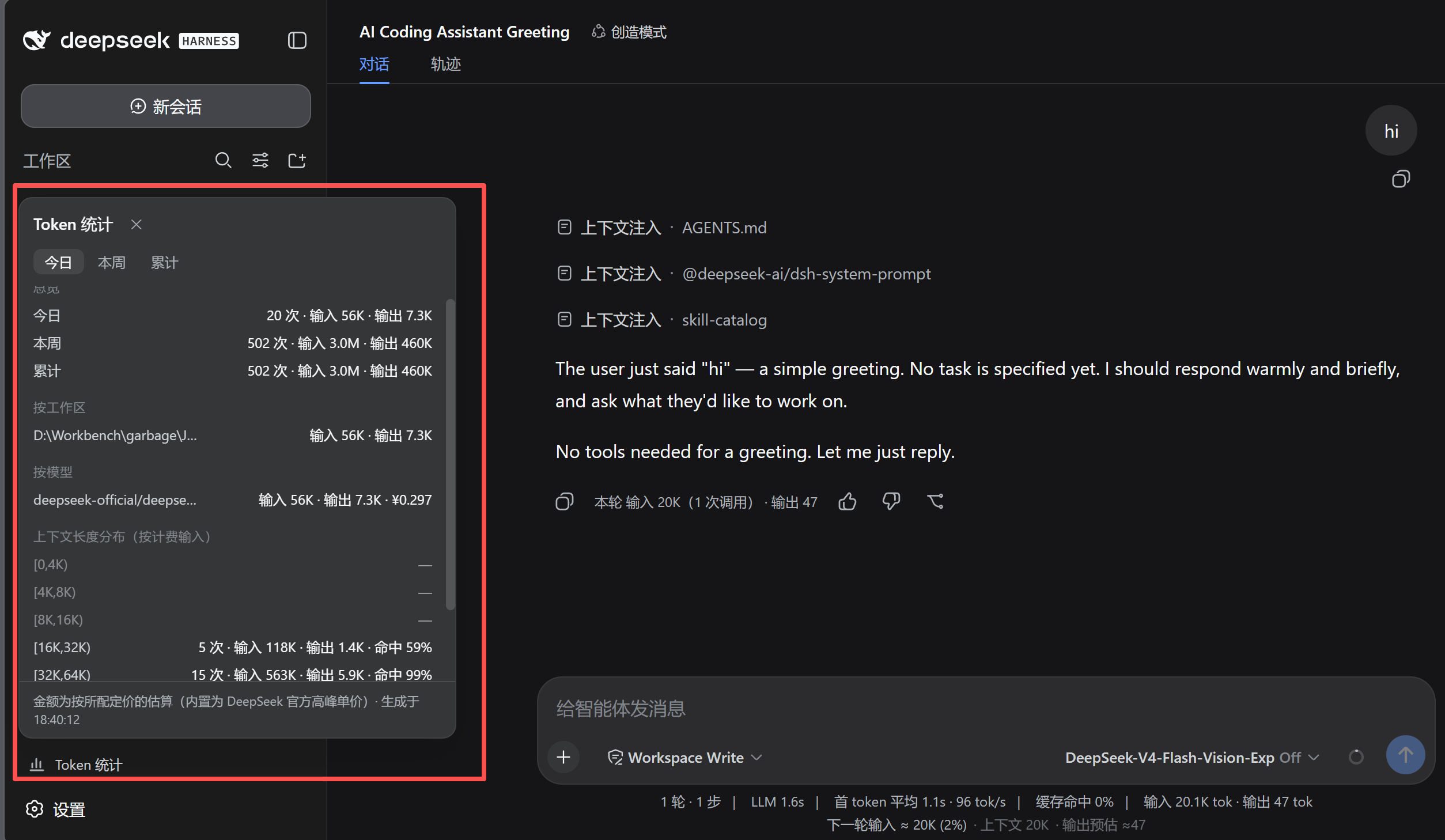
Three capabilities work together. tokprev renders a live next-turn input estimate at the bottom of the Composer—context baseline plus queued messages plus draft, updating keystroke by keystroke—and stamps each turn\u2019s final assistant message with a real-usage badge sourced from provider-reported figures: input, cache, output, and call count. tokstats opens a popover from a sidebar footer button that aggregates consumption across all durable sessions, broken down by time window (today / this week / all-time), workspace, model with optional cost estimates, and context-length distribution. promptopt places a star icon in the input toolbar; one click fires a side-channel model call to rewrite your draft, presents original and optimized text for comparison, and only writes back to the input box when you choose to adopt it.\n
This bundle is for DSH power users running multi-workspace, multi-model flows who want clear visibility into where tokens go and what they cost, while keeping prompt iteration a single click away. All three plugins share one locale dictionary, a common graceful-degradation strategy (missing data renders null, never breaks), and a zero-build install: point dsh plugin install at the repo, restart the web process, and they are live.
Screenshots
Use Cases
- Preview next-turn token input in real time before sending to avoid context-window overflow
- Aggregate token consumption and estimated cost across sessions by workspace, model, and time window
- One-click model rewrite of your draft with side-by-side comparison before deciding to adopt
Best For
- Developers running multi-workspace, multi-model DeepSeek Harness workflows
- Heavy users who track token cost and context-window management
- Efficiency-focused users who want prompt iteration done in a single click
Related Plugins
A unified suite combining hot runtime injection, task-aware thinking-mode routing, and a graded session protocol with red-team gates to sustain model diligence across long-horizon inference.

ModLens is a vision plugin for DeepSeek Harness that gives text-only models sight by reading images pasted directly into chat, with zero-config setup and multiple vision engines.

On-demand vision for text-only DeepSeek Harness agents: built-in free keyless vision chain and 14 vision tools, routing image turns as tool calls to vision models with pixel fidelity, no Python needed, one-command install.

Give text-only models in DeepSeek Harness eyes, enabling image Q&A, long-screenshot OCR, UI restoration, and GUI visual tasks.