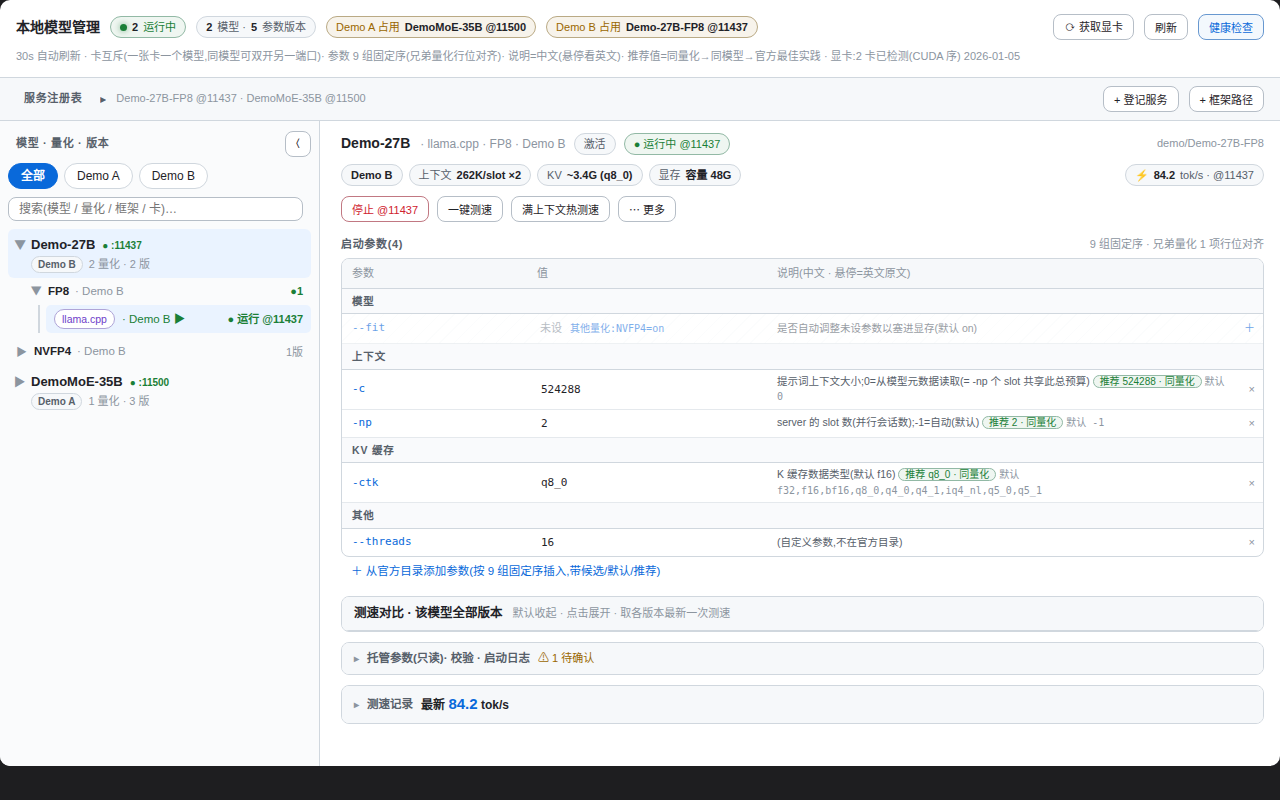
dsh-model-manager
Run the following command in DeepSeek Harness:
dsh plugin install Ansonfishing/dsh-model-manager
Paste the following prompt into your AI chat to install this plugin:
Run dsh plugin install Ansonfishing/dsh-model-manager in DeepSeek Harness to install; full source at https://github.com/Ansonfishing/dsh-model-manager
About this plugin
Running several local inference stacks side by side—llama.cpp, SGLang, vLLM—leaves parameters scattered across shell history and notebook scribbles. Is VRAM enough for this batch size? Which framework actually boots on this card? You find out by crashing.
dsh-model-manager folds all of that into a single control panel: which service lives on which GPU, its health status, start and stop, all in one view with no terminal archaeology required.
Parameter management is the heart of the panel. Each model × framework × GPU combination gets a named Profile version, with fields laid out in a fixed nine-group order (model, context, KV, speculative decoding, sampling, performance, parallelism, service, misc). Different quantisations of the same model are shown as a union-of-parameters table aligned row by row; fields absent in one quantisation are greyed out with the sibling quantisation's value annotated, so cross-quant diffing takes a glance. Recommended values follow a three-tier provenance chain—measured run, sibling quant, official best practice—and every cell carries its source tag; nothing is fabricated.
Common pitfalls are caught before they happen: saving a Profile estimates KV-cache VRAM from context length and batch size and warns immediately if the target card would be exceeded. One-click benchmarking issues a fixed 256-token prompt for tok/s, or a full-context hot test that first verifies available context, then streams a warmup and records TTFB, prefill, and decode in isolation. On the safety side the plugin never issues pkill; stopping an externally managed service requires an explicit force flag plus a two-click confirmation, and touching the DSH inference port carries an extra warning that the current session will be interrupted.
Built for developers juggling multiple inference services on a local multi-GPU box, frequently swapping quantisations or comparing across frameworks. The panel appears as a tab inside DSH once the bundle is loaded; to preview without installing DSH, clone the repo and open the zero-dependency mock harness in a browser.
Screenshots
Use Cases
- Unified health check and port ownership across multiple concurrent inference services
- Compare parameter profiles across quantisations with automatic VRAM validation before launch
- Baseline tok/s benchmarking and full-context hot testing with TTFB / prefill / decode breakdown
Best For
- Developers running multiple local LLM inference stacks on a multi-GPU box
- Researchers frequently swapping quantisations or comparing inference parameters across frameworks
- Local-deployment users who prefer a panel over terminal history for managing KV / context / batch configs
Related Plugins
A unified suite combining hot runtime injection, task-aware thinking-mode routing, and a graded session protocol with red-team gates to sustain model diligence across long-horizon inference.

ModLens is a vision plugin for DeepSeek Harness that gives text-only models sight by reading images pasted directly into chat, with zero-config setup and multiple vision engines.

On-demand vision for text-only DeepSeek Harness agents: built-in free keyless vision chain and 14 vision tools, routing image turns as tool calls to vision models with pixel fidelity, no Python needed, one-command install.

Give text-only models in DeepSeek Harness eyes, enabling image Q&A, long-screenshot OCR, UI restoration, and GUI visual tasks.