dsh-workspace-memory
Run the following command in DeepSeek Harness:
dsh plugin install luyy9apples/dsh-workspace-memory
Paste the following prompt into your AI chat to install this plugin:
Run dsh plugin install luyy9apples/dsh-workspace-memory in your terminal to install this plugin; source code is available at https://github.com/luyy9apples/dsh-workspace-memory
About this plugin
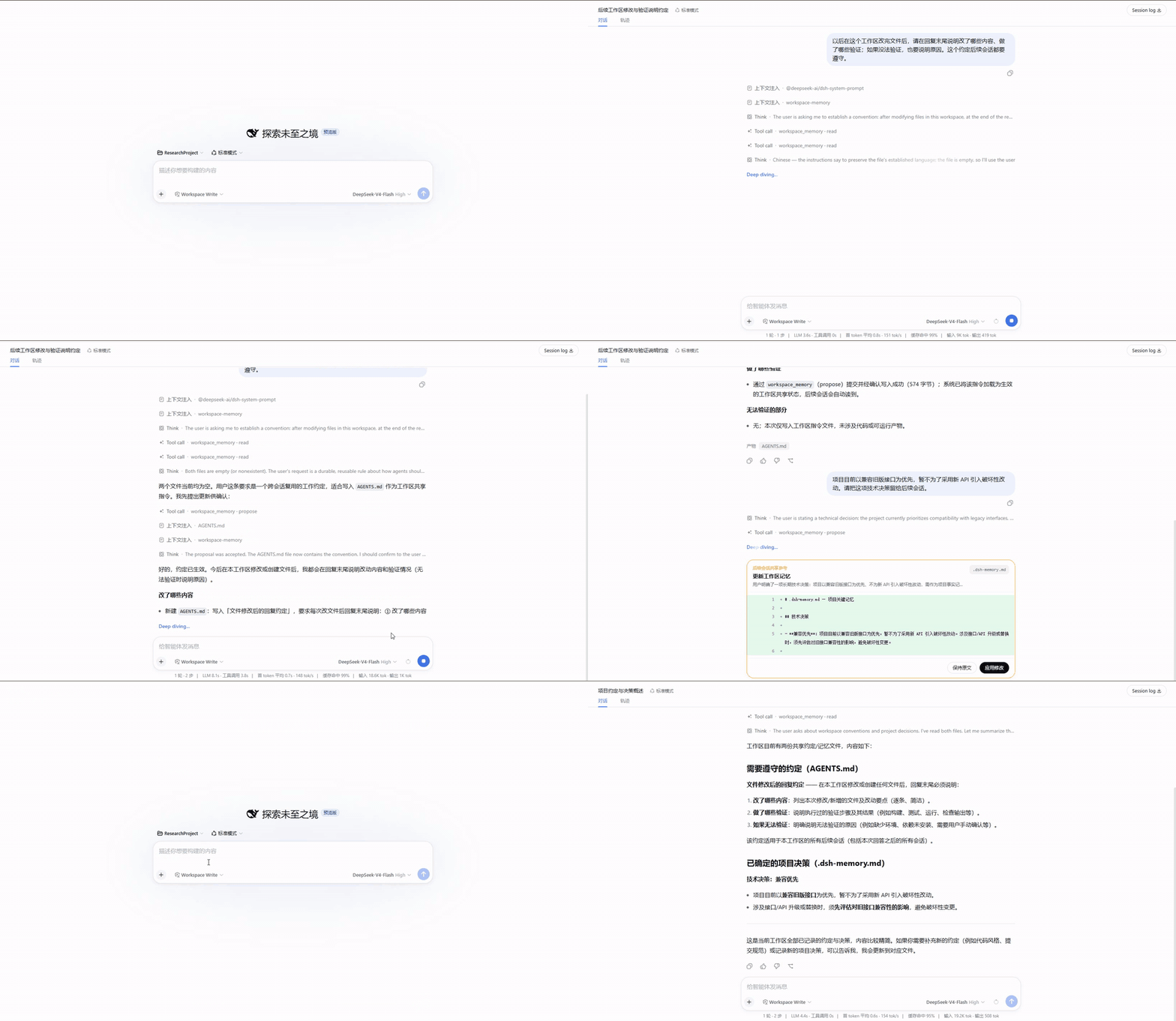
When you run multiple conversations in the same workspace, the hardest part is rarely model capability—it is context drift. The working habits, project decisions, and terminology constraints you settled in one session simply vanish by the next. dsh-workspace-memory splits shared context into two layers: reusable behavioral rules live in AGENTS.md, while stable facts, decisions, and terminology are kept in .dsh-memory.md. Both are ordinary Markdown files in the session working directory, readable, reviewable, and versionable without a database, embeddings, or any cloud service.
Its signature design is the approval gate. When the model identifies a piece of feedback worth keeping long-term, it does not write silently. It first reads the full target document, integrates the smallest coherent edit into the relevant section, and then presents a focused diff for line-by-line review. The file is written only after the user confirms, and the observed file version is re-checked at write time—stale proposals based on an older version are rejected outright. On DSH Web you get a dedicated review card with line numbers, colored additions and removals, and collapsed unchanged sections; other clients fall back to Markdown.
If you use DeepSeek Harness to run parallel conversations in one workspace, need to persist team working conventions and key project decisions, and want to avoid bolting on a memory service or vector database, this plugin is built for you. It keeps concurrent conversations aligned, makes every inferred write transparent and opt-in, and keeps the entire memory layer local, inspectable, and free of network calls.
Screenshots
Use Cases
- Run multiple conversations in one workspace with shared working rules and project decisions
- Persist team-level working conventions so every session starts with full context
- Maintain auditable project memory without a database, embeddings, or cloud service
Best For
- Developers using DeepSeek Harness for multi-turn collaboration who want context continuity across sessions
- Tech leads who need project decisions and team conventions persisted as version-controlled files
- Power users who prefer a zero-network, fully local and inspectable workflow
Related Plugins

Memory layer for coding agents that indexes local session history and auto-recalls relevant context before edits, commands, and failures, with no manual search needed.

Traceable, searchable cross-session memory for AI agents that turns conversation knowledge into a typed knowledge graph and recalls relevant subgraphs instead of replaying full history, natively integrated with DeepSeek Harness.
Gives DSH AI cross-session long-term memory, to-do and skill management, plus multi-session orchestration, external AI delegation, and an infinite canvas that grows with you.

dsh-mnemon is a three-tier, pluggable, Agent-driven memory system for DeepSeek Harness, combining Runtime memory, Project Documents, and replaceable Memory Spaces with nine long-term providers.