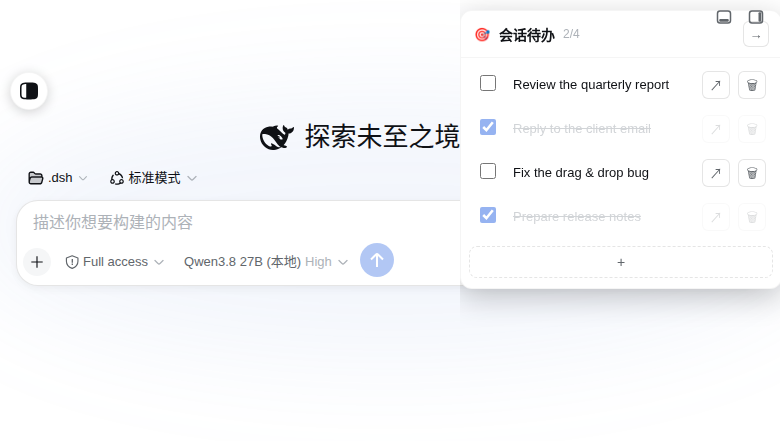
dsh-session-todos
Run the following command in DeepSeek Harness:
dsh plugin install seeingrain/dsh-session-todos
Paste the following prompt into your AI chat to install this plugin:
Run dsh plugin install seeingrain/dsh-session-todos in your terminal to install; source code at https://github.com/seeingrain/dsh-session-todos . After installing, restart dsh-web or hard-refresh the browser (Ctrl+Shift+R).
About this plugin
When you hop between multiple DSH conversations, those fleeting sub-tasks have nowhere native to land. You either break focus to open a note app or juggle them in your head and lose the thread. dsh-session-todos tucks a lightweight todo panel into the top-right corner of the chat area: expand it to break down tasks, check items off, drag-to-reorder by long-pressing, and push task text straight into the message input box—all without leaving the current conversation.
Every list is persisted as a JSON file under the DSH home directory (~/.dsh/dsh-session-todos/) rather than in browser localStorage. Switch machines, log in, and the same checklist is right there. Conversations that still have unfinished tasks also get a small badge in the sidebar, so a quick glance tells you where to pick up.
The plugin is split into a host half and a client half, both self-contained and registered through official DSH slots and routes. No DSH source code is patched. It is built for power users who run many parallel DSH sessions, need to decompose and track sub-tasks inline, and want consistent task state across devices. Install and go; uninstall and it is gone.
Screenshots
Use Cases
- Track and check off sub-tasks in each conversation while juggling multiple parallel DSH sessions
- Break a long multi-step task into trackable items, then push finished text back into the input box to continue
- Log in on a different machine and instantly see which sessions still have unfinished work
- Spot the right session at a glance via the sidebar badge among dozens of conversations
Best For
- Power users who run many parallel DSH sessions and need inline sub-task tracking
- Developers who prefer pure plugin solutions without patching any DSH source code
- Remote workers who want consistent task state across multiple devices
Related Plugins

Memory layer for coding agents that indexes local session history and auto-recalls relevant context before edits, commands, and failures, with no manual search needed.

Traceable, searchable cross-session memory for AI agents that turns conversation knowledge into a typed knowledge graph and recalls relevant subgraphs instead of replaying full history, natively integrated with DeepSeek Harness.
Gives DSH AI cross-session long-term memory, to-do and skill management, plus multi-session orchestration, external AI delegation, and an infinite canvas that grows with you.

dsh-mnemon is a three-tier, pluggable, Agent-driven memory system for DeepSeek Harness, combining Runtime memory, Project Documents, and replaceable Memory Spaces with nine long-term providers.