
dsh-ui-skin-switcher
Run the following command in DeepSeek Harness:
dsh plugin install domitor-syh/dsh-ui-skin-switcher
Paste the following prompt into your AI chat to install this plugin:
Run dsh plugin install domitor-syh/dsh-ui-skin-switcher in your terminal to install this plugin; the source code lives at https://github.com/domitor-syh/dsh-ui-skin-switcher. Restart dsh web after installation to see the switcher appear.
About this plugin
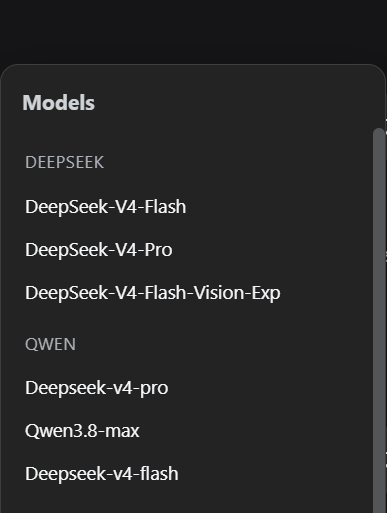
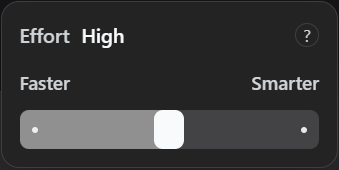
Switching models or dialing in the reasoning effort in DeepSeek Harness Web usually means opening the /model panel, scrolling through a list, and confirming--solid, but a few clicks more than you need in the middle of a conversation. dsh-ui-skin-switcher collapses both actions into a single floating toggle right next to the input box: drop down to pick a model, slide to tune the effort, and the change takes effect immediately through the same session.models / session.selectModel channel the first-party selector uses.
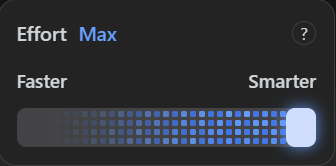
Under the hood, the widget renders a vendor-grouped model list, a multi-step reasoning-effort slider (click or drag), a subtle dot-sweep animation when you hit the top tier, and per-model memory so your last chosen strength is waiting when you switch back. Every colour is wired to DSH theme variables, so dark mode, light mode, and transparent-background skins all stay legible; on see-through backdrops the overlay automatically engages a frosted-glass blur to keep text readable.
If you live in the DSH Web UI, swap models and tweak inference strength a lot, or simply enjoy the tactile, rounded-track feel of Claude Desktop's switcher, this plugin shaves a step off every change and keeps the controls right where your attention already is.
Screenshots
Use Cases
- Switch between models on the fly without opening the /model panel
- Tweak reasoning effort mid-conversation to balance speed and depth
- Keep the switcher legible under transparent-background themes
Best For
- DSH Web power users who swap models and tune effort often
- Developers who prefer the tactile, rounded-track feel of Claude Desktop
- Users who need per-model effort memory to avoid re-tuning on every switch
Related Plugins
A unified suite combining hot runtime injection, task-aware thinking-mode routing, and a graded session protocol with red-team gates to sustain model diligence across long-horizon inference.

ModLens is a vision plugin for DeepSeek Harness that gives text-only models sight by reading images pasted directly into chat, with zero-config setup and multiple vision engines.

On-demand vision for text-only DeepSeek Harness agents: built-in free keyless vision chain and 14 vision tools, routing image turns as tool calls to vision models with pixel fidelity, no Python needed, one-command install.

Give text-only models in DeepSeek Harness eyes, enabling image Q&A, long-screenshot OCR, UI restoration, and GUI visual tasks.