dsh-localtts
Run the following command in DeepSeek Harness:
dsh plugin install abbccdd/dsh-localtts
Paste the following prompt into your AI chat to install this plugin:
Run dsh plugin install abbccdd/dsh-localtts in the DeepSeek Harness terminal to install; the source is available at https://github.com/abbccdd/dsh-localtts .
About this plugin
DeepSeek Harness assistant replies are text-only by default, and getting them read aloud usually means spinning up a separate WebUI or calling an external TTS service. dsh-localtts folds that workflow into Harness itself: point it at an IndexTTS 2.5 or GPT-SoVITS project you already have running, and the plugin launches a lightweight JSONL worker, sends one natural sentence per request, and streams the resulting audio back in the browser. No extra inference page, no HTTP microservice to babysit.
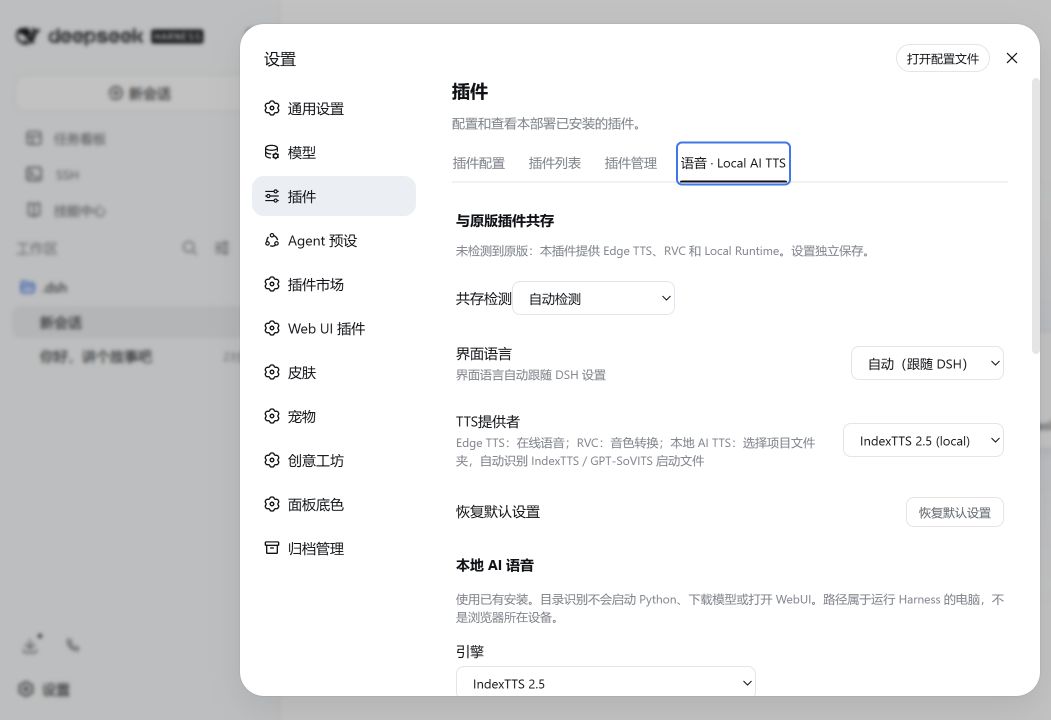
At its core the plugin is a local-process connector. It does not install, retrain, or ship any model weights; it simply starts the Python project and worker command you configure. The settings panel reduces setup to three fields—engine, project folder, and reference audio—with automatic file discovery for common wrapper directories. Advanced options cover external Python environments, custom model paths, and GPT-SoVITS reference-transcript alignment. During streaming, Harness can be generating sentence 3 while the runtime synthesizes sentence 2 and the browser plays sentence 1. Pause, resume, and stop controls are built in, and the Auto Read toggle lets you choose between reading only new messages or triggering manual reads. Repeated React renders and duplicate event sequence numbers never cause the same reply to replay.
The plugin is a good fit for developers who already have a local TTS model (IndexTTS 2.5 or GPT-SoVITS) and want all speech to stay on their machine without maintaining a separate WebUI. It coexists cleanly with the original dsh-plugin-tts: when the original is detected, local companion mode activates automatically, keeping only the local-process providers while Edge/RVC and cloud features remain with the original. Both plugins keep independent settings, and saving or uninstalling one never overwrites the other. On privacy, text travels only between the Harness Host and the local worker, loopback is the default, LAN endpoints require explicit consent, and there is no silent cloud fallback.
Screenshots
Use Cases
- Read Harness assistant replies aloud sentence-by-sentence with a local model, without opening a separate WebUI
- Integrate TTS into the Harness conversation loop using an existing IndexTTS or GPT-SoVITS install, with no extra HTTP service
- Keep all speech synthesis on the local machine with zero cloud round-trips for privacy-sensitive work
Best For
- Harness users who have IndexTTS 2.5 or GPT-SoVITS running locally and want on-device speech
- Privacy-first users who refuse cloud TTS such as Edge Read Aloud and need fully local playback
- Developers who need the JSONL worker protocol to plug their own TTS pipeline into Harness
Related Plugins
A unified suite combining hot runtime injection, task-aware thinking-mode routing, and a graded session protocol with red-team gates to sustain model diligence across long-horizon inference.

ModLens is a vision plugin for DeepSeek Harness that gives text-only models sight by reading images pasted directly into chat, with zero-config setup and multiple vision engines.

On-demand vision for text-only DeepSeek Harness agents: built-in free keyless vision chain and 14 vision tools, routing image turns as tool calls to vision models with pixel fidelity, no Python needed, one-command install.

Give text-only models in DeepSeek Harness eyes, enabling image Q&A, long-screenshot OCR, UI restoration, and GUI visual tasks.