dsh-cap-profile
Run the following command in DeepSeek Harness:
dsh plugin install Ansonfishing/dsh-cap-profile
Paste the following prompt into your AI chat to install this plugin:
Visit the source at https://github.com/Ansonfishing/dsh-cap-profile for documentation, then run dsh plugin install Ansonfishing/dsh-cap-profile inside DSH to install the plugin.
About this plugin
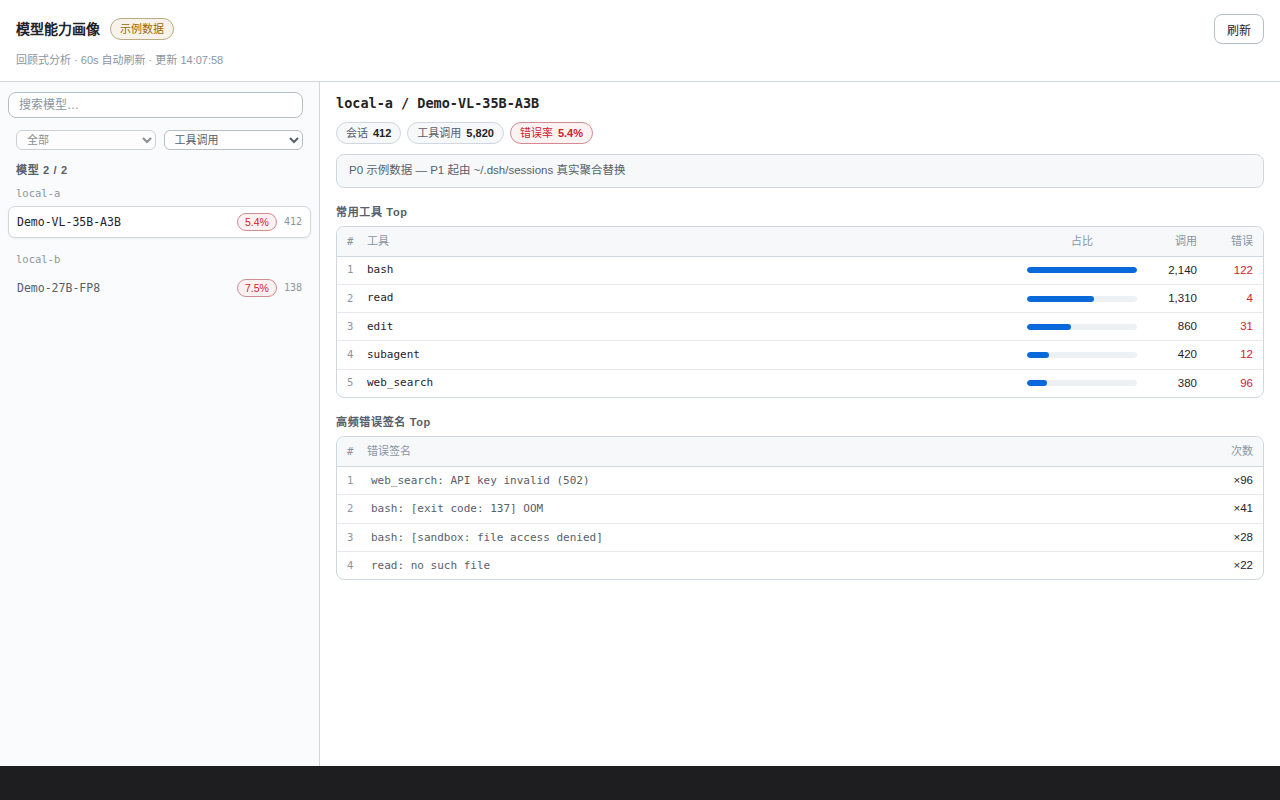
The more sessions you run, the harder it becomes to answer a simple question: which model is rock-solid on certain tasks and which one keeps tripping up on others. Scrolling through raw logs is slow; manual tallies inevitably miss patterns. dsh-cap-profile turns DSH (DeepSeek Harness) session history into a capability profile panel that shows, at a glance, each model s session count, tool-call volume, error rate, most-relied-upon tools, and highest-frequency error signatures.
The panel goes well beyond a single-model view. Select up to four models to enter a side-by-side comparison: convergent metrics auto-highlighted, a tool Top-10 matrix, top-5 recurring errors, and daily call/error trend mini-bars all laid out for quick differential reading. Time-range filters cover all-time, last 7 / 30 / 90 days, today, and yesterday, anchored to the latest date in the data so system clock drift is a non-issue.
Under the hood it is strictly read-only and never mutates session data. A per-file mtime baseline drives a 60-second incremental and 24-hour full refresh cycle in the background; if the initial scan is still running, the route falls back to the previous cache or mock data without blocking. Zero runtime dependencies, pure Node.js. If you run heavy DSH sessions daily and want to quickly gauge how models differ across task types, this panel saves you from hours of log-digging.
Screenshots
Use Cases
- Checking which model has the highest error rate on bash tasks
- Comparing two models on tool-call volume and stability
- Reviewing error signatures and tool usage distribution over the last 30 days
Best For
- Developers running heavy DSH sessions daily
- AI engineers who need to quickly gauge model capability boundaries
- Teams that want data-driven model selection instead of log-digging
Related Plugins
A unified suite combining hot runtime injection, task-aware thinking-mode routing, and a graded session protocol with red-team gates to sustain model diligence across long-horizon inference.

ModLens is a vision plugin for DeepSeek Harness that gives text-only models sight by reading images pasted directly into chat, with zero-config setup and multiple vision engines.

On-demand vision for text-only DeepSeek Harness agents: built-in free keyless vision chain and 14 vision tools, routing image turns as tool calls to vision models with pixel fidelity, no Python needed, one-command install.

Give text-only models in DeepSeek Harness eyes, enabling image Q&A, long-screenshot OCR, UI restoration, and GUI visual tasks.