dsh-cachescope
Run the following command in DeepSeek Harness:
dsh plugin install kober-basket/dsh-cachescope
Paste the following prompt into your AI chat to install this plugin:
Run dsh plugin install kober-basket/dsh-cachescope in DeepSeek Harness to install; the source is hosted at https://github.com/kober-basket/dsh-cachescope .
About this plugin
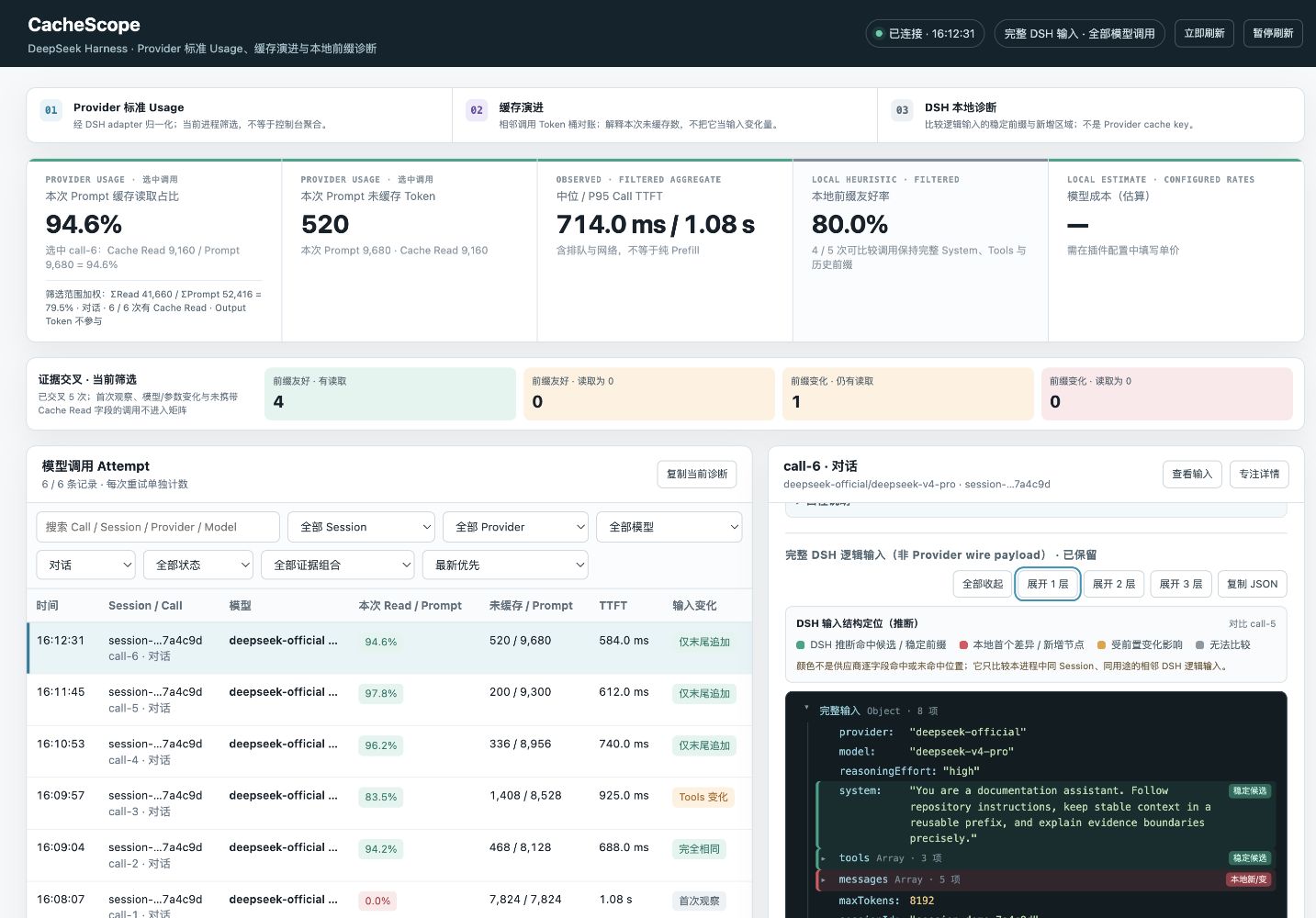
Every LLM call returns a usage field with scattered token counts—Cache Read, Cache Write, Prompt, Output—but those numbers sit orphaned in logs and answer none of the questions that matter: "How much of this call actually hit the prompt cache?" or "Why did the uncached portion grow compared to the previous turn?" CacheScope places provider-reported cache metrics side-by-side with the DSH-side diff between two adjacent logical inputs, giving you a single local panel that makes cache-hit behaviour and input drift visible at a glance.
The desktop dashboard records llm/stream attempts and surfaces a token-weighted Cache Read ratio, an arithmetic reconciliation of how the uncached bucket shifted (Delta-Prompt minus Delta-Cache Read minus Delta-Cache Write), a colour-coded input tree (stable prefix, first local difference, downstream regions, no-baseline regions), plus TTFT, total duration, retries, and filtering and sorting by Session, provider, model, and purpose. It does not modify model requests or register model-visible tools; all data lives in DSH process memory and vanishes when the process stops.
Ideal for developers and prompt engineers who iterate on System Prompts, tool schemas, or message history inside DSH and need a low-cost way to investigate dropping cache-hit rates, sanity-check token costs, or build reproducible evidence for a provider support ticket. No extra deployment required—just start DSH with the WebServer bound to loopback and open the panel.
Screenshots
Use Cases
- Investigate why the cache-hit ratio dropped after adjusting the System Prompt or tools
- Diff two adjacent calls to pinpoint exactly where uncached tokens grew
- Estimate per-call token cost and TTFT performance from a local panel
Best For
- Developers iterating on prompts, tool schemas, or message history
- Engineers filing provider cache-complaint bugs with reproducible evidence
- Prompt engineers tracking token cost and inference latency
Related Plugins
A unified suite combining hot runtime injection, task-aware thinking-mode routing, and a graded session protocol with red-team gates to sustain model diligence across long-horizon inference.

ModLens is a vision plugin for DeepSeek Harness that gives text-only models sight by reading images pasted directly into chat, with zero-config setup and multiple vision engines.

On-demand vision for text-only DeepSeek Harness agents: built-in free keyless vision chain and 14 vision tools, routing image turns as tool calls to vision models with pixel fidelity, no Python needed, one-command install.

Give text-only models in DeepSeek Harness eyes, enabling image Q&A, long-screenshot OCR, UI restoration, and GUI visual tasks.