dsh-cot-profile
Run the following command in DeepSeek Harness:
dsh plugin install Chloride233/dsh-cot-profile
Paste the following prompt into your AI chat to install this plugin:
In DeepSeek Harness, you can install this plugin by running the command dsh plugin install Chloride233/dsh-cot-profile, with the full source code at https://github.com/Chloride233/dsh-cot-profile.
About this plugin
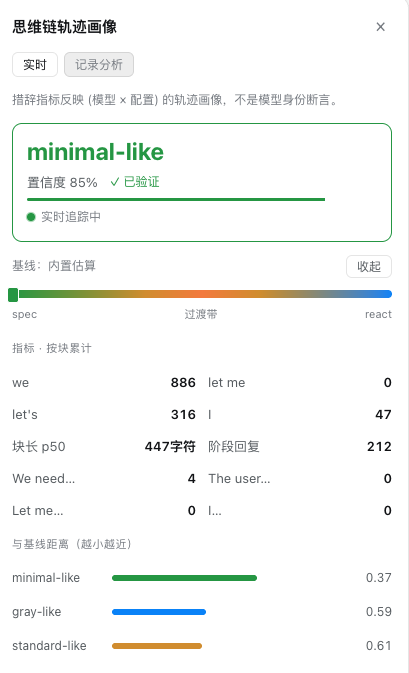
When using DeepSeek Harness, understanding the model's reasoning trajectory in real time can be opaque. The dsh-cot-profile plugin addresses this by offering a live window into the chain-of-thought as it unfolds. By tracking indicators like 'let me', 'we', and comparing them against configurable baselines, it classifies the current session's reasoning pattern—whether it leans toward a collective, spec-driven voice or a first-person, reactive style, or falls into an ambiguous transition zone. This analysis focuses not on labeling the model itself, but on revealing behavioral tendencies under specific assemblies (system prompts, tool schemas, reasoning effort), helping users grasp the 'flavor' of their current setup.
Its core strengths lie in a lightweight yet insightful monitoring system: a non-intrusive badge and collapsible panel update in real time via session projection, and an optional record mode stores per-turn aggregates (never raw text) for calibration. Ideal for developers and researchers engaged in prompt engineering, preset comparison, or simply seeking greater transparency into model reasoning, the plugin provides an extensible, privacy-conscious toolkit. Whether for controlled probe experiments or everyday use, it turns model behavior from guesswork into observable, data-informed insight.
Screenshots
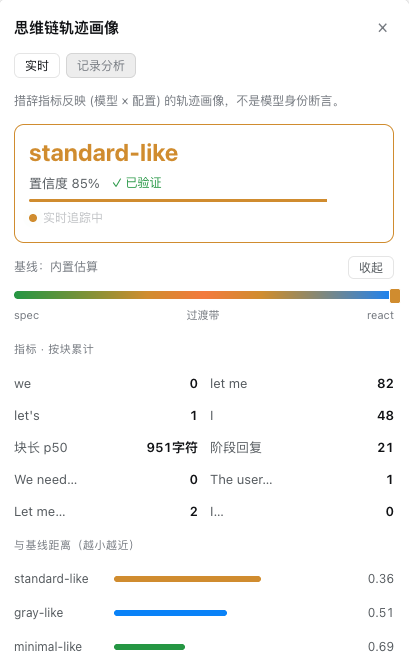
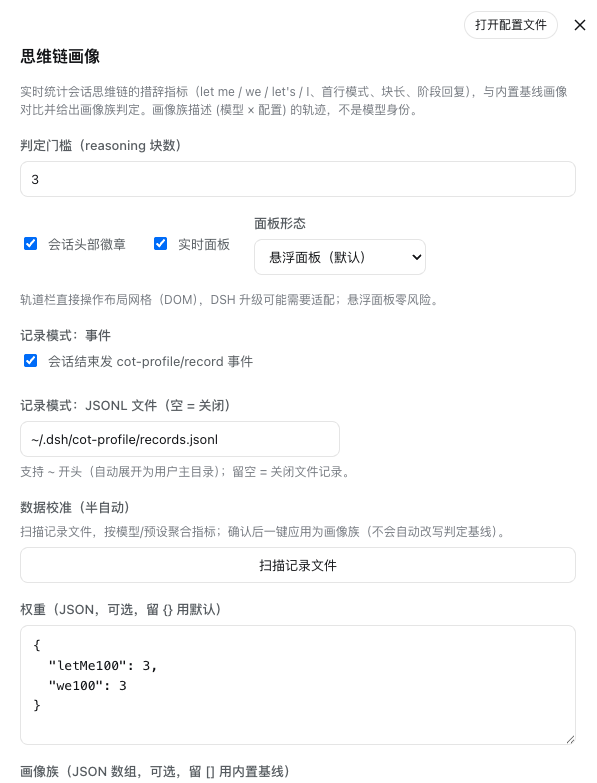
Use Cases
- Debug prompt engineering to optimize model reasoning patterns.
- Compare reasoning behavior differences under various system prompts or presets.
- Conduct controlled probe experiments to verify the impact of assembly configurations on chain-of-thought trajectories.
Best For
- AI developers and researchers needing deep analysis of model reasoning processes.
- Prompt engineers and model testers aiming to optimize and debug interactive configurations.
- Advanced users seeking transparent observation of real-time model thinking evolution in sessions.
Related Plugins
A unified suite combining hot runtime injection, task-aware thinking-mode routing, and a graded session protocol with red-team gates to sustain model diligence across long-horizon inference.

ModLens is a vision plugin for DeepSeek Harness that gives text-only models sight by reading images pasted directly into chat, with zero-config setup and multiple vision engines.

On-demand vision for text-only DeepSeek Harness agents: built-in free keyless vision chain and 14 vision tools, routing image turns as tool calls to vision models with pixel fidelity, no Python needed, one-command install.

Give text-only models in DeepSeek Harness eyes, enabling image Q&A, long-screenshot OCR, UI restoration, and GUI visual tasks.