dsh-connect-workbuddy
Run the following command in DeepSeek Harness:
dsh plugin install dingminhua/dsh-connect-workbuddy
Paste the following prompt into your AI chat to install this plugin:
Run dsh plugin install dingminhua/dsh-connect-workbuddy inside DeepSeek Harness to install the plugin; the source repository is at https://github.com/dingminhua/dsh-connect-workbuddy .
About this plugin
If you use the WorkBuddy desktop app alongside DeepSeek Harness, switching models in DSH used to mean manually juggling credentials, checking credit balances, and scrolling through model lists. dsh-connect-workbuddy bridges your locally logged-in WorkBuddy (China) account directly into the DSH model selector, eliminating that repetitive overhead.
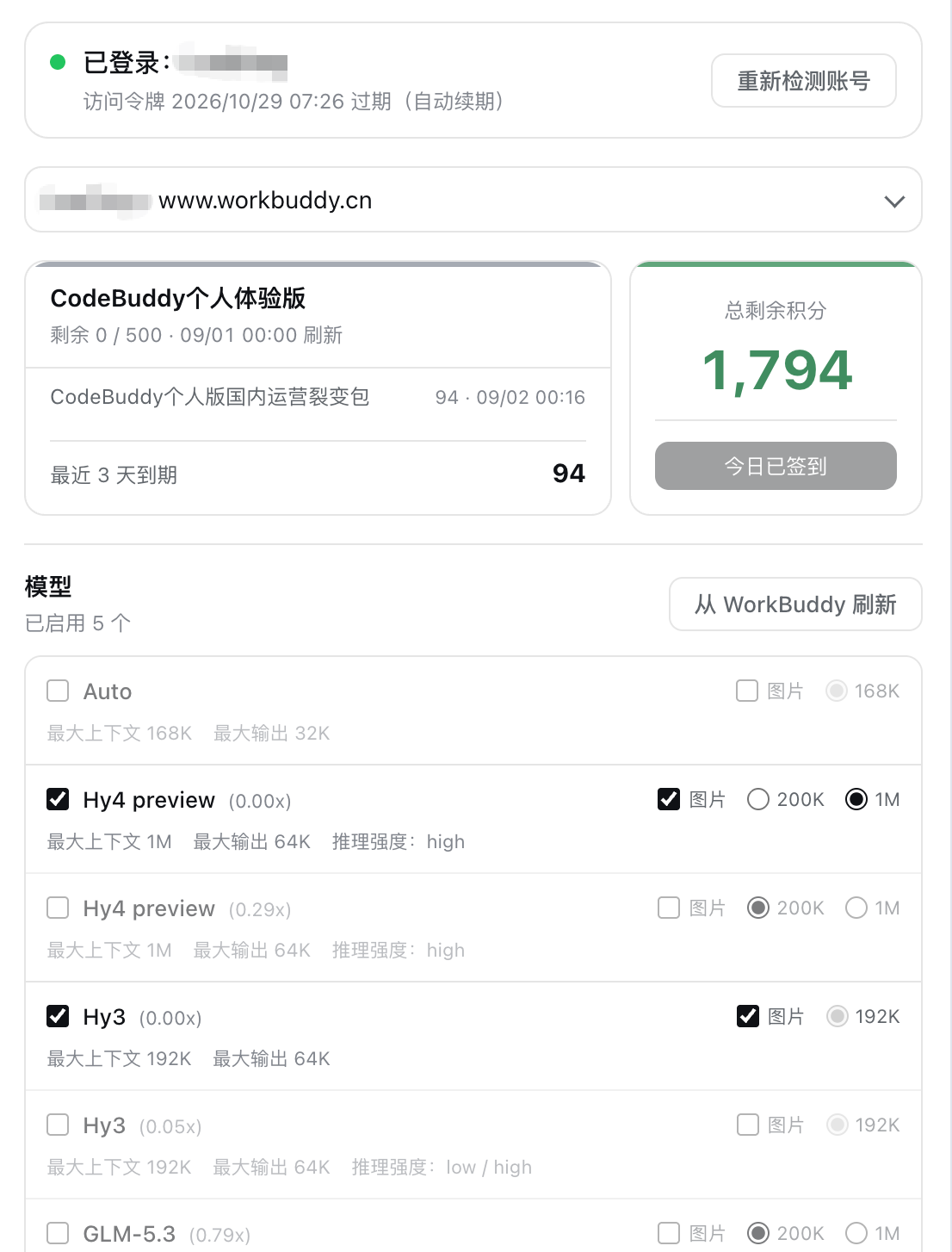
The plugin registers WorkBuddy upstream models such as GLM-5, DeepSeek-V4-Pro, Kimi-K3, MiniMax-M3, and Hy3 as a dedicated workbuddy provider, and ships a read-only model management panel: refresh the full catalog, toggle individual models on or off, and inspect credit multipliers and context limits per model. A consolidated credit overview grouped by plan is included as well (queries cost no credits), along with account switching based on the desktop app's credential history. Security is handled via a loopback shim with a random port and in-process random secret, so real tokens never pass through any external component. CLI commands for status, doctor, and logout let you verify sessions without opening a browser.
Best suited for individual developers who already have a WorkBuddy China desktop login and want DSH as a single inference entry point. No official open API is needed; the plugin reuses the app's own login state and works across Web, Desktop, and TUI interfaces, with automatic credential path discovery on macOS, Windows, and Linux.
Screenshots
Use Cases
- Invoke GLM, DeepSeek, and Kimi models from a WorkBuddy account directly inside the DSH model selector without manual credential switching.
- Refresh the upstream catalog, toggle individual models on or off, review credit multipliers and context limits, then save to apply.
- Run status or doctor from the CLI to verify login state and remaining credits without opening a browser.
Best For
- Individual developers who use both the WorkBuddy desktop app and DeepSeek Harness.
- DSH users who want a single entry point for managing models across multiple inference providers.
- Technical users who prefer CLI-based diagnostics for login state and credit balances.
Related Plugins
A unified suite combining hot runtime injection, task-aware thinking-mode routing, and a graded session protocol with red-team gates to sustain model diligence across long-horizon inference.

ModLens is a vision plugin for DeepSeek Harness that gives text-only models sight by reading images pasted directly into chat, with zero-config setup and multiple vision engines.

On-demand vision for text-only DeepSeek Harness agents: built-in free keyless vision chain and 14 vision tools, routing image turns as tool calls to vision models with pixel fidelity, no Python needed, one-command install.

Give text-only models in DeepSeek Harness eyes, enabling image Q&A, long-screenshot OCR, UI restoration, and GUI visual tasks.