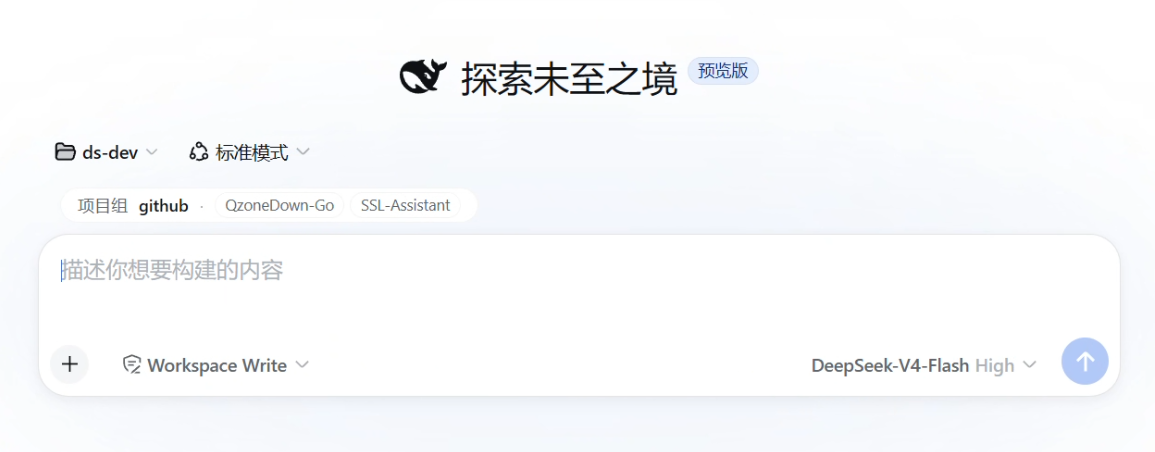
dsh-ProjectModel
Run the following command in DeepSeek Harness:
dsh plugin install Youngxj/dsh-ProjectModel
Paste the following prompt into your AI chat to install this plugin:
Run dsh plugin install Youngxj/dsh-ProjectModel in your DeepSeek Harness terminal to install this plugin (source: https://github.com/Youngxj/dsh-ProjectModel).
About this plugin
Native DeepSeek Harness sessions bind each conversation to a single workspace directory. Want to refactor project A, run tests in project B, then diff the two dependency manifests? You end up spawning new sessions, re-explaining context, and losing the thread. dsh-ProjectModel introduces a project group: register several related folders into one group, and the agent reads files, lists directories, and runs git, npm, or build commands across any folder in the group—all within the same conversation, with no manual workspace switching.\n\nSafety is built in. File operations are scoped to registered folders only; out-of-bounds paths are rejected, and writes are sandboxed to the target folder as its own root, so no global permissions are exposed. In workspace-write mode, standard file tools also pass through group paths without extra approval prompts, keeping the workflow friction-free. All configuration persists in dsh settings, survives restarts, and can be migrated by copying the profile.\n\nThis plugin is ideal for developers who maintain several closely related projects at once—say a Go server paired with a Python utility, or a frontend alongside a shared SDK—and need to cross-reference, batch-edit, or run coordinated builds in one continuous conversation. If your projects form a logical group, put them in one and let the context flow as a single unbroken thread.
Screenshots
Use Cases
- Read and write files, list directories, and run commands across multiple project folders in a single conversation
- Cross-reference manifests, code style, or test output between projects without switching workspaces
- Execute git, npm, or build commands in a per-folder scoped sandbox
Best For
- Developers maintaining several related projects who need chained operations
- DeepSeek Harness users who want to avoid spawning sessions and re-explaining context
- Independent developers or small teams completing multi-project tasks in one continuous conversation
Related Plugins
A unified suite combining hot runtime injection, task-aware thinking-mode routing, and a graded session protocol with red-team gates to sustain model diligence across long-horizon inference.

ModLens is a vision plugin for DeepSeek Harness that gives text-only models sight by reading images pasted directly into chat, with zero-config setup and multiple vision engines.

On-demand vision for text-only DeepSeek Harness agents: built-in free keyless vision chain and 14 vision tools, routing image turns as tool calls to vision models with pixel fidelity, no Python needed, one-command install.

Give text-only models in DeepSeek Harness eyes, enabling image Q&A, long-screenshot OCR, UI restoration, and GUI visual tasks.