dsh-multimodal-router
Run the following command in DeepSeek Harness:
dsh plugin install hanchn/dsh-multimodal-router
Paste the following prompt into your AI chat to install this plugin:
Run dsh plugin install hanchn/dsh-multimodal-router in DeepSeek Harness to install; see https://github.com/hanchn/dsh-multimodal-router
About this plugin
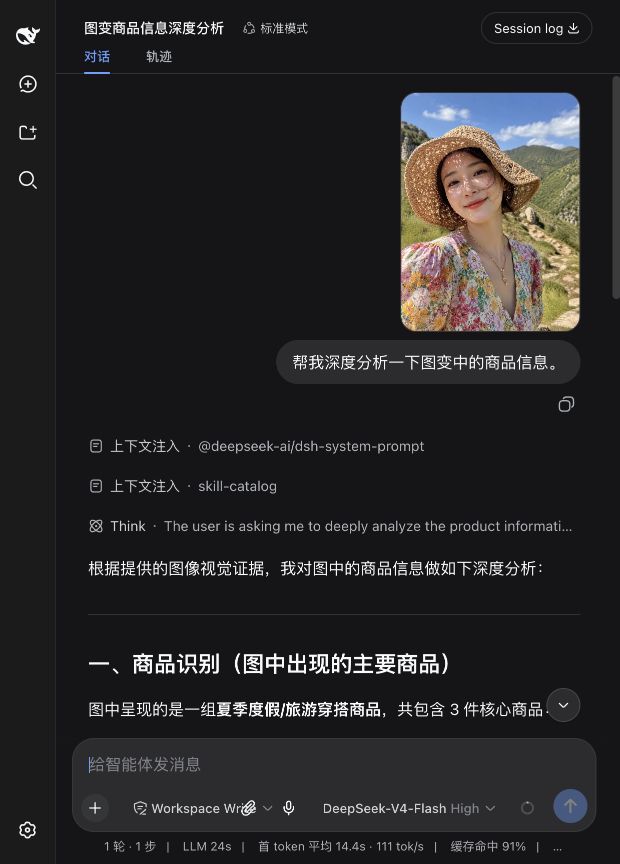
Running DeepSeek locally gives you strong reasoning, but the model still cannot see a single pixel. Paste a UI screenshot or a data chart and you get a polite refusal. dsh-multimodal-router closes that gap: it quietly delegates image perception to a vision-capable model on your local Ollama instance, converts the result into text evidence, and hands it back to DeepSeek — no manual prompt engineering, no endpoint configuration, no model name to remember.
Three pillars define the plugin. First, zero-config discovery: it scans Ollama model metadata to find Gemma 4 and other vision-ready models, accepts images via drag-and-drop, clipboard paste, or a paperclip button, and ships presets for OCR, charts, UI layout, and visible code. Second, local realtime voice: when an audio-capable model (Gemma 4 E2B, E4B, or 12B) and Qwen3-TTS are both available, the composer unlocks a full voice loop — incremental transcription every 1.5 seconds, silence-to-send, local TTS playback, and click-to-interrupt. Third, privacy by default: all routing stays on localhost, remote fallback is off unless you explicitly enable it, API keys are read only from environment variables, and archived filenames carry just a SHA-256 digest with no original name.
If you are a local-LLM developer on Apple Silicon or x86 Mac who wants multimodal capability without images ever leaving the machine, or simply curious about a fully offline realtime voice conversation, this plugin is a low-friction path: install it, drop in an image, and go. Voice components are optional and never break the image pipeline.
Screenshots
Use Cases
- Paste a UI screenshot into local DeepSeek for instant interface and code analysis
- Run OCR and data-chart recognition offline with Gemma 4 via Ollama
- Experience a fully offline realtime voice conversation loop on Apple Silicon
Best For
- Local LLM developers who need multimodal support without images leaving the machine
- Engineers running vision models via Ollama in offline environments
- Tech enthusiasts exploring realtime voice with privacy-first constraints
Related Plugins
A unified suite combining hot runtime injection, task-aware thinking-mode routing, and a graded session protocol with red-team gates to sustain model diligence across long-horizon inference.

ModLens is a vision plugin for DeepSeek Harness that gives text-only models sight by reading images pasted directly into chat, with zero-config setup and multiple vision engines.

On-demand vision for text-only DeepSeek Harness agents: built-in free keyless vision chain and 14 vision tools, routing image turns as tool calls to vision models with pixel fidelity, no Python needed, one-command install.

Give text-only models in DeepSeek Harness eyes, enabling image Q&A, long-screenshot OCR, UI restoration, and GUI visual tasks.