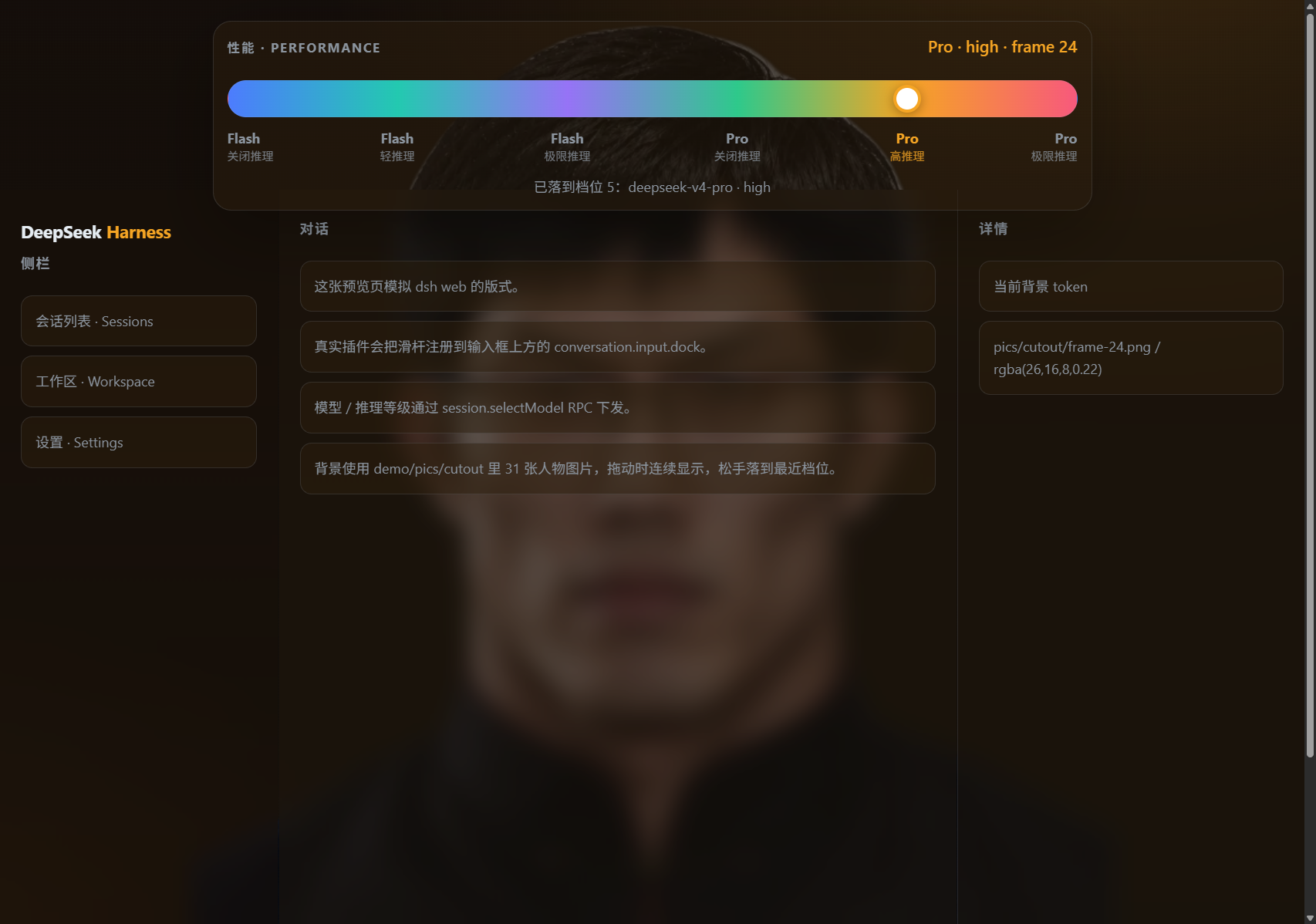
dsh-performance-slider
Run the following command in DeepSeek Harness:
dsh plugin install mobius/dsh-performance-slider
Paste the following prompt into your AI chat to install this plugin:
Run dsh plugin install mobius/dsh-performance-slider in your DeepSeek Harness terminal to install this plugin; the source code is at https://github.com/mobius/dsh-performance-slider .
About this plugin
Switching between models and reasoning-effort tiers in DeepSeek Harness used to mean opening a settings panel, scrolling past unrelated options, and double-checking what you actually changed. dsh-performance-slider collapses that into a single gesture: a Codex-desktop-style 6-level slider that sits directly above the input box. Drag left for a lightweight flash model at minimal reasoning, drag right for the pro tier at maximum effort. Every notch locks in a model plus a reasoning budget in one move, eliminating the cascade of toggles.
While you drag, the background scrubs continuously through 31 locally hosted character cutout frames; release and it snaps to the nearest anchor (frames 0, 6, 12, 18, 24, or 30). A low-opacity theme tint keeps the character visible without hurting text or code readability. Your selection persists in both browser localStorage and a port-independent host-scoped cookie, so even when dsh web launches on a random port each time, the background and model level restore automatically on your next session.
For developers who want to reshape the tiers, the LEVELS table in lib/client.frames.js lets you bind any provider model id per level, with a secondary modelClass (flash / pro) loose match so date-suffixed custom models still resolve correctly. Reasoning effort follows a preferred-then-fallback chain and ultimately falls back to the model-directory default. You can also open demo/index.html in a plain browser to experience the full drag-and-snap interaction without installing DSH at all. This plugin is for dsh web and dsh-desktop users who switch models and reasoning intensity often and prefer one tactile drag over a stack of setting changes, as well as developers who want a little visual personality in the Harness background.
Screenshots
Use Cases
- Switching rapidly between flash and pro models without repeatedly digging through settings
- Getting a tangible sense of the reasoning-effort gradient from off to max
- Having the Harness background showcase a different character cutout per level
Best For
- Everyday dsh web / dsh-desktop users
- Developers who frequently toggle model tier and reasoning intensity
- Harness users who enjoy adding visual personality to their interface
Related Plugins
A unified suite combining hot runtime injection, task-aware thinking-mode routing, and a graded session protocol with red-team gates to sustain model diligence across long-horizon inference.

ModLens is a vision plugin for DeepSeek Harness that gives text-only models sight by reading images pasted directly into chat, with zero-config setup and multiple vision engines.

On-demand vision for text-only DeepSeek Harness agents: built-in free keyless vision chain and 14 vision tools, routing image turns as tool calls to vision models with pixel fidelity, no Python needed, one-command install.

Give text-only models in DeepSeek Harness eyes, enabling image Q&A, long-screenshot OCR, UI restoration, and GUI visual tasks.