dsh-session-manager
Run the following command in DeepSeek Harness:
dsh plugin install DM-Odyssey/dsh-session-manager
Paste the following prompt into your AI chat to install this plugin:
Run dsh plugin install DM-Odyssey/dsh-session-manager in DeepSeek Harness. Source: https://github.com/DM-Odyssey/dsh-session-manager
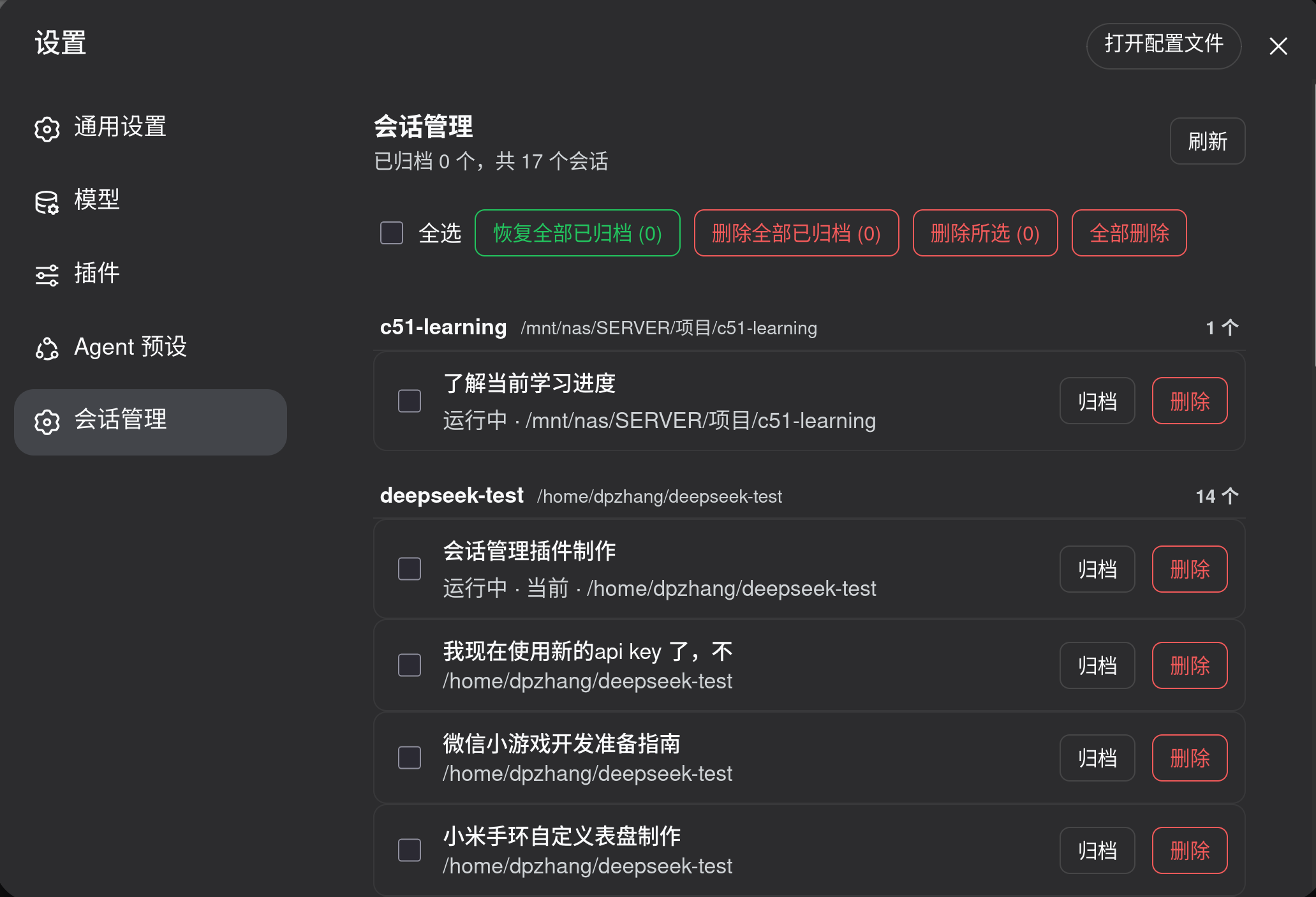
About this plugin
Any long-running DeepSeek Harness install eventually accumulates a sidebar full of sessions: archived ones are hard to recover, and a simple hide leaves workspace accounting, archive entries, and on-disk logs all in place. dsh-session-manager pulls every action into a single Settings page grouped by workspace, where each row offers archive, restore, or delete, and batch operations (delete selected, delete all archived, restore all archived) cover the rest in one click. Deletion is real: workspace accounting is removed, the archive entry is hidden, and the session.jsonl log is purged from disk, with cold sessions cleared immediately and running ones swept after they stop. As a deployment-level plugin it loads automatically on every restart and persists its state across sessions, making it ideal for teams or power users who maintain many long-lived sessions and need tight control over disk usage.
Screenshots
Use Cases
- The sidebar is cluttered with past sessions and you need batch restore or delete grouped by workspace
- Archived sessions disappeared from the sidebar and you need a dedicated page to bring them back
- Multiple workspaces mix their sessions together and you want to archive, delete, and verify log cleanup row by row
Best For
- DeepSeek Harness users who maintain many long-lived sessions on a single deployment
- Teams that need tight control over session lifecycle and disk footprint
- Ops engineers who prefer deployment-level plugins that load automatically on restart
Related Plugins

Memory layer for coding agents that indexes local session history and auto-recalls relevant context before edits, commands, and failures, with no manual search needed.

Traceable, searchable cross-session memory for AI agents that turns conversation knowledge into a typed knowledge graph and recalls relevant subgraphs instead of replaying full history, natively integrated with DeepSeek Harness.
Gives DSH AI cross-session long-term memory, to-do and skill management, plus multi-session orchestration, external AI delegation, and an infinite canvas that grows with you.

dsh-mnemon is a three-tier, pluggable, Agent-driven memory system for DeepSeek Harness, combining Runtime memory, Project Documents, and replaceable Memory Spaces with nine long-term providers.