dsh-inline-comments
Run the following command in DeepSeek Harness:
dsh plugin install zenvertao/dsh-inline-comments
Paste the following prompt into your AI chat to install this plugin:
Run dsh plugin install zenvertao/dsh-inline-comments in your terminal to install the inline annotation plugin; source is available at https://github.com/zenvertao/dsh-inline-comments . Restart dsh web after installation to activate it.
About this plugin
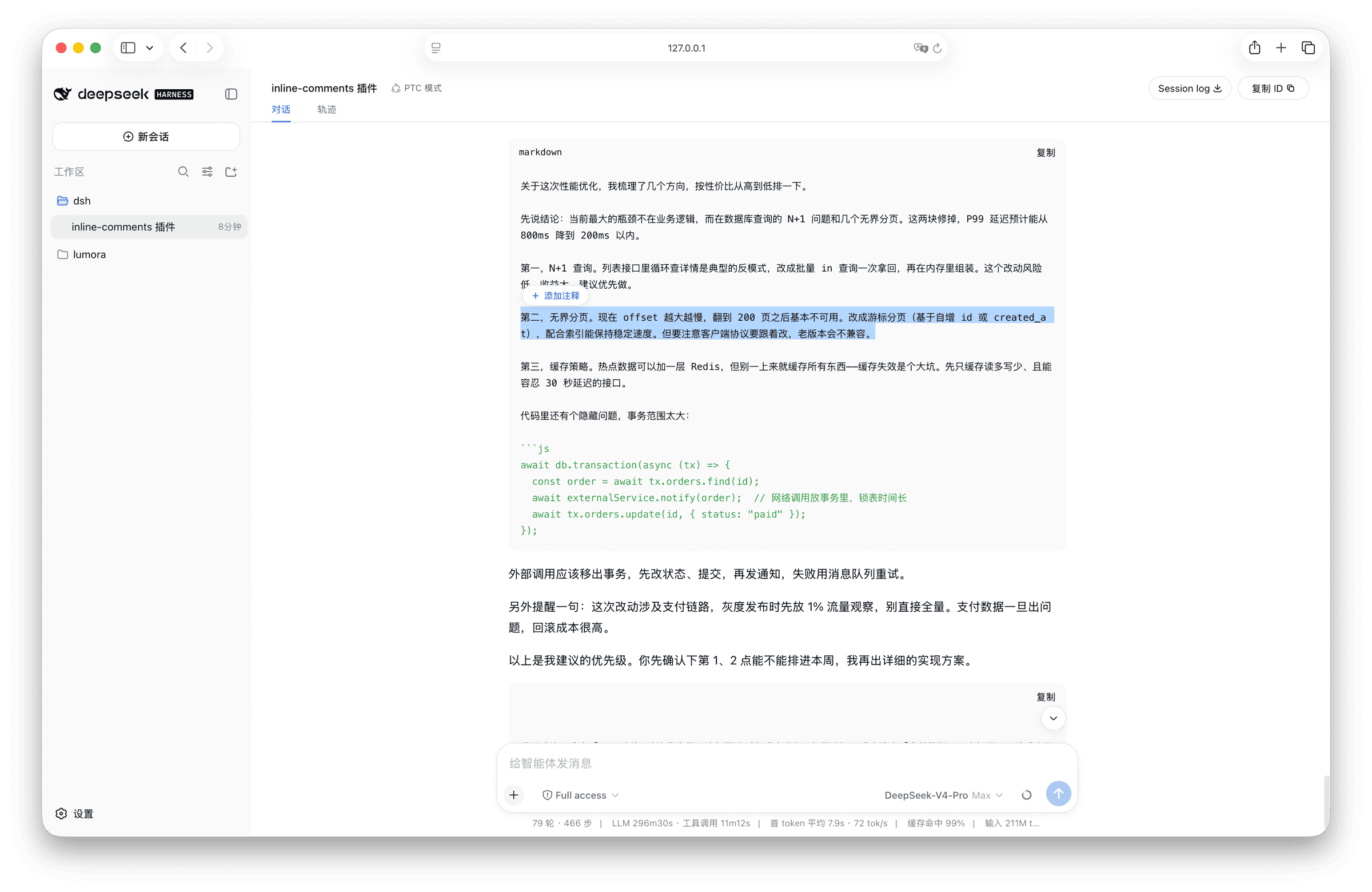
When iterating with an AI assistant, pinpointing exactly which sentence went wrong usually means typing yet another paragraph of explanation. dsh-inline-comments anchors your feedback directly to the offending text so context and correction stay together.
The core workflow is simple: select any span of the assistant reply, add a note, and the text highlights with a numbered badge. A capsule above the input box lets you review, pin, or delete individual annotations. On send, the annotations are serialized into a structured summary that precedes your message, so the model addresses each one in its next turn. Annotations survive page refreshes via a local JSON file and are consumed after sending; the plugin supports both languages and adapts to light or dark themes automatically.
Built for developers, researchers, and anyone who prefers a read-while-annotating style and wants the lowest-friction way to tell an AI exactly where they disagree.
Screenshots
Use Cases
- Pinpoint a specific sentence in a multi-turn reply and request item-by-item correction
- Annotate while reading a long response, manage notes centrally, and submit in one go
- Annotations persist across page refreshes so you resume without re-marking
Best For
- Developers and researchers who prefer a read-while-annotating workflow
- Anyone who wants the model to address a specific sentence rather than re-describe context
- DSH Web users who value annotation persistence and automatic theme adaptation
Related Plugins

Traceable, searchable cross-session memory for AI agents that turns conversation knowledge into a typed knowledge graph and recalls relevant subgraphs instead of replaying full history, natively integrated with DeepSeek Harness.
Gives DSH AI cross-session long-term memory, to-do and skill management, plus multi-session orchestration, external AI delegation, and an infinite canvas that grows with you.

dsh-mnemon is a three-tier, pluggable, Agent-driven memory system for DeepSeek Harness, combining Runtime memory, Project Documents, and replaceable Memory Spaces with nine long-term providers.
An opinionated, zero-infrastructure file-based memory protocol: human-readable markdown files plus a bounded always-loaded index, curation discipline, and no database or embeddings.