deepseek-harness-compaction-ui
Run the following command in DeepSeek Harness:
dsh plugin install preflower/deepseek-harness-compaction-ui
Paste the following prompt into your AI chat to install this plugin:
Run dsh plugin install preflower/deepseek-harness-compaction-ui in your terminal to install this plugin. Source repository: https://github.com/preflower/deepseek-harness-compaction-ui
About this plugin
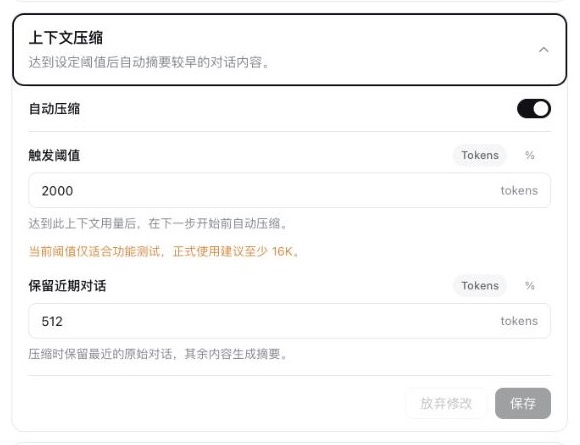
DeepSeek Harness ships with a context compaction engine, but its native configuration is ratio-based and YAML-driven, making it hard to reason about actual token budgets at a glance. This plugin adds a visual configuration card to the Web settings page, styled consistently with native Harness plugin cards, so users can tune compaction without opening a terminal or editing YAML files.
The core capabilities revolve around two things. First, both the trigger threshold and the recent-content retention can be set as a percentage of the model context window or as an absolute token count, with automatic conversion between the two when the unit is switched. Second, configuration is hot-reloaded on save, so there is no need to recreate a session. A small progress ring sits next to the input box at all times; hovering over it reveals the current context usage, the auto-compaction threshold, and the occupancy ratio. The ring turns red once the threshold is reached, while a lighter outer ring shows Harness's own context-window occupancy. Independent strategies can also be configured per provider or model.
This plugin is best suited for teams or individuals running long, multi-turn conversations in Harness and needing fine-grained control over the context window, especially when switching between models with different context sizes. It is important to note that this plugin is purely a visual configuration layer. Summary generation, message replacement, checkpointing, persistence, and all other compaction engine logic remain the responsibility of the official @deepseek-ai/dsh-compaction-basic package.
Screenshots

Use Cases
- Tune auto-compaction thresholds on the fly during long conversations
- Set independent compaction policies when switching models with different context windows
- Monitor context usage in real time and anticipate threshold breaches
Best For
- Developers running long conversations in DeepSeek Harness
- AI engineers who need fine-grained token budget control
- Platform teams managing multi-model, multi-provider configurations
Related Plugins

ModLens is a vision plugin for DeepSeek Harness that gives text-only models sight by reading images pasted directly into chat, with zero-config setup and multiple vision engines.

On-demand vision for text-only DeepSeek Harness agents: built-in free keyless vision chain and 14 vision tools, routing image turns as tool calls to vision models with pixel fidelity, no Python needed, one-command install.

Give text-only models in DeepSeek Harness eyes, enabling image Q&A, long-screenshot OCR, UI restoration, and GUI visual tasks.
An armor-breaking plugin for DeepSeek: rewrites instruction priority, expands refusal-blocked phrases, persists across sessions, and shows a green active indicator.