oss-prompt-optimizer
Run the following command in DeepSeek Harness:
dsh plugin install seven282/oss-prompt-optimizer
Paste the following prompt into your AI chat to install this plugin:
Run the installation command in your terminal, or visit https://github.com/seven282/oss-prompt-optimizer to fetch the source code and build it locally to complete the installation.
About this plugin
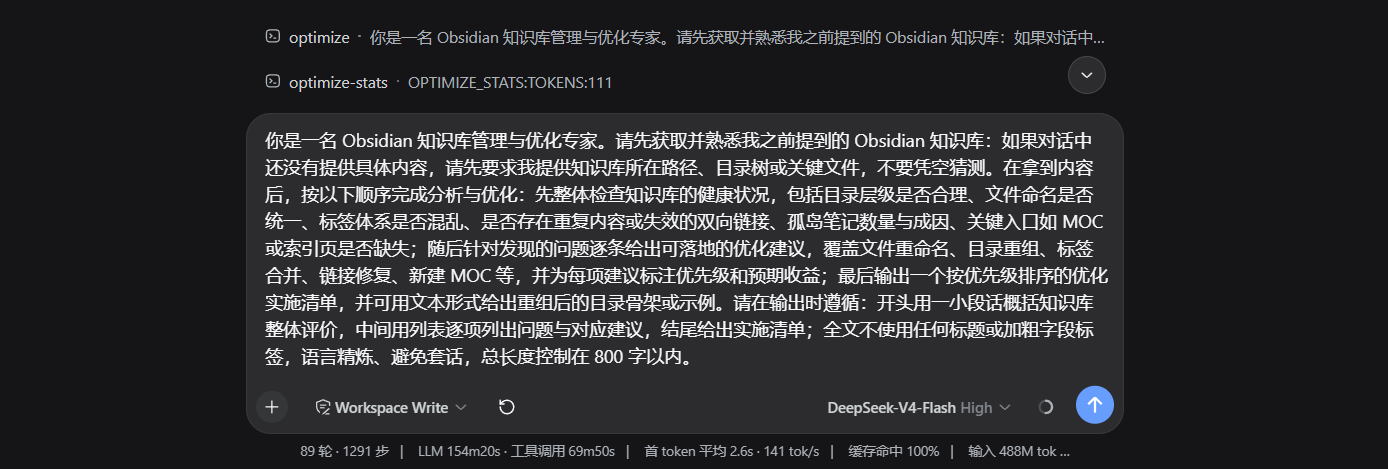
Struggling to translate fleeting ideas or casual requests into precise, high-quality prompts that actually deliver reliable results? The gap between raw intent and model-ready instructions is often the biggest bottleneck in modern AI workflows, and manually refining them can quickly break your creative flow. oss-prompt-optimizer bridges this divide by acting as an intelligent prompt engineering assistant. It automatically transforms your rough drafts into professionally structured, ready-to-execute prompts, eliminating the guesswork and iterative tweaking that typically drain time and focus.
Powered by an embedded meta-prompt engine and deep context awareness, the plugin intelligently extracts roles, tasks, goals, and constraints from your input while seamlessly adapting to multi-language environments. It supports flexible output formats—including plain text, role-task-goal tags, and structured sections—and features real-time iteration, contextual profiling, automated post-validation retries, and a three-tier self-learning preference system that continuously optimizes parameters based on historical feedback. Coupled with a streamlined UI toggle, background auto-optimization hooks, and granular runtime controls, it turns complex prompt crafting into a frictionless workflow tailored for coding, content creation, data analysis, and beyond.
Whether you are an AI developer streamlining application pipelines, a content creator chasing consistent output quality, or a knowledge worker leveraging LLMs to boost daily productivity, this plugin removes the friction from prompt engineering. By automating the refinement process and focusing on actionable, validated results, it lets you concentrate on what truly matters—your core ideas and business logic—while unlocking the full collaborative potential of large language models.
Screenshots
Use Cases
- Instantly upgrading casual requests into professional, ready-to-use instructions
- Automatically enriching roles and constraints using conversation history
- Zero-latency generation of standardized templates for weekly reports and emails
Best For
- Developers and creators seeking higher quality outputs from frequent LLM interactions
- Business professionals relying on AI for copywriting, data analysis, or operational troubleshooting
- Enterprise managers aiming to standardize team prompts and reduce debugging overhead
Related Plugins

ModLens is a vision plugin for DeepSeek Harness that gives text-only models sight by reading images pasted directly into chat, with zero-config setup and multiple vision engines.

On-demand vision for text-only DeepSeek Harness agents: built-in free keyless vision chain and 14 vision tools, routing image turns as tool calls to vision models with pixel fidelity, no Python needed, one-command install.

Give text-only models in DeepSeek Harness eyes, enabling image Q&A, long-screenshot OCR, UI restoration, and GUI visual tasks.
An armor-breaking plugin for DeepSeek: rewrites instruction priority, expands refusal-blocked phrases, persists across sessions, and shows a green active indicator.