dsh-viper-recap
Run the following command in DeepSeek Harness:
dsh plugin install superrabbit123/dsh-viper-recap
Paste the following prompt into your AI chat to install this plugin:
Run dsh plugin install superrabbit123/dsh-viper-recap in DeepSeek Harness to install the plugin; the source is available at https://github.com/superrabbit123/dsh-viper-recap .
About this plugin
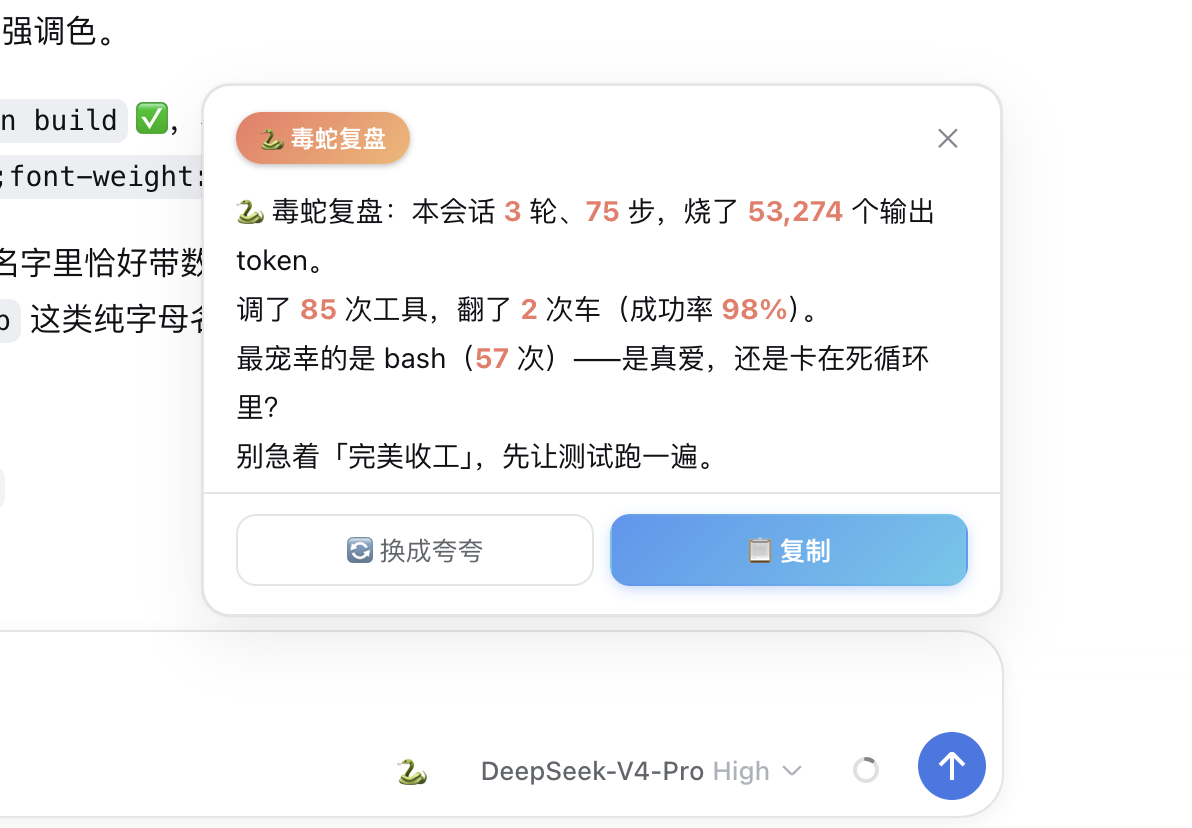
After every session with your AI assistant, you probably want to look back and see what you actually did, how efficiently you worked, and where things went sideways. dsh-viper-recap does exactly that: it folds the current session event log into turns, steps, tool calls, failures, output tokens, and top tools, then renders a deterministic Chinese recap based on those numbers. You can ask it to savage the session or praise you. The text is computed entirely locally, with no extra model call, no API key, and nothing you write ever leaves your machine.
Beyond natural-language triggers, a small snake button sits in the composer. Clicking it opens a floating recap card where you can toggle between roast and toast tones and copy the text with one click. The entire pipeline from log reading to text rendering is deterministic, meaning the same session data always produces the same recap with no dependence on a model improvising on the spot.
Who is it for? Anyone who makes frequent tool calls in Harness and wants a quick snapshot of a session strengths and stumbles. Privacy-conscious users who do not want session summaries processed by an external model. Or simply anyone who wants a sharp-tongued post-mortem after each round to remind themselves to stop fumbling.
Screenshots
Use Cases
- Instantly review the efficiency and tool usage of just-finished session
- Check which tool calls failed and what the failure rate was
- Generate a roast-or-toast one-paragraph summary of the current session
Best For
- Harness users who make heavy tool calls and want per-session metrics
- Privacy-minded developers who do not want session summaries routed through an external model
- Users who enjoy a sharp-tongued post-mortem after every session
Related Plugins

Traceable, searchable cross-session memory for AI agents that turns conversation knowledge into a typed knowledge graph and recalls relevant subgraphs instead of replaying full history, natively integrated with DeepSeek Harness.
Gives DSH AI cross-session long-term memory, to-do and skill management, plus multi-session orchestration, external AI delegation, and an infinite canvas that grows with you.

dsh-mnemon is a three-tier, pluggable, Agent-driven memory system for DeepSeek Harness, combining Runtime memory, Project Documents, and replaceable Memory Spaces with nine long-term providers.
An opinionated, zero-infrastructure file-based memory protocol: human-readable markdown files plus a bounded always-loaded index, curation discipline, and no database or embeddings.