dsh-model-presets
Run the following command in DeepSeek Harness:
dsh plugin install Zding89/dsh-model-presets
Paste the following prompt into your AI chat to install this plugin:
Run dsh plugin install Zding89/dsh-model-presets in the terminal, or visit https://github.com/Zding89/dsh-model-presets to browse the source; after installation restart DSH Web and the plugin will appear in the Plugin Market.
About this plugin
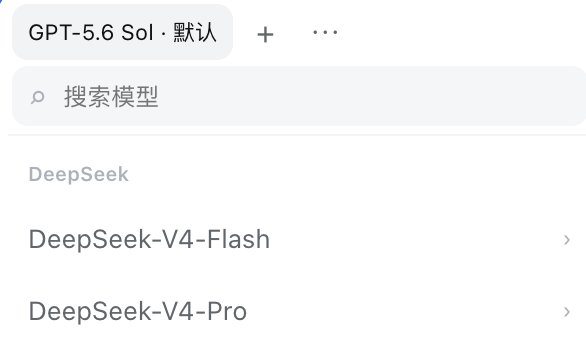
Picking the right model and reasoning-effort pair in DeepSeek Harness every single time interrupts flow, especially when you work across multiple API providers where the same model under two providers is genuinely two distinct configurations. dsh-model-presets lets you pin those go-to combinations as named presets so you stop re-selecting from scratch.
Open the model selector at the bottom of the composer, choose a combination, and tap the plus icon to save it. After that, switch with one click from the top of the list or call any of the first nine presets with Alt (Option) + 1-9. Presets can be renamed, reordered, and deleted, up to a cap of fifty entries. All data lives in local browser storage; nothing is uploaded, nothing syncs across devices, and presets survive a Harness restart. If a provider or model goes temporarily offline its preset dims and stops responding, then snaps back to normal once the service returns.
Built for DeepSeek Harness users who rotate between two or three fixed model-and-effort combos in a single workflow, have a strong preference for specific reasoning levels, or maintain parallel API providers. If you find yourself scrolling the model list and nudging parameters over and over, this plugin collapses that ritual into a single click or a keyboard shortcut.
Screenshots
Use Cases
- Routinely toggling between two or three fixed model-and-effort pairs
- Maintaining parallel API providers and switching model configurations back and forth quickly
- Batch runs where the same reasoning config must be reused without re-picking each time
Best For
- DeepSeek Harness daily users with a fixed preference for specific reasoning levels
- Multi-provider operators running parallel API pipelines
- Efficiency-focused users who prefer keyboard-first interaction over repeated mouse clicks
Related Plugins

ModLens is a vision plugin for DeepSeek Harness that gives text-only models sight by reading images pasted directly into chat, with zero-config setup and multiple vision engines.

On-demand vision for text-only DeepSeek Harness agents: built-in free keyless vision chain and 14 vision tools, routing image turns as tool calls to vision models with pixel fidelity, no Python needed, one-command install.

Give text-only models in DeepSeek Harness eyes, enabling image Q&A, long-screenshot OCR, UI restoration, and GUI visual tasks.
An armor-breaking plugin for DeepSeek: rewrites instruction priority, expands refusal-blocked phrases, persists across sessions, and shows a green active indicator.