dsh-archive-session
Run the following command in DeepSeek Harness:
dsh plugin install DreamStan/dsh-archive-session
Paste the following prompt into your AI chat to install this plugin:
Run dsh plugin install DreamStan/dsh-archive-session in your terminal to install; the source is at https://github.com/DreamStan/dsh-archive-session .
About this plugin
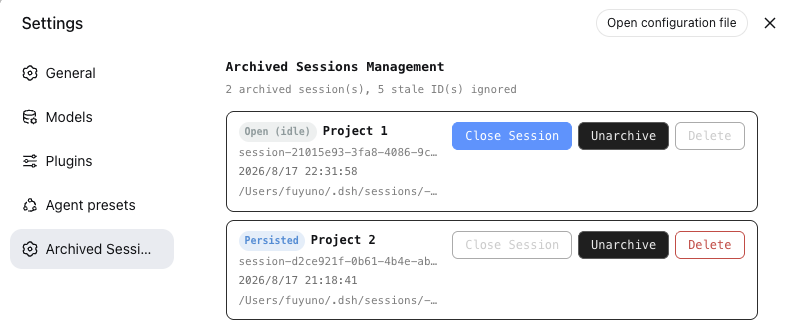
DSH ships with native session archiving, yet once a session lands in the archive it becomes a blind spot: there is no way to browse the archive, release a session still held in memory, restore it to the sidebar, or safely remove the leftover log directory. dsh-archive-session fills exactly that gap.
The plugin covers the full lifecycle of archived sessions. A dedicated settings panel lists every archived session with its title, ID, workspace path, creation time, and running / idle / persisted status. An idle session can be flushed and detached from memory on the spot without restarting DSH. Archived sessions can be unarchived so they reappear in the sidebar and are managed through the normal UI. With explicit confirmation, the physical log directory behind the JSONL persistence backend is removed. Every action is also exposed through a small set of clean Host HTTP JSON endpoints, making it easy to script or wire into automation pipelines.
It is aimed at heavy DSH users whose archive keeps growing and needs regular triage, as well as developers who want programmatic control over session cleanup. Deletion is not supported for SQLite-backed sessions; the plugin surfaces a clear error rather than failing silently.
Screenshots
Use Cases
- Archive set keeps growing and needs centralized browsing with selective deletion
- A conversation ends but the session still holds memory and needs releasing without restarting DSH
- Programmatically manage the archived session lifecycle via HTTP API or scripts
Best For
- Heavy DSH users whose archive grows and needs regular triage
- Developers who want programmatic control over session lifecycle
- Teams that need a unified entry point to browse, restore, or delete historical sessions
Related Plugins

Traceable, searchable cross-session memory for AI agents that turns conversation knowledge into a typed knowledge graph and recalls relevant subgraphs instead of replaying full history, natively integrated with DeepSeek Harness.
Gives DSH AI cross-session long-term memory, to-do and skill management, plus multi-session orchestration, external AI delegation, and an infinite canvas that grows with you.

dsh-mnemon is a three-tier, pluggable, Agent-driven memory system for DeepSeek Harness, combining Runtime memory, Project Documents, and replaceable Memory Spaces with nine long-term providers.
An opinionated, zero-infrastructure file-based memory protocol: human-readable markdown files plus a bounded always-loaded index, curation discipline, and no database or embeddings.