bga-dsh-workbench
Run the following command in DeepSeek Harness:
dsh plugin install bingoogolapple/bga-dsh-workbench
Paste the following prompt into your AI chat to install this plugin:
Run dsh plugin install bingoogolapple/bga-dsh-workbench in DeepSeek Harness to install this plugin. Source repository: https://github.com/bingoogolapple/bga-dsh-workbench.
About this plugin
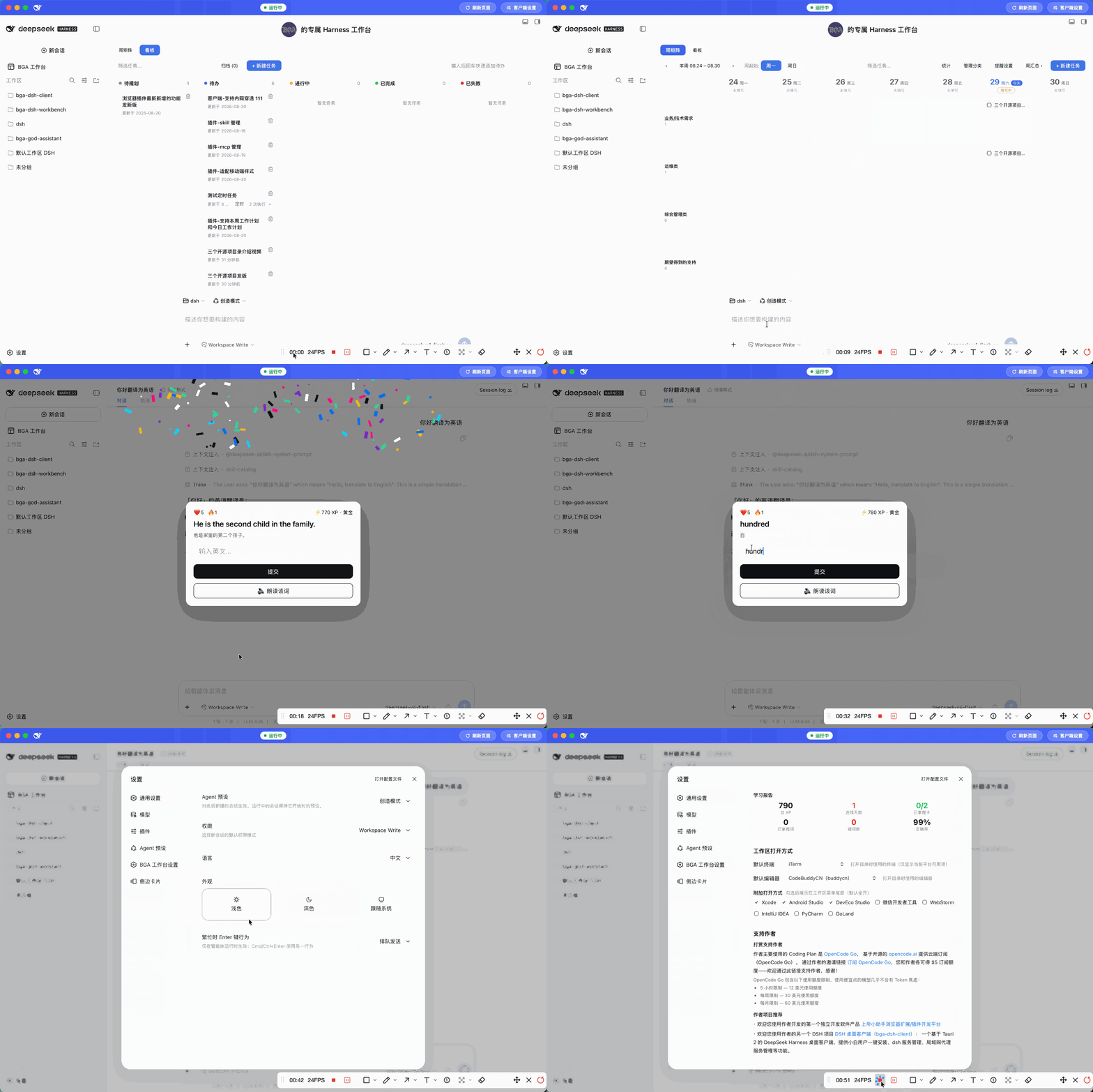
The DeepSeek Harness Web UI is capable, but after a while it starts to feel generic: the same blank-state page every time, no feedback when a conversation round finishes, and your task tracking, language practice, and workspace access all scattered across different tools. This workbench plugin turns Harness into a personal daily development panel that actually looks like yours.
Four pillars make it tick. For personality, the blank-state hero banner shows your name, greeting, and avatar of choice; when a round completes, confetti rains down in a color theme, intensity, and timing you pick, with an optional sound cue that turns the coding loop into a small ritual. For learning, the same confetti moment can drop a foreign-language question, drawing from a built-in CEFR A1-C2 word bank or generating ~20 items on any topic via your current model. Nine target languages are supported, and the game layer-hearts, streaks, XP tiers, and a mistake notebook-keeps it engaging without a single backend call. For tasks, a sidebar board offers a week-matrix and a five-column kanban. Lightweight to-dos are a checkbox away; executable tasks are handed to the agent with pinned workspace, permission scope, and a five-field cron schedule (daily, hourly, weekly presets included). Every run keeps a session history you can replay. For workspace access, each directory gets an open menu that launches your file manager, terminal, editor, or any IDE you light up, silently skipping anything not installed.
It is built for developers who live in DeepSeek Harness day to day and want their tool to feel personal, rewarding, and all-in-one. Every byte of data lands in the host storage directory, so there is no server to stand up, no account to create-just configure and go.
Screenshots
Use Cases
- Open Harness to see your name and avatar, starting each workday with a personal touch
- Celebrate with confetti after each round and slip in a few language questions during the break
- Plan the week on the matrix, delegate tasks to the agent with cron schedules, and review the stats panel before leaving
Best For
- Developers who work in DeepSeek Harness day to day
- Builders who want their tooling to feel personal and rewarding
- Learners who want bite-sized language practice without opening another app
Related Plugins

ModLens is a vision plugin for DeepSeek Harness that gives text-only models sight by reading images pasted directly into chat, with zero-config setup and multiple vision engines.

On-demand vision for text-only DeepSeek Harness agents: built-in free keyless vision chain and 14 vision tools, routing image turns as tool calls to vision models with pixel fidelity, no Python needed, one-command install.

Give text-only models in DeepSeek Harness eyes, enabling image Q&A, long-screenshot OCR, UI restoration, and GUI visual tasks.
An armor-breaking plugin for DeepSeek: rewrites instruction priority, expands refusal-blocked phrases, persists across sessions, and shows a green active indicator.