dsh-subagent-setting
Run the following command in DeepSeek Harness:
dsh plugin install marshfolx/dsh-subagent-setting
Paste the following prompt into your AI chat to install this plugin:
Run dsh plugin install marshfolx/dsh-subagent-setting in your DeepSeek Harness profile; source: https://github.com/marshfolx/dsh-subagent-setting
About this plugin
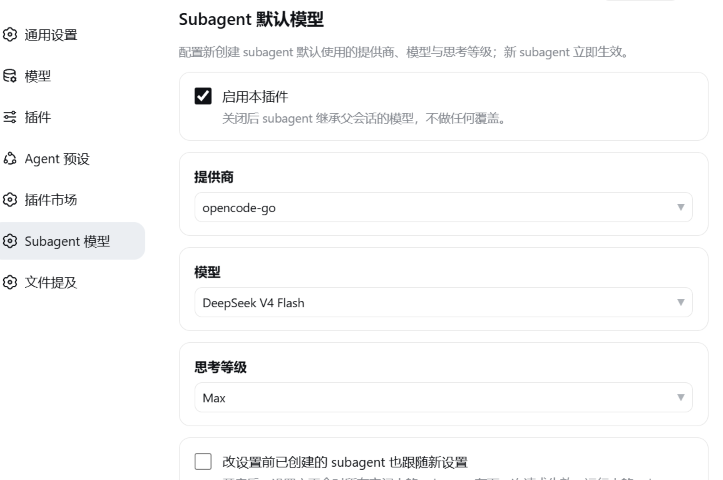
When you create a lot of subagents in DeepSeek Harness, reaching for a YAML file every time you want to change the provider, model, or reasoning effort is tedious and error-prone, especially when swapping models between tasks. dsh-subagent-setting moves that decision into the Web settings page: open Settings → Subagent Model, pick from the live model catalog, and you are done. No more hand-editing configuration files.
Under the hood, the plugin installs a request-scoped interceptor at the moment each subagent is born, rewriting the call config to the route you configured. Newly created subagents pick up the settings immediately. If you enable the live-propagation toggle, existing idle subagents also re-point on their next request with no restart required. Leaving any field empty simply inherits the parent session model, matching the native fallback. The settings form uses fully controlled custom dropdowns, so it behaves identically in a browser and inside a Tauri WebView shell.
It is built for DeepSeek Harness users who spin up many subagents and want to switch providers or model tiers without touching a config file each time. Set it once in the settings page and every subsequent subagent aligns automatically, removing the repetitive plumbing from your workflow.
Screenshots
Use Cases
- Frequently switching subagent inference settings across providers and models
- Configuring subagent model routing from the settings UI instead of editing YAML by hand
- Propagating updated model and reasoning-strength settings to existing idle subagents
Best For
- DeepSeek Harness users who spawn many subagents in their projects
- Workflow developers who frequently adjust model or reasoning strength
- Teams that prefer all model configuration to live in the Web UI
Related Plugins

ModLens is a vision plugin for DeepSeek Harness that gives text-only models sight by reading images pasted directly into chat, with zero-config setup and multiple vision engines.

On-demand vision for text-only DeepSeek Harness agents: built-in free keyless vision chain and 14 vision tools, routing image turns as tool calls to vision models with pixel fidelity, no Python needed, one-command install.

Give text-only models in DeepSeek Harness eyes, enabling image Q&A, long-screenshot OCR, UI restoration, and GUI visual tasks.
An armor-breaking plugin for DeepSeek: rewrites instruction priority, expands refusal-blocked phrases, persists across sessions, and shows a green active indicator.