dsh-explain
Run the following command in DeepSeek Harness:
dsh plugin install yuezengwu/dsh-explain
Paste the following prompt into your AI chat to install this plugin:
To install this plugin in DeepSeek Harness, execute the command dsh plugin install yuezengwu/dsh-explain, and you can find the full source code at https://github.com/yuezengwu/dsh-explain.
About this plugin
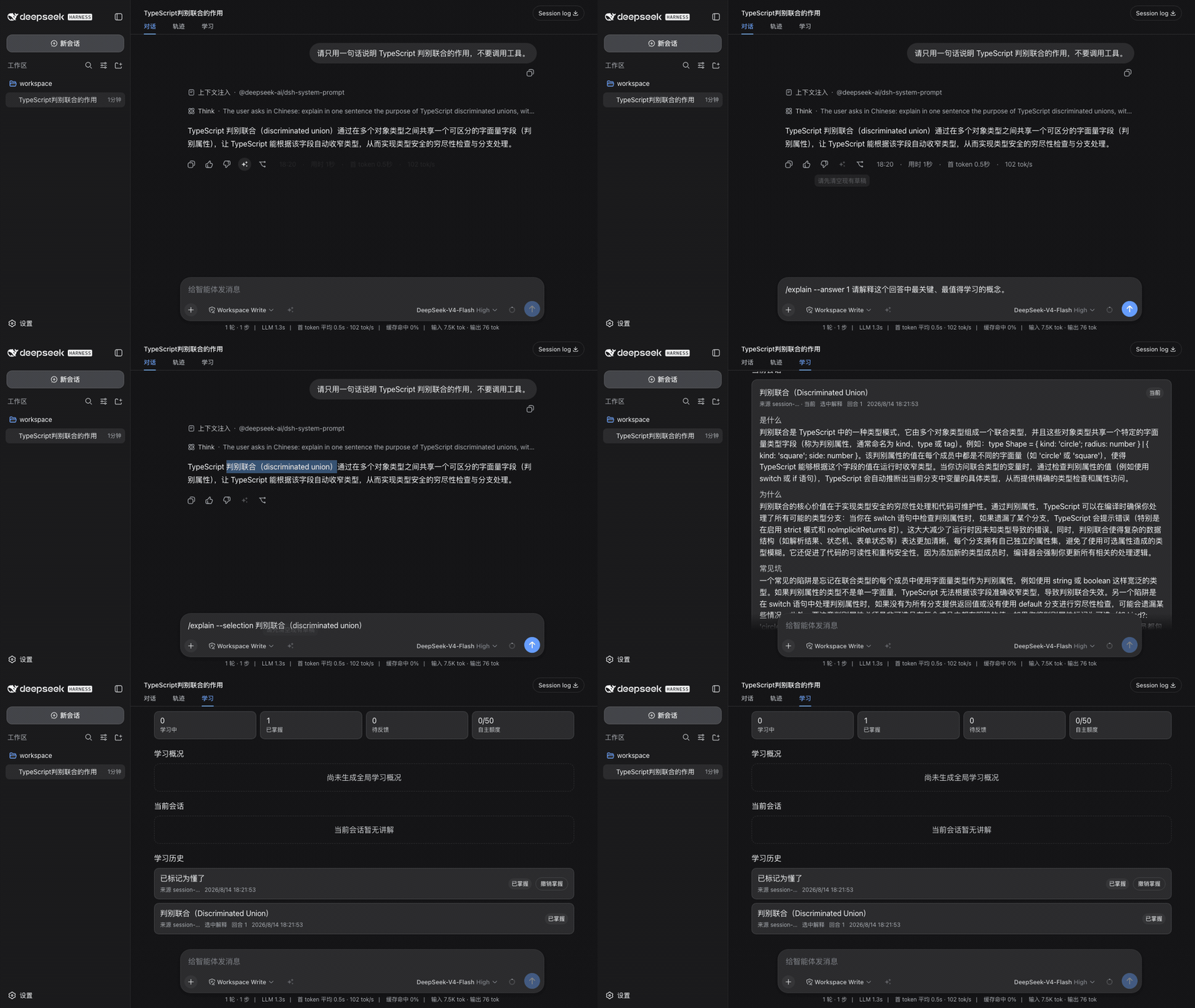
When using AI assistants for daily development or work, valuable new concepts often slip away as soon as a session ends. The dsh-explain plugin is designed to solve this "knowledge drain" by turning everyday DeepSeek Harness (DSH) interactions into a private, continuous learning loop. It extracts useful concepts from completed work sessions and transforms them into structured learning cards, helping you build a personal knowledge base effortlessly.
The core strength of this plugin lies in its non-intrusive "learning mode" and global knowledge thread. It offers multiple entry points for learning, including manual commands, explaining selected text, learning from specific answers, and autonomous evaluation within a configured budget. Each learning card concisely answers "What is it?", "Why does it matter?", and "What is the common pitfall?". Furthermore, it features a local-first design: all learning data is stored in a local SQLite database and interacts only with an auxiliary model, ensuring that the primary agent's workflow remains completely untouched and unpolluted.
dsh-explain is perfect for developers and knowledge workers who want to continuously improve their technical understanding and consolidate domain knowledge while using DSH. If you want your AI assistant to be more than just a task-completion tool—acting instead as a private tutor that adapts to your knowledge level and grows with you—this plugin is the ideal addition to your workflow.
Screenshots
Use Cases
- Extract core concepts from complex debugging sessions to generate review cards.
- Select text or specific answers to quickly generate structured knowledge breakdowns.
- Automatically evaluate completed conversations in the background to build a personal knowledge base.
Best For
- Programmers looking to continuously consolidate technical knowledge during daily development.
- Knowledge workers who want to transform AI conversations into long-term memory and study materials.
- Users who prioritize data privacy and prefer storing learning records locally.
Related Plugins

Memory layer for coding agents that indexes local session history and auto-recalls relevant context before edits, commands, and failures, with no manual search needed.

Traceable, searchable cross-session memory for AI agents that turns conversation knowledge into a typed knowledge graph and recalls relevant subgraphs instead of replaying full history, natively integrated with DeepSeek Harness.
Gives DSH AI cross-session long-term memory, to-do and skill management, plus multi-session orchestration, external AI delegation, and an infinite canvas that grows with you.

dsh-mnemon is a three-tier, pluggable, Agent-driven memory system for DeepSeek Harness, combining Runtime memory, Project Documents, and replaceable Memory Spaces with nine long-term providers.