dsh-llm-call-inspector
Run the following command in DeepSeek Harness:
dsh plugin install striveh/dsh-llm-call-inspector
Paste the following prompt into your AI chat to install this plugin:
Add https://github.com/striveh/dsh-llm-call-inspector to your DeepSeek Harness Web profile to enable the LLM Calls inspector view.
About this plugin
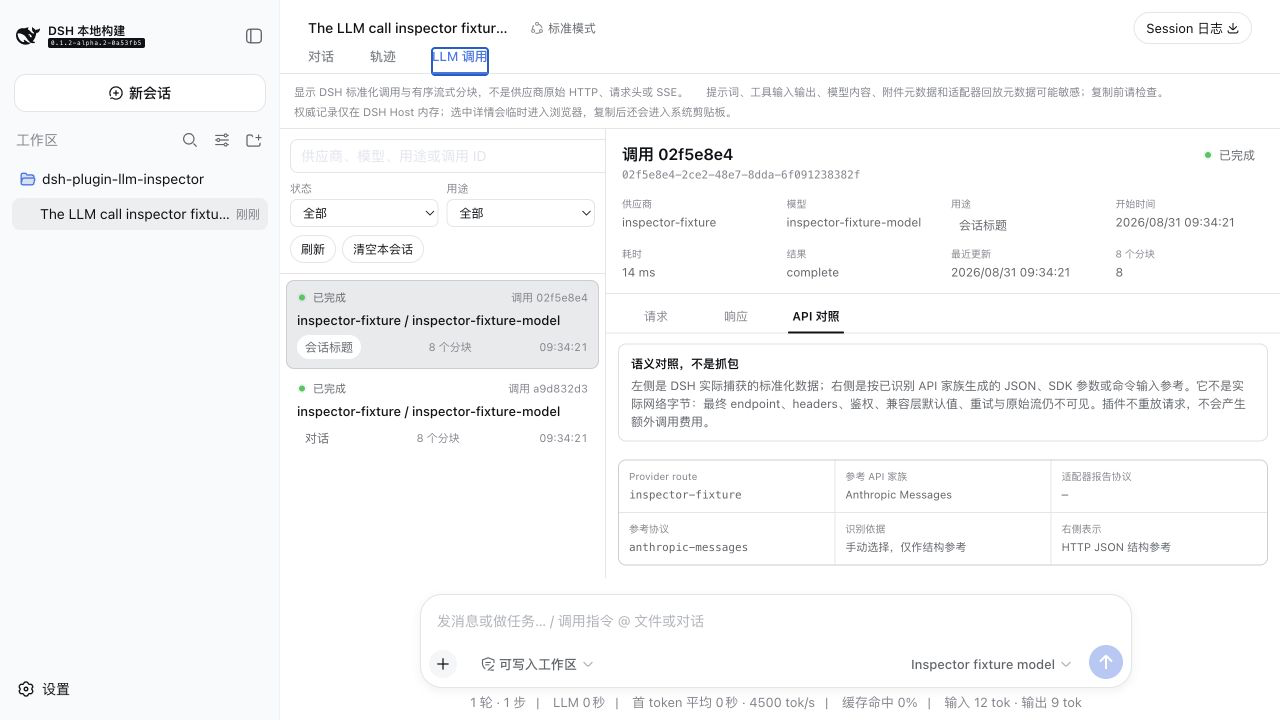
In DeepSeek Harness Web, the Trajectory view narrates the full session story, yet it leaves a gap: there is no window where you can inspect exactly what the model received and what it returned for each normalized llm/stream call. dsh-llm-call-inspector fills that gap with an adjacent LLM Calls view that lists every session-scoped call in newest-first order, preserving the captured request snapshot and ordered response chunks without altering what the model receives or the caller gets back.
Key capabilities include a three-tab inspector (Request, Response, API Comparison), search with status and purpose filters, expandable JSON with copy actions, and session-scoped state restoration so your selected call, filters, and scroll positions survive view switches. The API Comparison tab is a semantic shape projection rather than a packet capture: the left side shows the actual DSH-normalized data observed, while the right side maps to mainstream shape families such as OpenAI, Anthropic, Gemini, Bedrock, and Mistral based on call-level protocol evidence, with a manual reference fallback available. Opening the tab or copying content never triggers an additional LLM call or incurs provider charges.
This plugin suits developers working with DeepSeek Harness 0.1.2-alpha.2 who need to audit normalized call boundaries during local debugging, multi-agent orchestration, or prompt engineering, compare protocol shape families, and track down token truncation or tool-argument anomalies without changing runtime behavior.
Screenshots
Use Cases
- Audit each LLM call's request snapshot and response chunks in the active session.
- Semantically compare DSH-normalized data against OpenAI, Anthropic, Gemini, and other protocol shapes.
- Verify that fields and parameters reach the model as intended before and after prompt or tool changes.
Best For
- Developers doing local prompt engineering and debugging in DeepSeek Harness Web.
- Engineers orchestrating multi-agent workflows who need to track each model call boundary.
- Tech leads investigating token truncation, tool-argument anomalies, or protocol compatibility issues.
Related Plugins

ModLens is a vision plugin for DeepSeek Harness that gives text-only models sight by reading images pasted directly into chat, with zero-config setup and multiple vision engines.

On-demand vision for text-only DeepSeek Harness agents: built-in free keyless vision chain and 14 vision tools, routing image turns as tool calls to vision models with pixel fidelity, no Python needed, one-command install.

Give text-only models in DeepSeek Harness eyes, enabling image Q&A, long-screenshot OCR, UI restoration, and GUI visual tasks.
An armor-breaking plugin for DeepSeek: rewrites instruction priority, expands refusal-blocked phrases, persists across sessions, and shows a green active indicator.