dsh-archive-manager
Run the following command in DeepSeek Harness:
dsh plugin install MS666666/dsh-archive-manager
Paste the following prompt into your AI chat to install this plugin:
Run dsh plugin install MS666666/dsh-archive-manager in the DeepSeek Harness terminal to install it. Source repository: https://github.com/MS666666/dsh-archive-manager .
About this plugin
The DSH archive-session action only hides a session from the grouped views. The underlying session.jsonl.zstd log, workspace accounting entries, and projection cache all remain on disk untouched, while the official UI offers no delete entry at all. As archived sessions accumulate over time, disk space silently fills up with no built-in way to reclaim it.
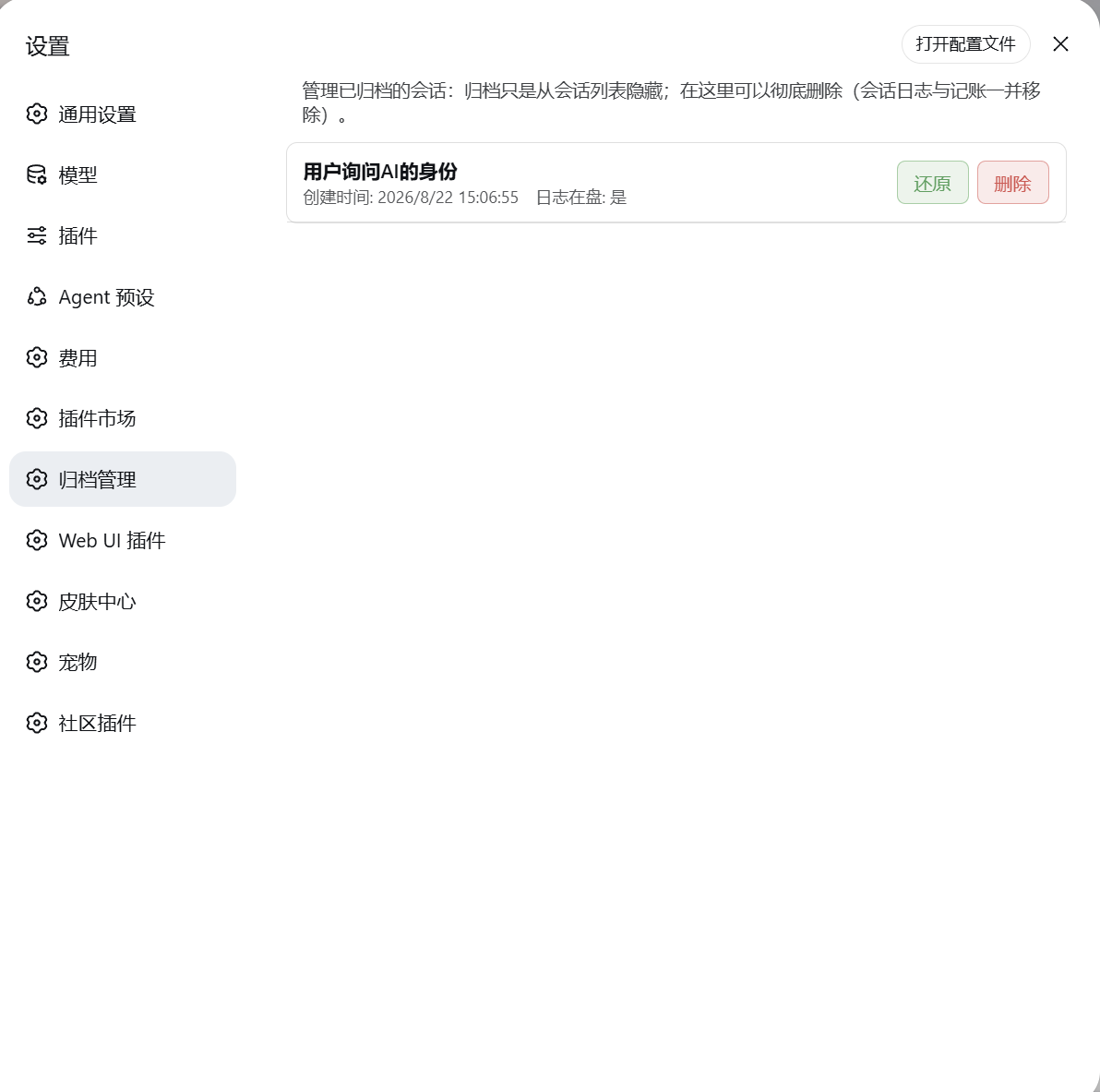
This plugin adds an Archive Manager tab to the Settings page, peering alongside General and Models. It lists every archived session with its title, creation time, and whether the log file still exists on disk. Each row carries a Delete button gated by a confirmation dialog; on confirm, the plugin removes the session log, clears the archived ID from workspace.json, strips the session ID from every workspace sessionIds array, and purges the entry from session_projcache.json. The cost ledger (ledger.json) is deliberately left intact so spend history is preserved. Security is handled with same-origin POST only, strict session-id format validation, Node self-verification after every write, and automatic rollback on failure.
Ideal for users who have collected dozens or hundreds of archived sessions and want a verified, disk-level cleanup without manually hunting through file trees. A few clicks in Settings and the session is gone for real.
Screenshots
Use Cases
- Archived sessions pile up and quietly eat disk space with no built-in way to clean them
- You want to fully delete an old session but are unsure which log, accounting, and cache files to remove
- You need a quick view of which archived sessions still occupy disk before safely deleting them one by one
Best For
- Users with a large backlog of archived sessions looking to reclaim disk space
- Users who prefer a graphical interface over manually browsing file trees
- Power DSH users who value safe, verifiable, and rollback-capable deletion workflows
Related Plugins

Traceable, searchable cross-session memory for AI agents that turns conversation knowledge into a typed knowledge graph and recalls relevant subgraphs instead of replaying full history, natively integrated with DeepSeek Harness.
Gives DSH AI cross-session long-term memory, to-do and skill management, plus multi-session orchestration, external AI delegation, and an infinite canvas that grows with you.

dsh-mnemon is a three-tier, pluggable, Agent-driven memory system for DeepSeek Harness, combining Runtime memory, Project Documents, and replaceable Memory Spaces with nine long-term providers.
An opinionated, zero-infrastructure file-based memory protocol: human-readable markdown files plus a bounded always-loaded index, curation discipline, and no database or embeddings.