dsh-model-health
Run the following command in DeepSeek Harness:
dsh plugin install oxlyn/dsh-model-health
Paste the following prompt into your AI chat to install this plugin:
Run dsh plugin install oxlyn/dsh-model-health in the DeepSeek Harness terminal to install, source repository: https://github.com/oxlyn/dsh-model-health
About this plugin
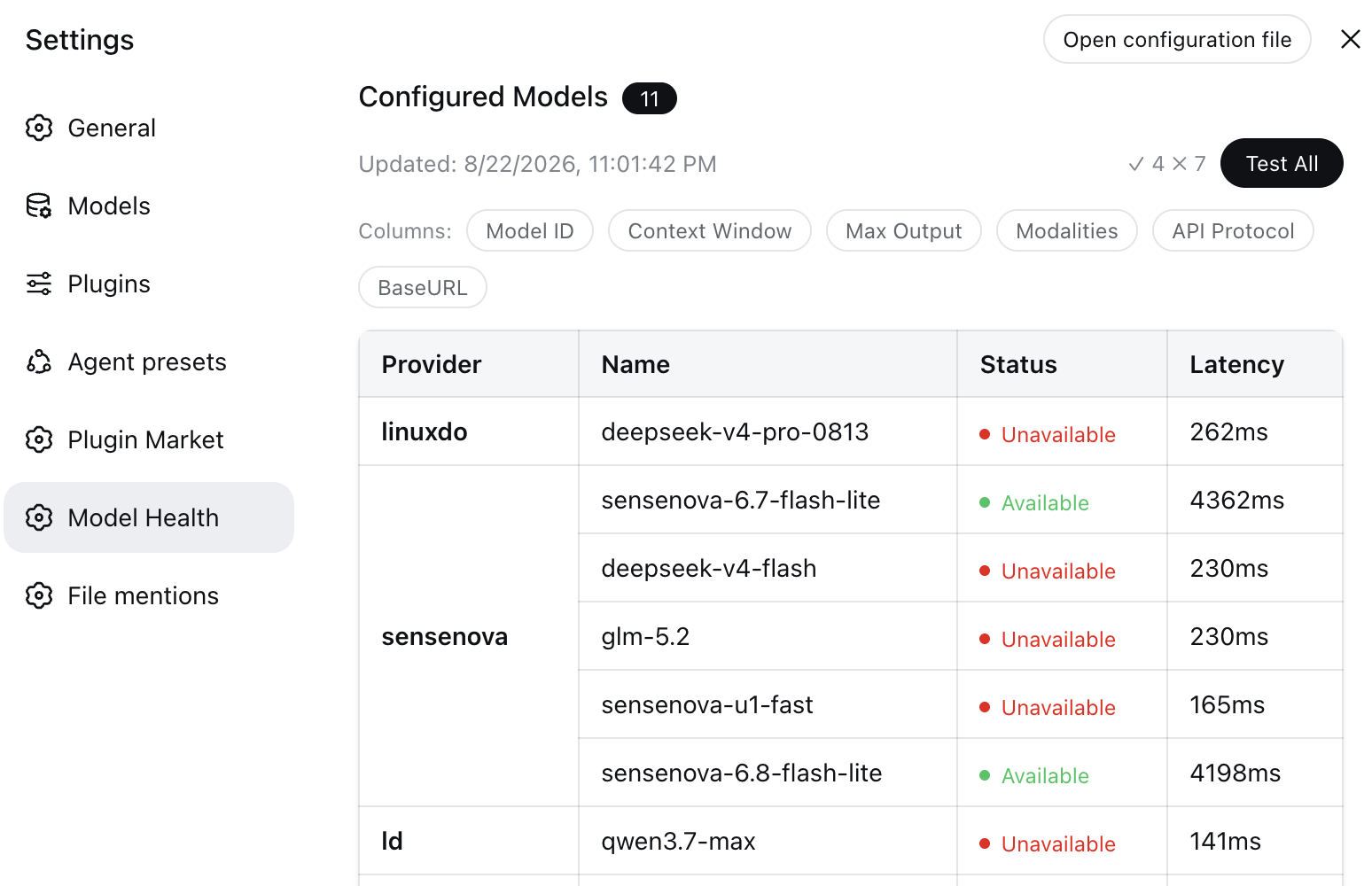
Managing multiple LLM providers usually means the same frustrating question: which models are actually up, which are down, and what is the real latency? dsh-model-health was built for exactly this. It adds a Model Health panel to your DSH settings page, giving you an at-a-glance status view of every configured model without firing off manual test requests one by one.
The panel renders each model in a table with toggleable columns for Provider, Model ID, Name, Context Window, Max Output, Input Modality, API Protocol, and BaseURL. Click Test All and the plugin issues minimal requests (max_tokens=1, 10-second timeout) across up to six concurrent workers, returning a per-row status of available, unavailable, skipped, or measured latency. Hover over any failure to see the underlying reason. Results persist in browser localStorage across page refreshes, and you can re-test any single model at any time by clicking its status badge. A list_models tool is also exposed so that an in-conversation model can query the current catalog on demand.
If you maintain a multi-provider setup, switch between backends frequently, or debug those tricky gateway responses that return HTTP 200 but carry an error object in the body, this plugin gives you a clear health snapshot in seconds.
Screenshots
Use Cases
- You have multiple LLM providers configured and need to quickly confirm which models are currently online
- Switching backends often and want to batch-verify that newly configured models are ready
- Debugging gateway responses that return HTTP 200 but contain an error object in the body
Best For
- Developers or teams managing multi-provider LLM configurations
- Technical staff using DeepSeek Harness for day-to-day inference management
- Ops engineers who need to frequently verify model availability and latency
Related Plugins

ModLens is a vision plugin for DeepSeek Harness that gives text-only models sight by reading images pasted directly into chat, with zero-config setup and multiple vision engines.

On-demand vision for text-only DeepSeek Harness agents: built-in free keyless vision chain and 14 vision tools, routing image turns as tool calls to vision models with pixel fidelity, no Python needed, one-command install.

Give text-only models in DeepSeek Harness eyes, enabling image Q&A, long-screenshot OCR, UI restoration, and GUI visual tasks.
An armor-breaking plugin for DeepSeek: rewrites instruction priority, expands refusal-blocked phrases, persists across sessions, and shows a green active indicator.