dsh-sticky-note
Run the following command in DeepSeek Harness:
dsh plugin install Meredith2328/dsh-sticky-note
Paste the following prompt into your AI chat to install this plugin:
To install this plugin in DeepSeek Harness, run dsh plugin install Meredith2328/dsh-sticky-note, and the full source code URL is https://github.com/Meredith2328/dsh-sticky-note.
About this plugin
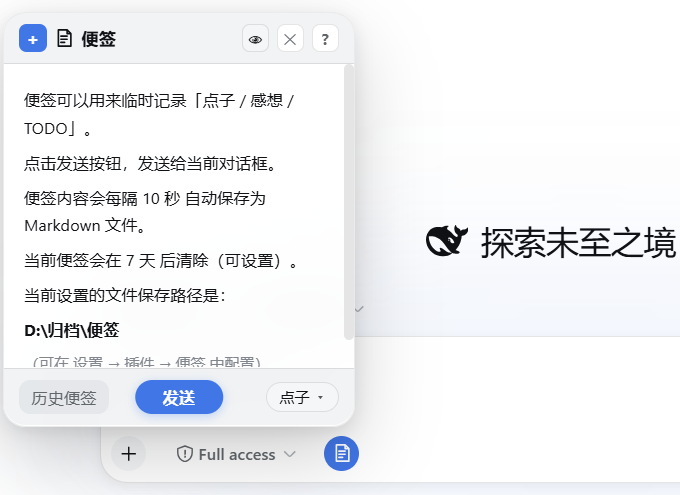
dsh-sticky-note addresses a common interruption: ideas appear quickly while working with DSH, then disappear before they can be captured. Instead of forcing users to leave the conversation, write a note somewhere else, or lose the thought entirely, it provides a low-friction sticky note in the lower-left corner that can be opened whenever inspiration shows up.
Its core strength is a small but focused workflow: capture, classify, save, and reuse. Notes can be tagged as ideas, reflections, or TODOs, autosaved in the background, previewed with Markdown, and sent back into the current conversation. Historical notes are archived in a grouped list where users can review, edit, or restore them later, while inactive notes can be automatically cleaned into a trash folder instead of cluttering the archive.
It is best for people who use DSH regularly for coding, thinking, planning, or drafting, but want only a lightweight scratchpad rather than a full note-taking system. If you often need to jot down quick notes and bring them back into the conversation later, this plugin fits that moment naturally.
Screenshots
Use Cases
- Quickly capture ideas, reflections, or TODOs while chatting with DSH.
- Send sticky note content to the current conversation or append it to the input box.
- Review, edit, and restore archived notes from the history list.
Best For
- People who use DSH for coding, writing, or organizing ideas.
- Users who want a lightweight sticky note instead of a complex note-taking app.
- People who prefer categorized notes, Markdown preview, and keyboard shortcuts.
Related Plugins

Memory layer for coding agents that indexes local session history and auto-recalls relevant context before edits, commands, and failures, with no manual search needed.

Traceable, searchable cross-session memory for AI agents that turns conversation knowledge into a typed knowledge graph and recalls relevant subgraphs instead of replaying full history, natively integrated with DeepSeek Harness.
Gives DSH AI cross-session long-term memory, to-do and skill management, plus multi-session orchestration, external AI delegation, and an infinite canvas that grows with you.

dsh-mnemon is a three-tier, pluggable, Agent-driven memory system for DeepSeek Harness, combining Runtime memory, Project Documents, and replaceable Memory Spaces with nine long-term providers.