dsh-pianist
Run the following command in DeepSeek Harness:
dsh plugin install Laplace-bit/dsh-pianist
Paste the following prompt into your AI chat to install this plugin:
Run dsh plugin install Laplace-bit/dsh-pianist in your DeepSeek Harness terminal to install; source code is available at https://github.com/Laplace-bit/dsh-pianist .
About this plugin
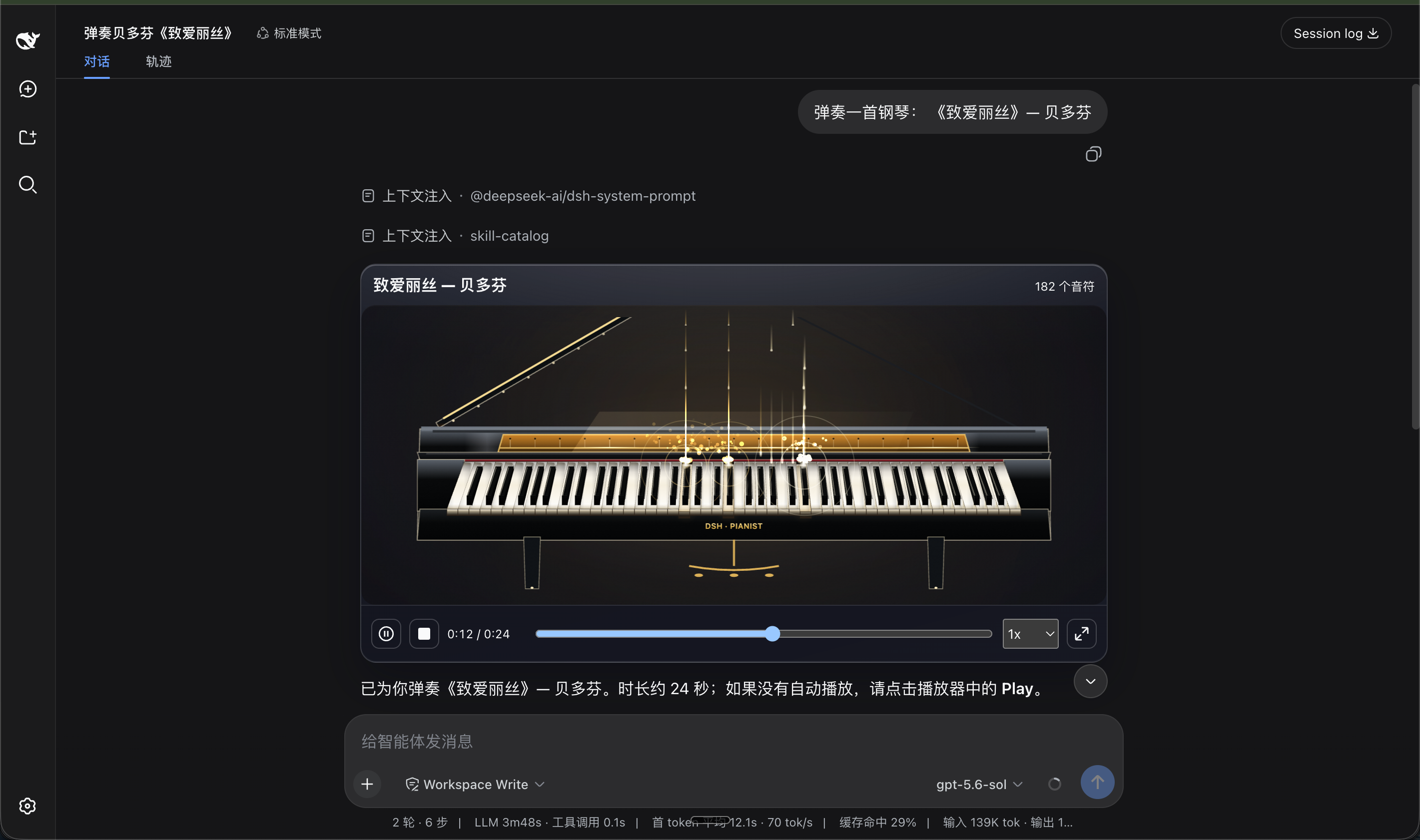
After a long haul of staring at a terminal, dsh-pianist offers a gentler escape: it turns your DeepSeek Harness Agent into a grand-piano player. You type a sentence like "play a Debussy nocturne" in natural language, the model composes a full score, and an 88-key piano renders it note by note while falling notes, water reflections, meteors, and drifting mist ripple with the melody. Think of it as both a mid-day micro-break and a genuine benchmark for how musically fluent a large model really is.
The sound is drawn from real recordings of the Salamander Grand Piano V3, not a synth patch—six velocity layers, key release, string resonance, and pedal action are all present. The playback engine sits on a deterministic timeline, so pausing, scrubbing, and replaying the same piece are frame-perfect every single run, making side-by-side model comparisons immediately audible. Two visual skins are included: Obsidian Gold, a black high-gloss grand with warm gold interiors and a golden flash on every keyfall, and Sakura Pearl, a pearl-white body with rose-gold detailing under a wash of cherry-blossom light. All 88 keys are open to the user as well—glide with the mouse, tap the computer keyboard, or pick notes with arrow keys—whenever you feel like taking the bench yourself.
It is aimed at developers who want a touch of music inside a serious Agent workflow, researchers who need a quick, low-friction way to compare models' musical reasoning and generation, and anyone who simply wants to sit back, listen to an AI play a song, and enjoy a small private concert.
Screenshots
Use Cases
- Take a break mid-session by asking the Agent to play a piece in natural language
- Feed the same prompt to different models and compare their musical generation side by side
- Glide across all 88 keys with the mouse or tap the computer keyboard to play by hand
Best For
- Developers who want a musical micro-break inside a coding workflow
- Researchers who need a quick, low-friction way to benchmark models' musical reasoning
- Creative users who enjoy driving AI tasks through natural language
Related Plugins

ModLens is a vision plugin for DeepSeek Harness that gives text-only models sight by reading images pasted directly into chat, with zero-config setup and multiple vision engines.

On-demand vision for text-only DeepSeek Harness agents: built-in free keyless vision chain and 14 vision tools, routing image turns as tool calls to vision models with pixel fidelity, no Python needed, one-command install.

Give text-only models in DeepSeek Harness eyes, enabling image Q&A, long-screenshot OCR, UI restoration, and GUI visual tasks.
An armor-breaking plugin for DeepSeek: rewrites instruction priority, expands refusal-blocked phrases, persists across sessions, and shows a green active indicator.