dsh-image-gen
Run the following command in DeepSeek Harness:
dsh plugin install Anyway-one/dsh-image-gen
Paste the following prompt into your AI chat to install this plugin:
Run dsh plugin install Anyway-one/dsh-image-gen in your terminal to install; the plugin source is available at https://github.com/Anyway-one/dsh-image-gen .
About this plugin
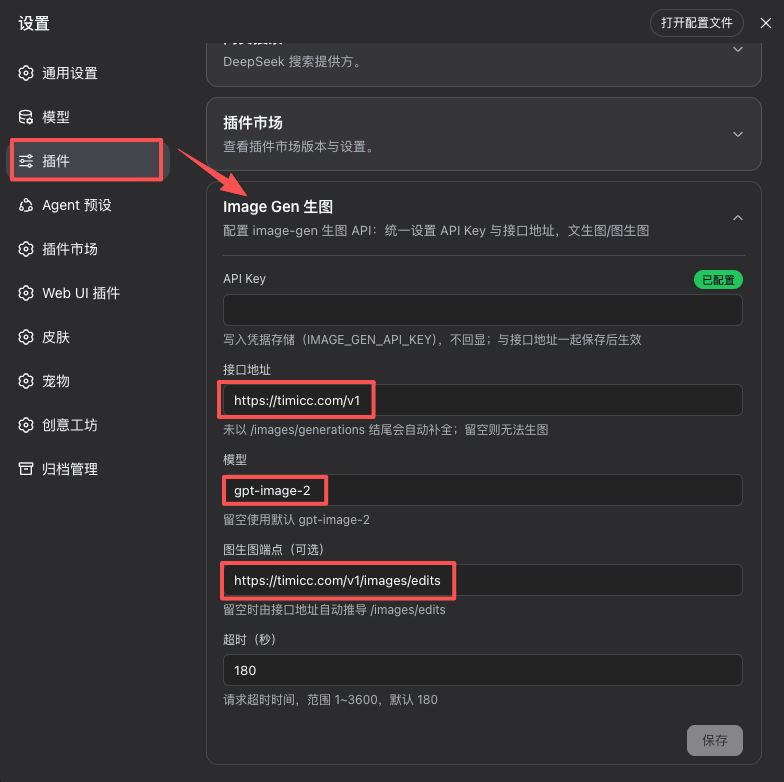
DeepSeek Harness does not ship with image generation out of the box, yet many teams already rely on third-party OpenAI Images-compatible inference providers. dsh-image-gen bridges that gap: enter a baseURL and an API Key, and you can invoke text-to-image and image-to-image tools directly inside Harness conversations without switching platforms or scripting external calls.
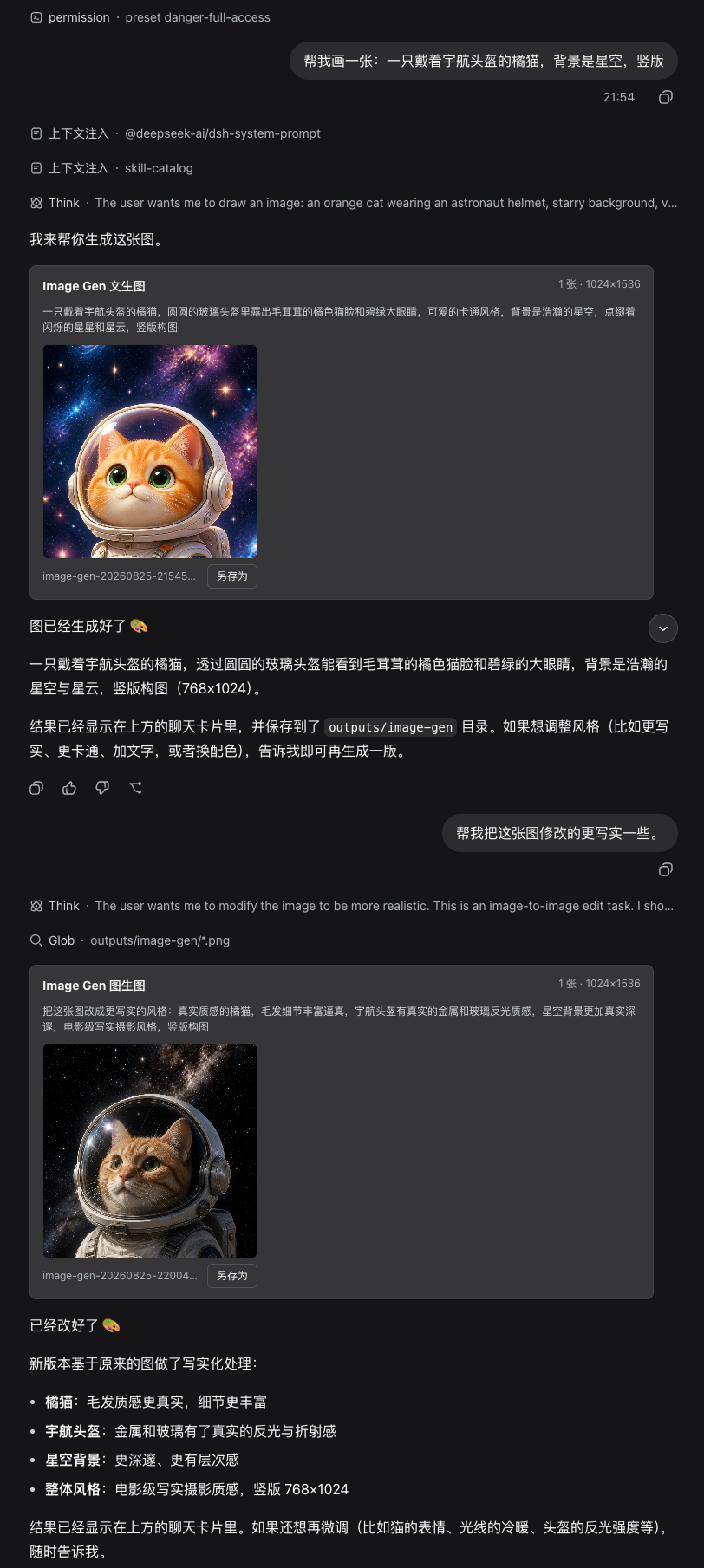
The plugin exposes two tools. image-generate produces 1 to 8 images per call, auto-selecting portrait, landscape, or square aspect ratios while also accepting validated custom dimensions. image-edit accepts 1 to 8 PNG, JPEG, or WebP reference images for image-to-image workflows. Results render inline with thumbnails, a lightbox zoom, and a save-as action, and are additionally written to outputs/image-gen/ in the session working directory with auto-numbered filenames that never overwrite existing files. The API Key is stored exclusively in DSH credentials and is never echoed into the settings document or logs; 524 and timeout errors are deliberately not auto-retried to prevent duplicate billing.
It is built for developers who work daily inside DeepSeek Harness and already have access to any OpenAI Images-compatible endpoint—whether a self-hosted proxy, Azure OpenAI, Together AI, or similar. Open the plugin settings card, fill in two fields, and start generating images without changing your existing workflow.
Screenshots
Use Cases
- Generate illustrations, logos, or design sketches directly in Harness conversations
- Upload reference images for style transfer, background replacement, or partial edits
- Connect a self-hosted proxy endpoint to batch-produce product previews or marketing assets
Best For
- Developers who already hold an OpenAI Images-compatible API key
- Creators who need image generation embedded in their daily development workflow
- Engineering teams looking to extend DeepSeek Harness without adopting an extra platform
Related Plugins

ModLens is a vision plugin for DeepSeek Harness that gives text-only models sight by reading images pasted directly into chat, with zero-config setup and multiple vision engines.

On-demand vision for text-only DeepSeek Harness agents: built-in free keyless vision chain and 14 vision tools, routing image turns as tool calls to vision models with pixel fidelity, no Python needed, one-command install.

Give text-only models in DeepSeek Harness eyes, enabling image Q&A, long-screenshot OCR, UI restoration, and GUI visual tasks.
An armor-breaking plugin for DeepSeek: rewrites instruction priority, expands refusal-blocked phrases, persists across sessions, and shows a green active indicator.