dsh-ai-quota
Run the following command in DeepSeek Harness:
dsh plugin install Carrick-K7/dsh-ai-quota
Paste the following prompt into your AI chat to install this plugin:
Run dsh plugin install Carrick-K7/dsh-ai-quota in DeepSeek Harness to install; the source is at https://github.com/Carrick-K7/dsh-ai-quota
About this plugin
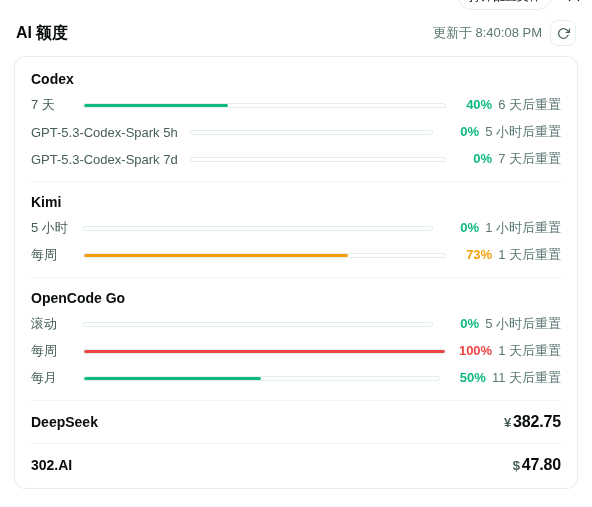
Developers who subscribe to multiple AI services at once - Codex, Kimi, DeepSeek, 302.AI, OpenCode Go - often have to log into several dashboards just to check remaining quotas. dsh-ai-quota consolidates all of those balances and usage windows into a single unified view, eliminating the back-and-forth.\n\nIt offers three layers of access: a settings page with visual usage bars and balance figures per provider; a model tool called query_ai_quota that lets you ask any agent session for a natural-language quota summary; and a composer chip embedded in the chat UI that tracks your currently selected model and shows a one-line quota indicator. All providers auto-refresh every two minutes (configurable), a failure on one provider never blocks the others, and API keys are never exposed in tool output or logs.\n\nIf you run multiple AI coding agents in parallel and care about subscription window consumption, this plugin gives you a constant pulse on total remaining quota so you are not caught off guard mid-task by a hard limit.
Screenshots
Use Cases
- You subscribe to multiple AI services (Codex, Kimi, DeepSeek, 302.AI, OpenCode Go) and want a unified view of remaining quotas and usage windows in one place
- You need to query the current model quota with a single natural-language tool call inside any agent session
- You want to track subscription window burn rate with auto-refreshing visual bars so you never hit a hard limit mid-task
Best For
- Developers running multiple AI coding agents in parallel who need a constant pulse on remaining quota
- Independent developers tracking personal subscription balances to avoid overage charges or mid-task quota exhaustion
- Tech leads who want a shared overview of AI quota usage across the team to reduce repetitive dashboard checks
Related Plugins

ModLens is a vision plugin for DeepSeek Harness that gives text-only models sight by reading images pasted directly into chat, with zero-config setup and multiple vision engines.

On-demand vision for text-only DeepSeek Harness agents: built-in free keyless vision chain and 14 vision tools, routing image turns as tool calls to vision models with pixel fidelity, no Python needed, one-command install.

Give text-only models in DeepSeek Harness eyes, enabling image Q&A, long-screenshot OCR, UI restoration, and GUI visual tasks.
An armor-breaking plugin for DeepSeek: rewrites instruction priority, expands refusal-blocked phrases, persists across sessions, and shows a green active indicator.