DeepSeek-VisionPlus
Run the following command in DeepSeek Harness:
dsh plugin install qq247505/DeepSeek-VisionPlus
Paste the following prompt into your AI chat to install this plugin:
Install the plugin by running dsh plugin install qq247505/DeepSeek-VisionPlus with DeepSeek Harness already set up; the source code is available at https://github.com/qq247505/DeepSeek-VisionPlus . No host modifications are required; restart Harness and configure your API keys under Settings > Vision Bridge to get started.
About this plugin
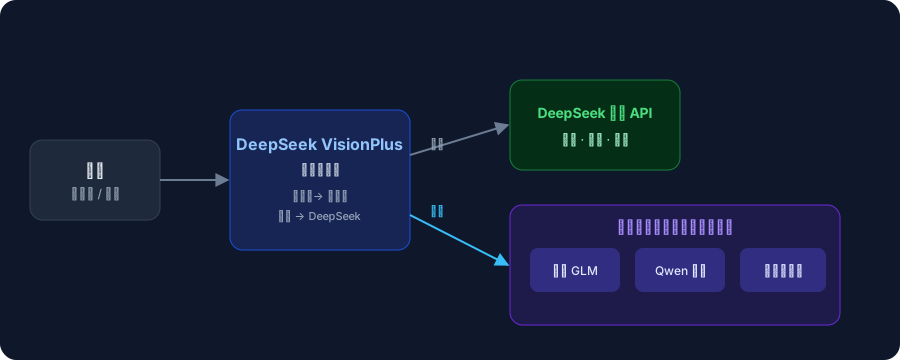
DeepSeek's official models are strictly text-based, which means they simply cannot interpret an image. The moment you need the model to make sense of a screenshot, a whiteboard photo, or a UI mockup, you are forced to transcribe the content by hand, losing detail and adding friction. DeepSeek-VisionPlus closes that gap: the instant an image appears in a message, the vision task is routed automatically to a pool of free vision models (Zhipu GLM, Qwen, and more), and the understanding flows seamlessly back into the DeepSeek conversation. Text-only requests continue to be served by the official API with reasoning levels fully preserved, so the experience feels as if DeepSeek has always had eyes.
The plugin ships a complete visual workflow out of the box. A dedicated settings card lets you add models, manage API keys, and edit context windows and max-output limits with instant effect. Every model comes with a one-click connectivity test that validates parameters first and then issues a real request following each provider's official protocol. Built-in free-quota protection handles sequential rotation, rate limiting, and failure cooldowns; if one model hits a throttle, the next one picks up automatically, and if the entire pool fails the error is handed back to DeepSeek for its own decision. An LRU content-hash cache (cap of 64) prevents duplicate vision calls for the same image and question. Visual memory auto-restores the four most recent vision results after session compaction, so long-running tasks never lose visual context. Autonomous image-reading guidance prompts the model to call read_image on its own, processing one or two images at a time with per-image retry, eliminating the need for any manual transcription. The whole plugin is zero-patch: it modifies no Harness source code, and uninstalling it leaves no host residue.
If your daily workflow revolves around DeepSeek for long-form reasoning, code debugging, or document work, and you occasionally need it to glance at a screenshot or design doc, this plugin is the lightest possible add-on. The free vision model pool means zero extra API cost, and switching back to pure-text mode is as simple as picking the native model in the selector, with no impact on any other session.
Screenshots

Use Cases
- Ask DeepSeek to analyze error logs, UI mockups, or conversation screenshots
- Let the model autonomously read whiteboard photos or charts during long reasoning tasks
- Add image understanding to a text-only chat at zero extra API cost
Best For
- Developers who rely on DeepSeek for daily code debugging or document work
- Students and researchers who need affordable multimodal assistance
- Plugin users who want zero-patch, non-invasive vision extensions for Harness
Related Plugins

ModLens is a vision plugin for DeepSeek Harness that gives text-only models sight by reading images pasted directly into chat, with zero-config setup and multiple vision engines.

On-demand vision for text-only DeepSeek Harness agents: built-in free keyless vision chain and 14 vision tools, routing image turns as tool calls to vision models with pixel fidelity, no Python needed, one-command install.

Give text-only models in DeepSeek Harness eyes, enabling image Q&A, long-screenshot OCR, UI restoration, and GUI visual tasks.
An armor-breaking plugin for DeepSeek: rewrites instruction priority, expands refusal-blocked phrases, persists across sessions, and shows a green active indicator.