dsh-eyes
Run the following command in DeepSeek Harness:
dsh plugin install qing9835/dsh-eyes
Paste the following prompt into your AI chat to install this plugin:
To install the dsh-eyes plugin in DeepSeek Harness, please visit its open-source repository https://github.com/qing9835/dsh-eyes and use the provided install command.
About this plugin
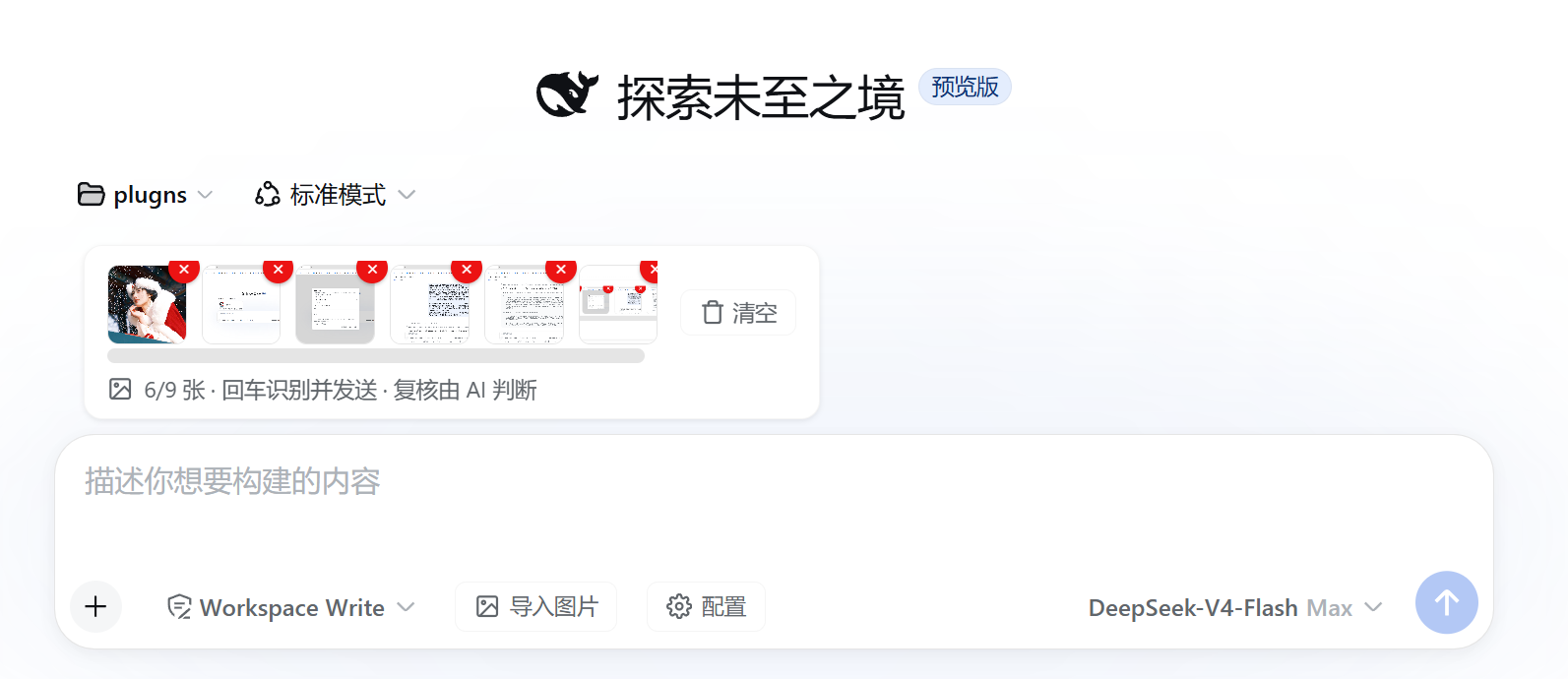
When using DeepSeek Harness for text-only conversations, have you ever faced the awkwardness of needing to "see" an image but only being able to "read" text? dsh-eyes is designed to solve this pain point. It acts like adding a pair of "eyes" to your chat interface, capable of intelligently intercepting images pasted, dragged, or imported, converting them into text content, and seamlessly integrating them into the dialogue flow. Whether it is a complex screenshot or a document, it can quickly transform it into readable text, bridging the gap between images and text models.
The plugin's core capability lies in its flexible and powerful interaction modes. You can choose to enable image interception, allowing the plugin to automatically recognize thumbnails and extract text (supporting up to 9 images at once), or disable interception to send images directly to multimodal models for real-time analysis. It also supports the vision_ask tool, which combines recognition results with your instructions, allowing the main model to ask questions and refine details based on understanding. Additionally, the plugin includes various model presets and supports directly reading local file paths to adapt to various workflow needs.
Whether you are a researcher needing complex document analysis or a visual worker accustomed to mixed text and graphics, dsh-eyes is a tool to boost efficiency. It not only simplifies the interaction between images and text but also provides powerful toolchain support, enabling large language models to not only "see" but also engage in deep follow-up questions and detail correction based on understanding.
Screenshots
Use Cases
- Quickly extract text from screenshots
- Analyze PDF reports or document content
- Process uploaded images and summarize content
Best For
- Researchers who need to process documents and screenshots
- Users using DeepSeek for efficient multimodal interaction
- Developers needing visual context for reasoning
Related Plugins

ModLens is a vision plugin for DeepSeek Harness that gives text-only models sight by reading images pasted directly into chat, with zero-config setup and multiple vision engines.

On-demand vision for text-only DeepSeek Harness agents: built-in free keyless vision chain and 14 vision tools, routing image turns as tool calls to vision models with pixel fidelity, no Python needed, one-command install.

Give text-only models in DeepSeek Harness eyes, enabling image Q&A, long-screenshot OCR, UI restoration, and GUI visual tasks.
An armor-breaking plugin for DeepSeek: rewrites instruction priority, expands refusal-blocked phrases, persists across sessions, and shows a green active indicator.