suanzhang-dsh
Run the following command in DeepSeek Harness:
dsh plugin install CZ1900/suanzhang-dsh
Paste the following prompt into your AI chat to install this plugin:
Run the command dsh plugin install CZ1900/suanzhang-dsh in DeepSeek Harness to install this plugin. Source: https://github.com/CZ1900/suanzhang-dsh
About this plugin
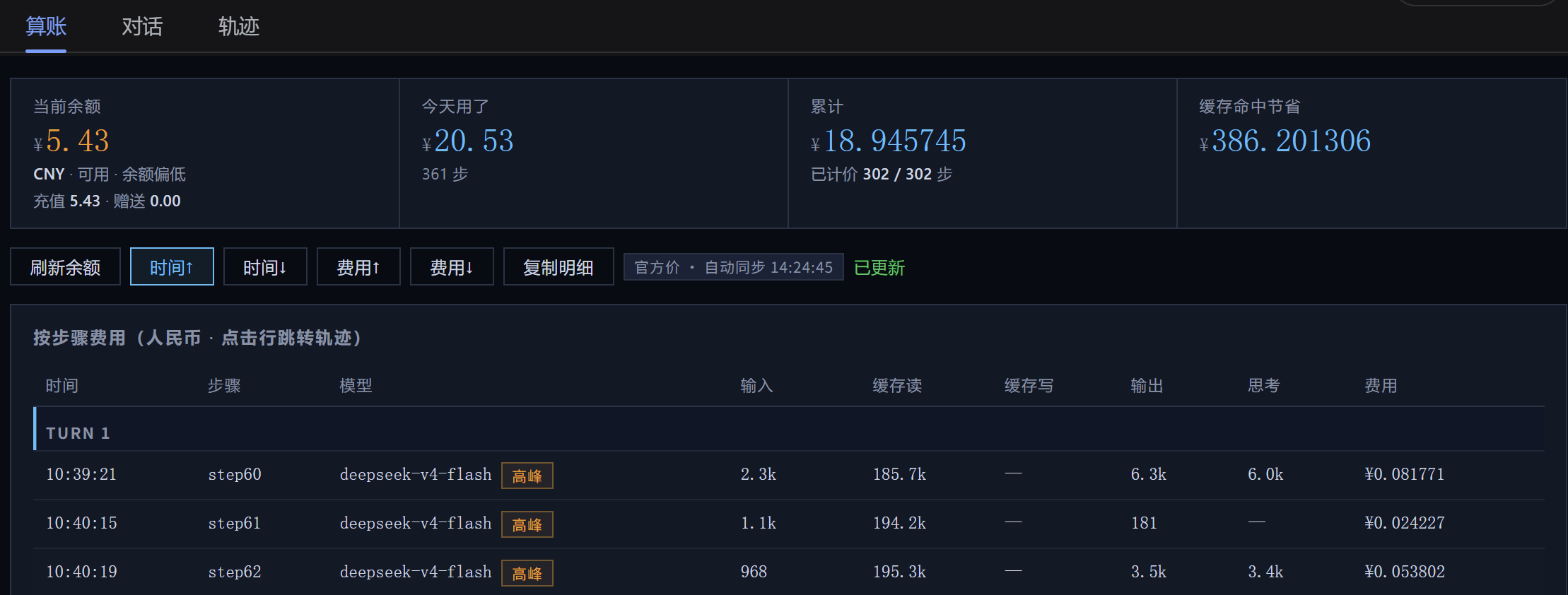
When using DeepSeek, do you often feel confused about "where the money went"? How much balance is left, how much was spent today, and exactly how much RMB each reasoning step consumes—these details are often scattered across complex tables without intuitive feedback. This plugin, named "Suanzhang" (Accounting), is designed to solve exactly this pain point. It transforms dry token consumption data into intuitive financial reports, allowing you to keep track of costs with every interaction.
Screenshots
Use Cases
- Want to know how much API was spent today?
- Track the specific cost of every reasoning step
- View real-time balance and predict future costs
Best For
- Developers needing precise API budget control
- Paid users frequently using the DeepSeek API
- Analysts wanting clear tracking of model usage costs
Related Plugins

ModLens is a vision plugin for DeepSeek Harness that gives text-only models sight by reading images pasted directly into chat, with zero-config setup and multiple vision engines.

On-demand vision for text-only DeepSeek Harness agents: built-in free keyless vision chain and 14 vision tools, routing image turns as tool calls to vision models with pixel fidelity, no Python needed, one-command install.

Give text-only models in DeepSeek Harness eyes, enabling image Q&A, long-screenshot OCR, UI restoration, and GUI visual tasks.
An armor-breaking plugin for DeepSeek: rewrites instruction priority, expands refusal-blocked phrases, persists across sessions, and shows a green active indicator.