dsh-loghud
Run the following command in DeepSeek Harness:
dsh plugin install XuXcode/dsh-loghud
Paste the following prompt into your AI chat to install this plugin:
Install the dsh-loghud plugin in DeepSeek Harness by running the command 'dsh plugin install XuXcode/dsh-loghud' with the full source code at https://github.com/XuXcode/dsh-loghud.
About this plugin
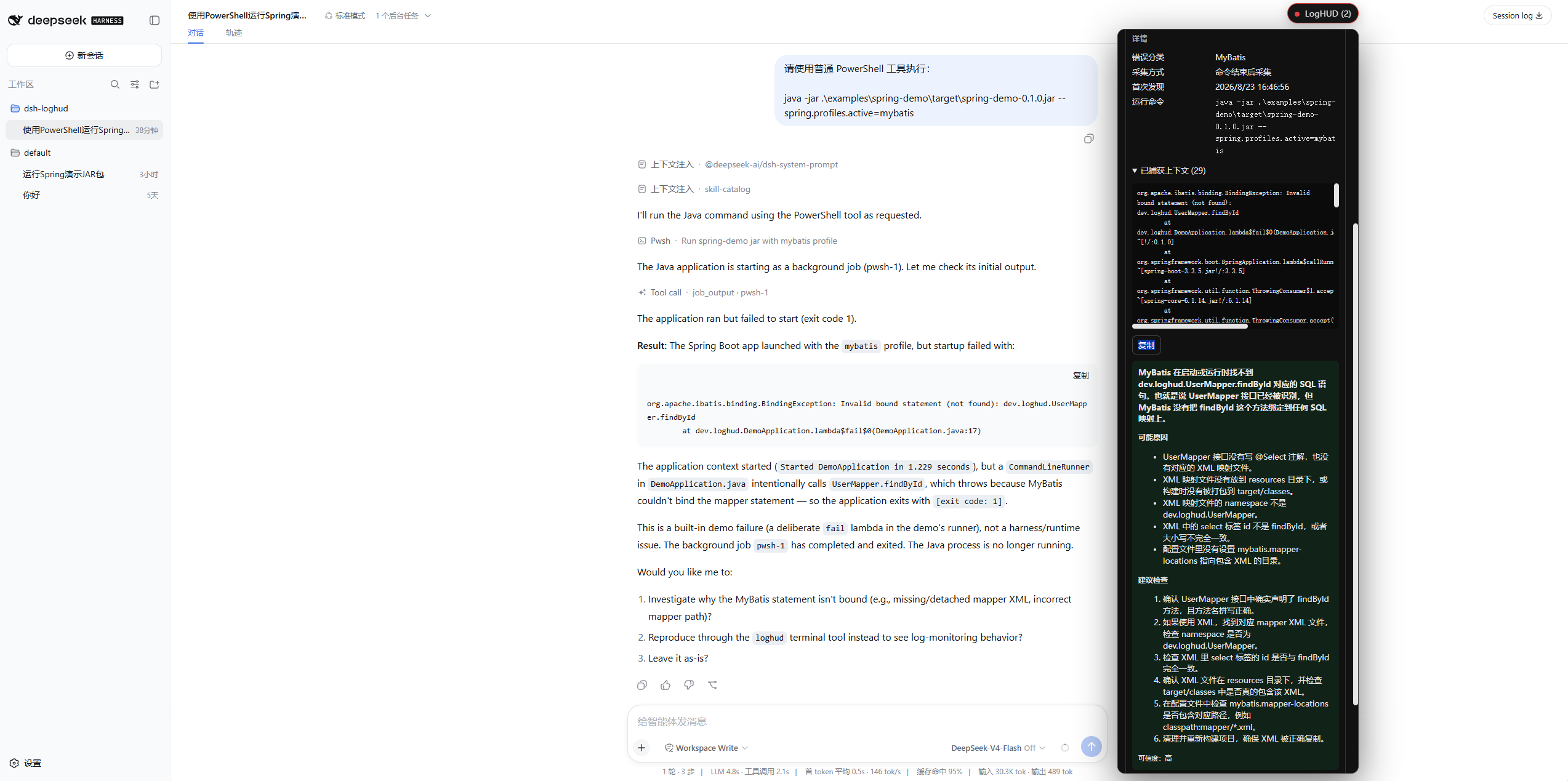
In local development, errors often emerge from diverse languages and toolchains, scattered across terminal outputs, making them hard to track and understand. dsh-loghud is purpose-built for DeepSeek Harness, capturing and organizing runtime errors in Python, Node.js, TypeScript, and Java in real-time. It merges duplicate issues into clear error cards, revealing root causes, locations, and occurrence frequencies at a glance. The plugin also offers intelligent health status monitoring, visually indicating shifts from HEALTHY to BROKEN states, helping you avoid blind debugging.
At its core, dsh-loghud features a precise error recognition engine and user-friendly interaction design. It automatically extracts exception chains, error codes, and business stack frames, using deduplication to cut through noise. Manual AI diagnosis, triggered only by users, provides deep explanations while safeguarding privacy—ideal for quick decisions in complex projects. The interface supports drag-and-drop, search, and multilingual switching, seamlessly integrating with Harness themes for smooth error management.
Whether you're a full-stack developer, language engineer, or DevOps practitioner using DeepSeek Harness for polyglot development, dsh-loghud significantly boosts debugging efficiency. It excels in team settings, with session isolation and state persistence keeping error tracking orderly. If you're tired of sifting through log oceans, this plugin becomes your reliable local error steward.
Screenshots
Use Cases
- Quickly capture and organize multi-language errors during local development
- Monitor project build, test, and runtime exceptions
- Track issue status and health in team collaboration
Best For
- Full-stack engineers using DeepSeek Harness for local development
- Developers needing efficient debugging for polyglot projects
- Tech teams focused on development experience and error management
Related Plugins
A unified suite combining hot runtime injection, task-aware thinking-mode routing, and a graded session protocol with red-team gates to sustain model diligence across long-horizon inference.

ModLens is a vision plugin for DeepSeek Harness that gives text-only models sight by reading images pasted directly into chat, with zero-config setup and multiple vision engines.

On-demand vision for text-only DeepSeek Harness agents: built-in free keyless vision chain and 14 vision tools, routing image turns as tool calls to vision models with pixel fidelity, no Python needed, one-command install.

Give text-only models in DeepSeek Harness eyes, enabling image Q&A, long-screenshot OCR, UI restoration, and GUI visual tasks.