
dsh-model-capabilities
Run the following command in DeepSeek Harness:
dsh plugin install WJZ-P/dsh-model-capabilities
Paste the following prompt into your AI chat to install this plugin:
In DeepSeek Harness, you can install this plugin by running the command dsh plugin install WJZ-P/dsh-model-capabilities or manually from the source at https://github.com/WJZ-P/dsh-model-capabilities.
About this plugin
Managing model capabilities in DeepSeek Harness can be tricky, especially when it comes to multimodal abilities like image input support. Many OpenAI-compatible services already handle images, but Harness often relies on manual configuration, leading to potential inaccuracies or guesswork in model declarations.
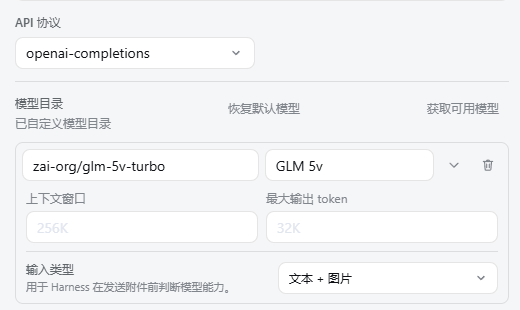
The dsh-model-capabilities plugin addresses this by adding a simple input type selector directly in the native model settings page. Users can explicitly choose whether a model supports text only, text and images, or images only. The plugin then updates the model's input configuration field automatically, ensuring that the declared capabilities match the actual model features.
Designed for seamless integration, the plugin extends the Harness form without taking over the entire workflow. It uses official callbacks to update fields and is built to respect the platform's design variables, offering theme adaptation and bilingual support for a smooth user experience.
This plugin is ideal for developers, AI researchers, or anyone using DeepSeek Harness to manage and deploy models, particularly those working with multimodal systems. It simplifies the configuration process, making it easier to declare and maintain accurate model capabilities.
Screenshots
Use Cases
- Declaring image input capabilities when configuring vision-language models.
- Managing multimodal model settings in DeepSeek Harness.
- Simplifying the model configuration process to avoid manual file edits.
Best For
- AI developers using DeepSeek Harness.
- Researchers managing multimodal models.
- Engineers seeking to streamline model configuration.
Related Plugins
A unified suite combining hot runtime injection, task-aware thinking-mode routing, and a graded session protocol with red-team gates to sustain model diligence across long-horizon inference.

ModLens is a vision plugin for DeepSeek Harness that gives text-only models sight by reading images pasted directly into chat, with zero-config setup and multiple vision engines.

On-demand vision for text-only DeepSeek Harness agents: built-in free keyless vision chain and 14 vision tools, routing image turns as tool calls to vision models with pixel fidelity, no Python needed, one-command install.

Give text-only models in DeepSeek Harness eyes, enabling image Q&A, long-screenshot OCR, UI restoration, and GUI visual tasks.