
Subtitle Template Editor
Paste the following prompt into your AI chat to install this skill:
Please install @user_a5827f21/subtitle-editor-pro according to https://skillhub.cn/install/skillhub.md.
About this skill
Problem
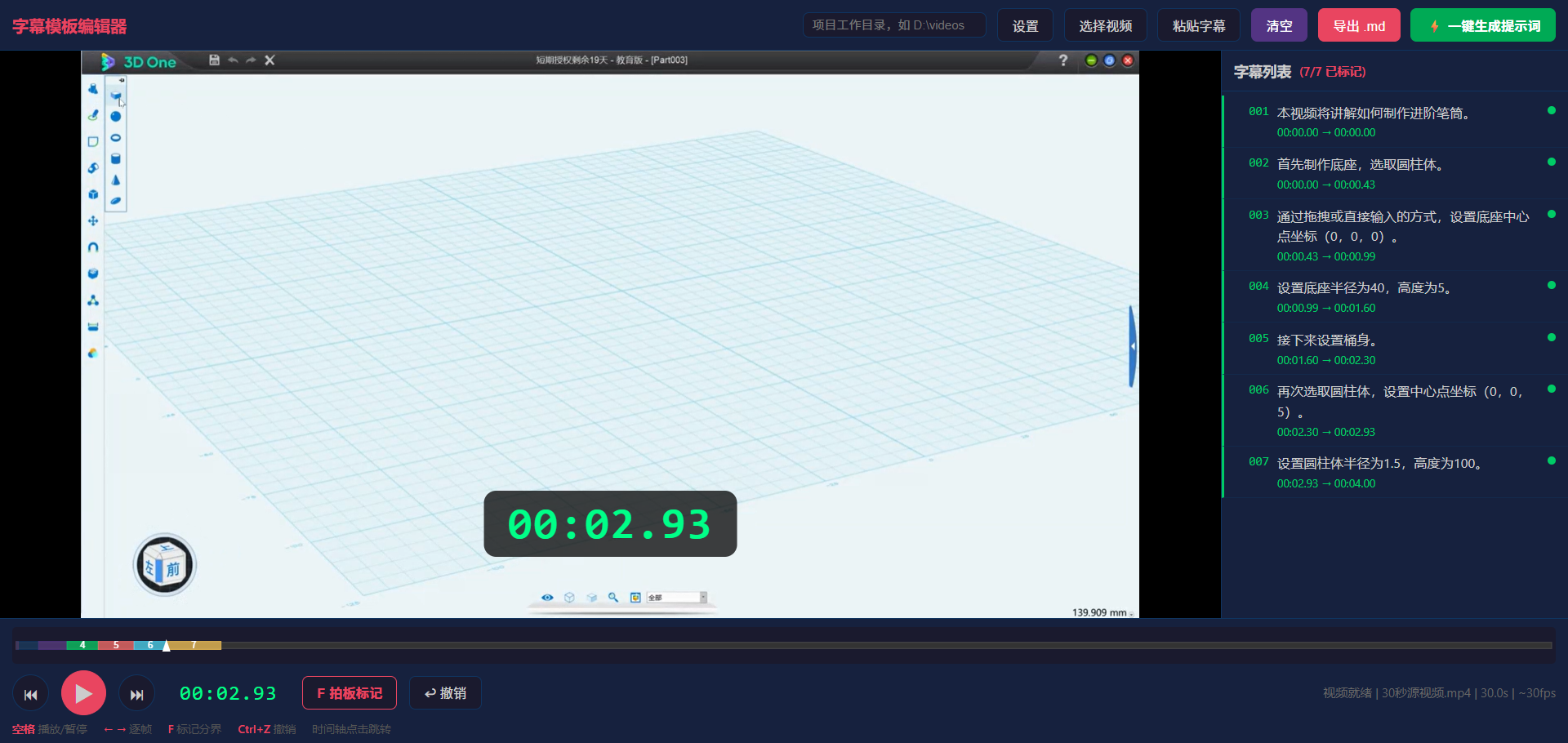
Creating video subtitles is often less about writing copy and more about aligning each line with visual cut points. Manually scrubbing frames and recording MM:SS,FF values is error-prone and can disconnect subtitle timing from downstream dubbing or caption pipelines. subtitle-editor reduces this to a front-end HTML tool: open it, drag in a video, press F at each shot boundary, and export a Markdown template with frame-level timing.
How It Works
It targets the “watch the video and mark timing points” workflow. The core loop is simple:
- F-key marking: writes the current video time as the end time of the current subtitle and chains the next segment.
- Frame stepping: single
←/→moves one frame; long-press moves faster forward or backward, reducing progress-bar dragging. - Timeline view: a Canvas timeline shows colored segments and playback position for review.
- Local persistence: marks and working directory are saved to
localStorage, so state survives browser close. - Markdown export: outputs
MM:SS,FFSMPTE-style timecodes suitable for later dubbing or caption injection.
A good workflow is to number subtitles as 001, 002, paste them into the tool, press F at each cut, and export the template. It is best used as a helper for tutorial videos, course recordings, or pre-marking subtitle segments, not as an ASR engine, automatic translator, or full video editor.
Screenshots
Use Cases
- Mark visual cut points for each lecture segment in recorded teaching videos and export a frame-level Markdown subtitle template.
- Paste already numbered course subtitle lines into the tool and align each end time by pressing F while the video plays.
- Create reversible timing marks for pre-edit video segments, then export them for dubbing or caption injection workflows.
- Mark subtitle timing points offline in a local browser and use arrow keys to frame-step at exact shot transitions.
Best For
- Instructors creating course recordings who need to align each spoken line to shot changes and export subtitle templates.
- Subtitle editors handling video localization who need to calibrate existing copy into MM:SS,FF timecode templates.
- Front-end tool authors building tutorial demos who need zero-install browser-based manual timing marks for videos.
- Dubbing collaborators in video-tutorial-v2 workflows who need subtitle templates ready for downstream dubbing pipelines.
Related Skills

Call Mew image and design APIs in two stages to create an emotional background and compose a share-ready quote check-in poster.

Generate felt-craft pendant designs, part breakdowns, and structured analysis from a product image or Base64 input.

A ComfyUI image-generation skill that uses a five-step dialog to collect prompts, prefill templates, confirm parameters, submit API jobs, and return results.

A design-system guidance skill for Impeccable that produces token-based rules, component states, accessibility criteria, and QA checklists.