
Xiao Xiao Bid Document Generator
Paste the following prompt into your AI chat to install this skill:
Please install @user_ba095919/biaoshu-writer-lite according to https://skillhub.cn/install/skillhub.md.
About this skill
Problem It Addresses
Tender workflows have concrete pain points: tender documents are long and clause-heavy, so disqualification lines, scoring points, and package-specific requirements are easy to miss; after drafting, it is hard to check the bid file line by line against the tender; and multi-package projects also require choosing which package to pursue. This skill connects three steps to the Bailian® Bid Writing open API: interpret the tender document, generate the bid document, and run a compliance review. It suits engineers and bid teams who need to check whether to bid, how to bid, and what risks remain.
How It Works
- Smart interpretation: accepts
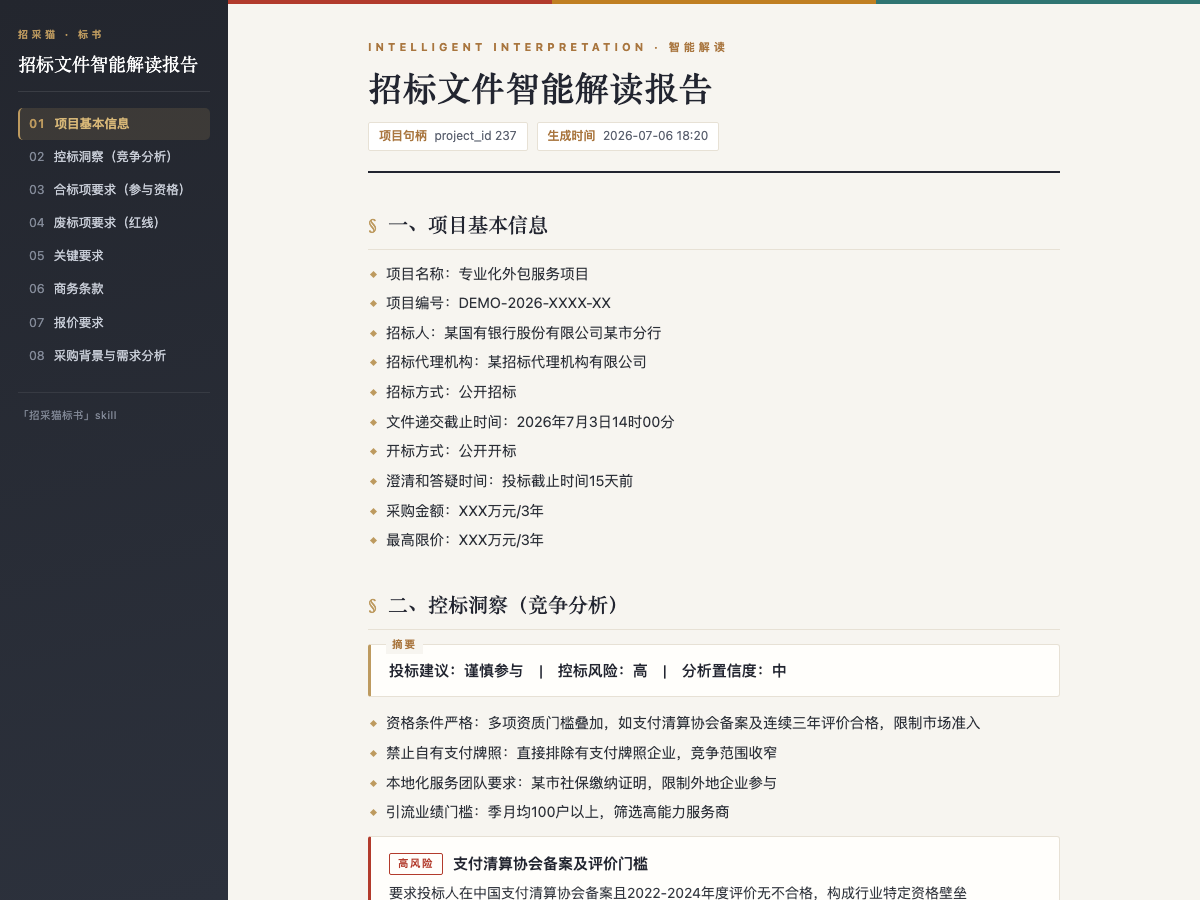
.pdf,.doc, or.docxtender files, usually up to50 MB, from a local path or cloud URL. It outputs project info, qualification items, disqualification lines, scoring rules, commercial terms, pricing requirements, procurement background, and bid-control insights, with optional HTML / Word reports. - Bid drafting: works from an interpreted project and selected package, with
total_pagesup to500. It produces a.docxbid file with table of contents, chapters, standard templates, and to-be-filled bookmarks. Uncertain fields are kept as placeholders instead of being invented. - Compliance review: uses the interpreted tender plus one or more
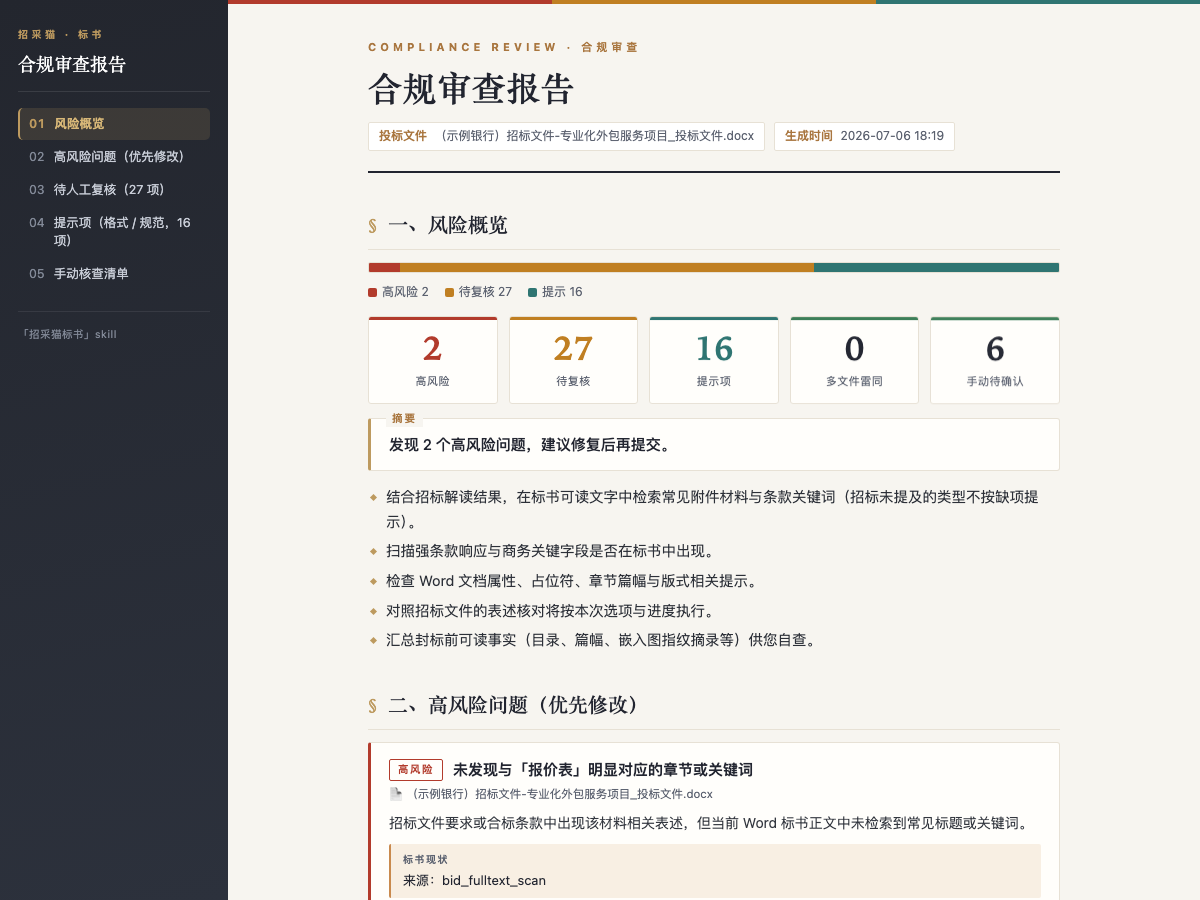
.doc/.docxbid files, each up to1024 MB. It returns a risk list with high-risk, needs-review, and note items, including tender basis, bid evidence, and revision suggestions, and supports multi-file similarity checks. - Async execution: tasks run through the
App Keyvia a submit, poll, fetch model; bid generation may take more than 10 minutes and reports progress.
Boundaries And Notes
- Interpretation, package selection, and compliance review do not consume credits, while bid generation does; API / Skill entry points still require a positive balance.
- Users mainly provide files, state requirements, and paste the
App Key; background commands are run by the assistant and should not be shown to users. - Reports must provide full absolute file paths; if semantic review only returns partial results, it should not be described as a complete review.
- Experience capture and issue feedback are consent-based and do not upload file contents or personal information automatically.
Screenshots
Use Cases
- After receiving a tender file, extract disqualification lines, scoring rules, and commercial terms, then export an interpretation report.
- For a multi-package tender, select a package and generate a .docx bid file with a table of contents and to-be-filled bookmarks at a target page count.
- Before submission, run a compliance review using the interpreted tender and multiple bid files to identify high-risk and similarity issues.
- With only an announcement or procurement snippet, get generic bidding notes first, then provide the full file for a customized interpretation.
Best For
- Technical engineers responsible for bid documents who need to convert tender clauses into an executable proposal and compliance checklist.
- Bid specialists managing multiple tenders who need to judge quickly whether a project is bid-worthy and which package to pursue.
- Delivery managers who must check disqualification lines and commercial terms before the submission deadline.
- Team members using LLM assistants for office documents who want to drive the bid workflow with file paths and natural requests.
Related Skills
Generates a fixed-structure A-share tech daily across five tracks, screening 24-hour news and selecting leader and growth stocks.

Convert teaching schedules from talent development plan PDFs into structured Excel files, with cross-page tables, merged cells, multi-semester course splitting, major metadata extraction, and batch output.

Turn post-meeting text into bilingual minutes, preserving structure and consistent terminology.
Interprets tender files, generates bid docs, and checks compliance via the Bailian API.