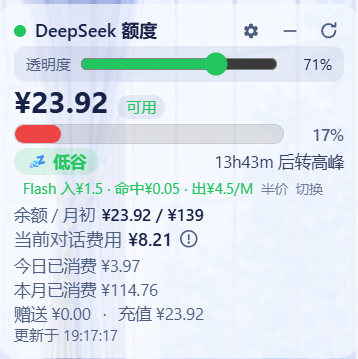
dsh-deepseek-quota-bar
Run the following command in DeepSeek Harness:
dsh plugin install jiangli07/dsh-deepseek-quota-bar
Paste the following prompt into your AI chat to install this plugin:
In DeepSeek Harness, install this plugin by running the command `dsh plugin install jiangli07/dsh-deepseek-quota-bar` from the GitHub repository https://github.com/jiangli07/dsh-deepseek-quota-bar.
About this plugin
When using the DeepSeek API, developers often face the hassle of manually checking balances and usage, which can lead to unexpected overspending or service interruptions. This plugin solves that by providing a floating blood-bar card at the bottom-right corner, visually displaying the balance ratio with color-coded cues for quick at-a-glance monitoring. It also integrates today's and monthly usage statistics, along with real-time cost calculations for current conversations based on official pricing, even including peak-hour reminders to help optimize usage timing.
The plugin's core strengths lie in its seamless integration and interactivity: it supports dragging to reposition, collapsing into a mini-card, adjusting transparency, and auto-following system themes. With balances auto-refreshing every 60 seconds, it ensures up-to-date information. Ideal for developers using the DeepSeek API, especially those working with the dsh web GUI, this tool streamlines cost management, boosts efficiency, and prevents unnecessary expenses.
Screenshots
Use Cases
- Monitor DeepSeek API balance in real-time to prevent unexpected service interruptions.
- Track current conversation costs during development for precise budget control.
- Optimize API call timing based on peak-hour reminders to save costs.
Best For
- Programmers developing with the DeepSeek API.
- Technical teams needing to monitor and manage API costs.
- Daily users interacting via the dsh web GUI.
Related Plugins
A service-oriented sidebar framework for DSH, offering a full workbench with file explorer, embedded browser, real terminal, Git panel, and extensible plugin services.

A beautiful, practical Claude Code-style TUI plugin with pixel whale top bar, flowing glow title, real-time status line, streaming thought expansion, time rewind, context progress bar and TPS gauge — zero core changes.

The plugin market for DeepSeek Harness: browse/search/one-click install community plugins and themes, with updates, backup/restore, hot disable, diagnostics, and AI fix.

A persistent whale widget on the DSH web UI that shows DeepSeek balance, today's usage, and per-turn cost, with drag-and-snap and sound effects.