dsh-todo-board
Run the following command in DeepSeek Harness:
dsh plugin install sueqet/dsh-todo-board
Paste the following prompt into your AI chat to install this plugin:
Run dsh plugin install sueqet/dsh-todo-board in your terminal, then restart the profile (run dsh web again) to load the TODO board panel in the top-right corner; the full source is at https://github.com/sueqet/dsh-todo-board.
About this plugin
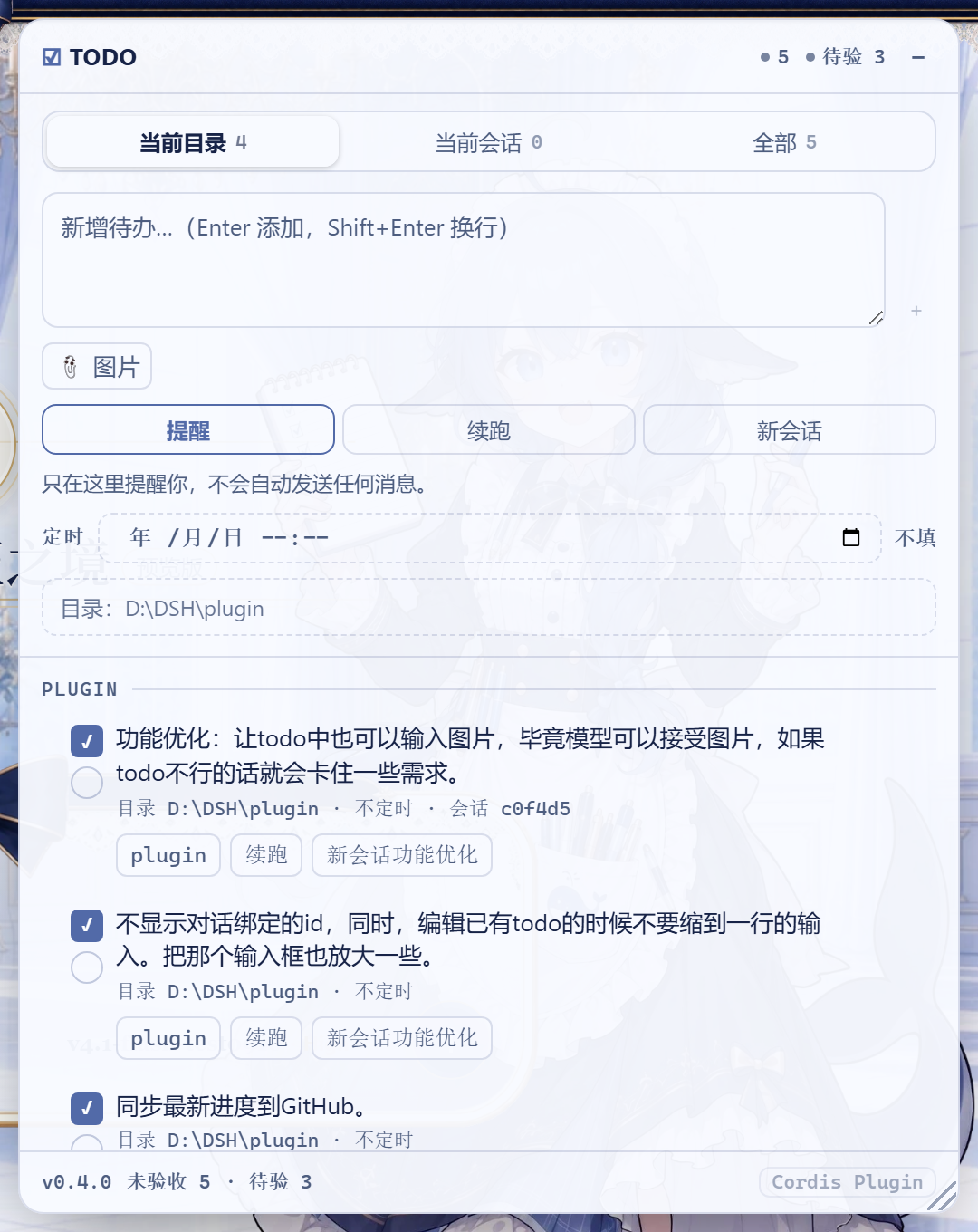
Dumping five tasks on an agent at once yields five half-finished jobs; hand-feeding them one by one means babysitting every single turn. dsh-todo-board turns the backlog into a cross-session working board: one task ships at a time, the agent ticks its own left box, then walks into the same working directory and pulls the next unfinished item to keep going. You simply check the right-hand box after verifying the output, and only that action truly closes the task.
Each task carries one of three run modes—Remind (waits for your tap), Auto-Continue (injects the next task into the current session at turn end), or Auto-New-Session (spins up a fresh session bound to the row so later hand-offs reuse it)—plus an optional one-shot local schedule, up to four image attachments delivered as real pixels alongside the prompt, and drag-to-reorder dispatch priority. The dual-checkbox design keeps the left tick as the agent's self-report and the right tick as your explicit acceptance; the system prompt explicitly forbids the model from ticking the right-hand box.
Built for teams and solo developers who batch dev chores, doc writing, or data wrangling through DeepSeek Harness and would rather lay out the queue once and let the agent march down the list one item at a time, stepping in only to verify.
Screenshots
Use Cases
- Queue up dev tasks and let the agent finish one, tick it, then pull the next—no babysitting
- Lay out a weekly task list with one-shot schedules that auto-dispatch when due
- Maintain a bug-fix backlog with screenshots attached as real images alongside the prompt
Best For
- Solo developers running daily dev chores through DeepSeek Harness
- Tech leads who break down multi-step work and hand it to an agent one item at a time
- Small teams that want the queue to march itself forward, stepping in only to verify
Related Plugins
A service-oriented sidebar framework for DSH, offering a full workbench with file explorer, embedded browser, real terminal, Git panel, and extensible plugin services.

A beautiful, practical Claude Code-style TUI plugin with pixel whale top bar, flowing glow title, real-time status line, streaming thought expansion, time rewind, context progress bar and TPS gauge — zero core changes.

The plugin market for DeepSeek Harness: browse/search/one-click install community plugins and themes, with updates, backup/restore, hot disable, diagnostics, and AI fix.

A persistent whale widget on the DSH web UI that shows DeepSeek balance, today's usage, and per-turn cost, with drag-and-snap and sound effects.